longhorn: [BUG] nfs Backup Storage high CPU Usage, slow data throughput.
Describe the bug
i created an NFS4.x share on a Windows 2019 server to create backups with Longhorn.
A backup takes a long time, because Longhorn causes a high CPU (16 Core K8s Node 88%) load and has a low data throughput (avg 39Mbps).
The NFS storage on the Windows 2019 server is generally fast, we use this for data backup via BackupExec / VMware without any problems of this kind.
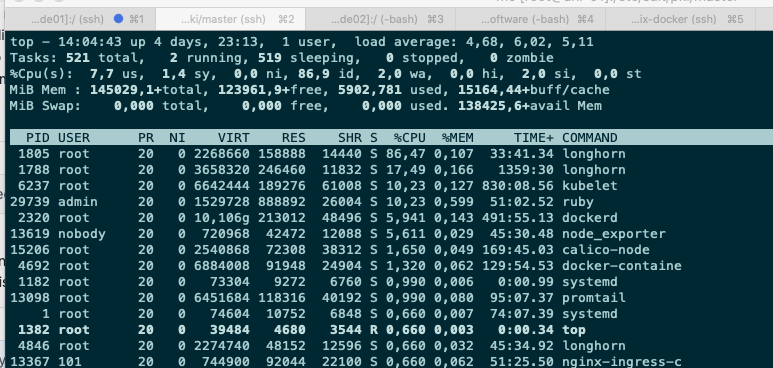
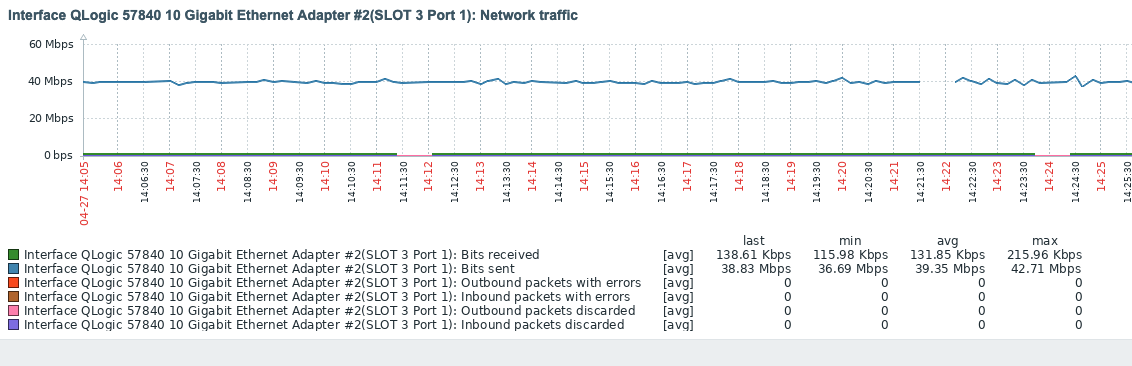
To Reproduce Steps to reproduce the behavior:
- Create an NFS backup target
- Generate an NFS backup from a volume
Expected behavior Fast backup, well over 100 Mbps and significantly less CPU load.
Environment:
- Longhorn version: v1.1.0
- Installation method: Rancher Catalog App
- Kubernetes distro: RKE 2.5.7
- Number of management node in the cluster: 2
- Number of worker node in the cluster: 3
- Node config
- OS type and version: openSUSE Leap 15.2
- CPU per node: 16
- Memory per node: 142GiB
- Disk type: SAN Storage FC RAID 10
- Network bandwidth between the nodes: 1GiB
- Underlying Infrastructure: Baremetal
- Number of Longhorn volumes in the cluster:
About this issue
- Original URL
- State: open
- Created 3 years ago
- Comments: 18 (11 by maintainers)
It seems that we can speed up the backup creation. More specifically, for each 2Mi block of a backup, Longhorn will calculate the checksum and compress it before transferring to the remote backupstore. This cannot utilize disk, CPU, and network resources simultaneously and efficiently. I think start multiple block processing parallelly would help. This improvement can be similar to the backup volume listing: https://github.com/longhorn/backupstore/blob/dfee2468733ec26b3e50561530046ad917b98e2d/deltablock.go#L262-L286
Related to #1409.
@shuo-wu Okay that seems good but also the compression is done there. And if this volume replica runs on a worker node (in our case we have hybrid nodes) it also takes cpu resources from the cluster (and then from the applications running on that hosts). It’s okay for us but I think we will really run into problems if the volumes get larger. That’s why I asked for some possibility to disable compression as it would be very useful for large volume workloads.
Hi, can you try to use a Linux NFS server and see if this issue can be reproduced as well? It would help a lot for narrowing down the issue.