aspnetcore: Cannot find bin/obj directory for blazor app.
Description
Cannot find bin directory for Blazor app. Neither ‘C:/Users…BBGrid/bin/debug’ nor ‘C:/Users…BBGrid/bin/release’ exists on disk.
To Reproduce
- Using
3.0.100-preview5-011568 dotnet new -i Microsoft.AspNetCore.Blazor.Templates::3.0.0-preview5-19227-01as per https://docs.microsoft.com/en-us/aspnet/core/blazor/get-started?view=aspnetcore-3.0&tabs=visual-studiodotnet new blazor -o BBGridcd BBGriddotnet run
Expected behavior
Project to run
Screenshots
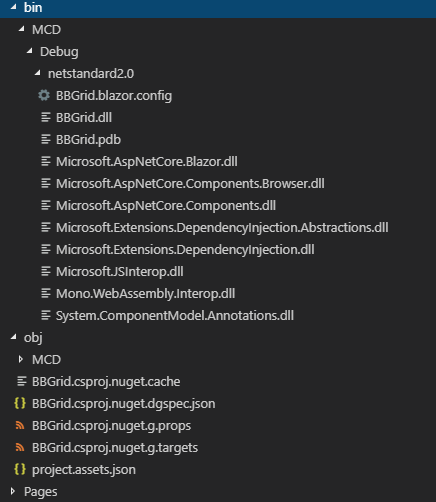
bin/obj folders: https://i.gyazo.com/5b97ca49c9f5458e47f4b3a187824c8e.png
dotnet run output: https://i.gyazo.com/86578b19107317796a7aaec3fc79c7b0.png
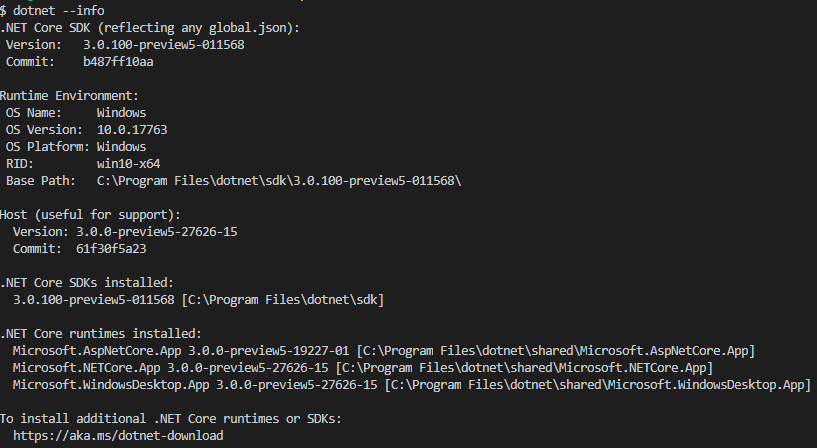
dotnet --info output: https://i.gyazo.com/8853b0bf140c35b10e731980a465a447.png
Workaround folder structure: https://i.gyazo.com/db42ca0b333322ef7df9942fb6eacdf3.png


Additional context
There seems to be a manual workaround. Looking at the bin/obj folders, if I move the debug folder outside the MCD folder so it’s direct parent is the bin and obj, it will run successfully. See workaround folder structure in screenshots. Unfortunately this isn’t feasible if I have to do this every time the project builds 😦
dotnet build does not solve issue 😦
Possible Duplicate of https://github.com/aspnet/Blazor/issues/487
About this issue
- Original URL
- State: closed
- Created 5 years ago
- Comments: 15 (9 by maintainers)
@SteveSandersonMS I believe I have something that can help with this. I changed how the devserver works as part of adding support for static web asssets and pass the target path from MSBuild. I believe that has potentially the side-effect or fixing this
Thanks for contacting us, @Gander7. What OS are you running this on?