react-native-background-geolocation: Error in fresh new project with Expo in IOS
Your Environment
- Plugin version: “react-native-background-fetch”: “^4.1.5”, “react-native-background-geolocation”: “^4.9.3”,
- Platform: iOS
- OS version: macOs Monterey
- Device manufacturer / model: MacBook air (M1,2020) 16gb
- React Native version (
react-native -v): react-native-cli: 2.0.1 react-native: 0.70.5 - Plugin config
{
  "expo": {
    "name": "Zerel-Parksharing",
    "slug": "Zerel-Parksharing",
    "version": "1.0.0",
    "assetBundlePatterns": [
      "**/*"
    ],
    "plugins": [
      [
        "react-native-background-geolocation",
        {
          "license": ""
        }
      ],
      [
        "expo-gradle-ext-vars",
        {
          "googlePlayServicesLocationVersion": "20.0.0",
          "appCompatVersion": "1.4.2"
        }
      ],
      "react-native-background-fetch"
    ],
    "ios": {
      "infoPlist": {
        "NSLocationAlwaysAndWhenInUseUsageDescription": "[Zerel Parksharing] This app requires location in the background",
        "NSLocationWhenInUseUsageDescription": "[Zerel Parksharing] This app requires location while in use",
        "NSMotionUsageDescription": "[Zerel Parksharing] This app uses motion-detection to determine the motion-activity of the device (walking, vehicle, bicycle, etc)",
        "UIBackgroundModes": [
          "location",
          "fetch",
          "processing",
          "audio"
        ],
        "BGTaskSchedulerPermittedIdentifiers": [
          "com.transistorsoft.fetch",
          "com.transistorsoft.customtask"
        ]
      },
      "bundleIdentifier": "com.zerelparksharing"
    },
    "android": {
      "package": "com.zerelparksharing"
    }
  },
  "name": "Zerel-Parksharing"
}
Expected Behavior
Should run the project on IOS without any errors.
PS: By the way, we do have another app(yes we’ve 5 license keys) with this lib and works well but the version of the react-native and the plugin is different and we don’t use expo
Actual Behavior
I´ve followed this tutorial below and I´ve inserted my license key on the app.json
The app run on Android as you can see below

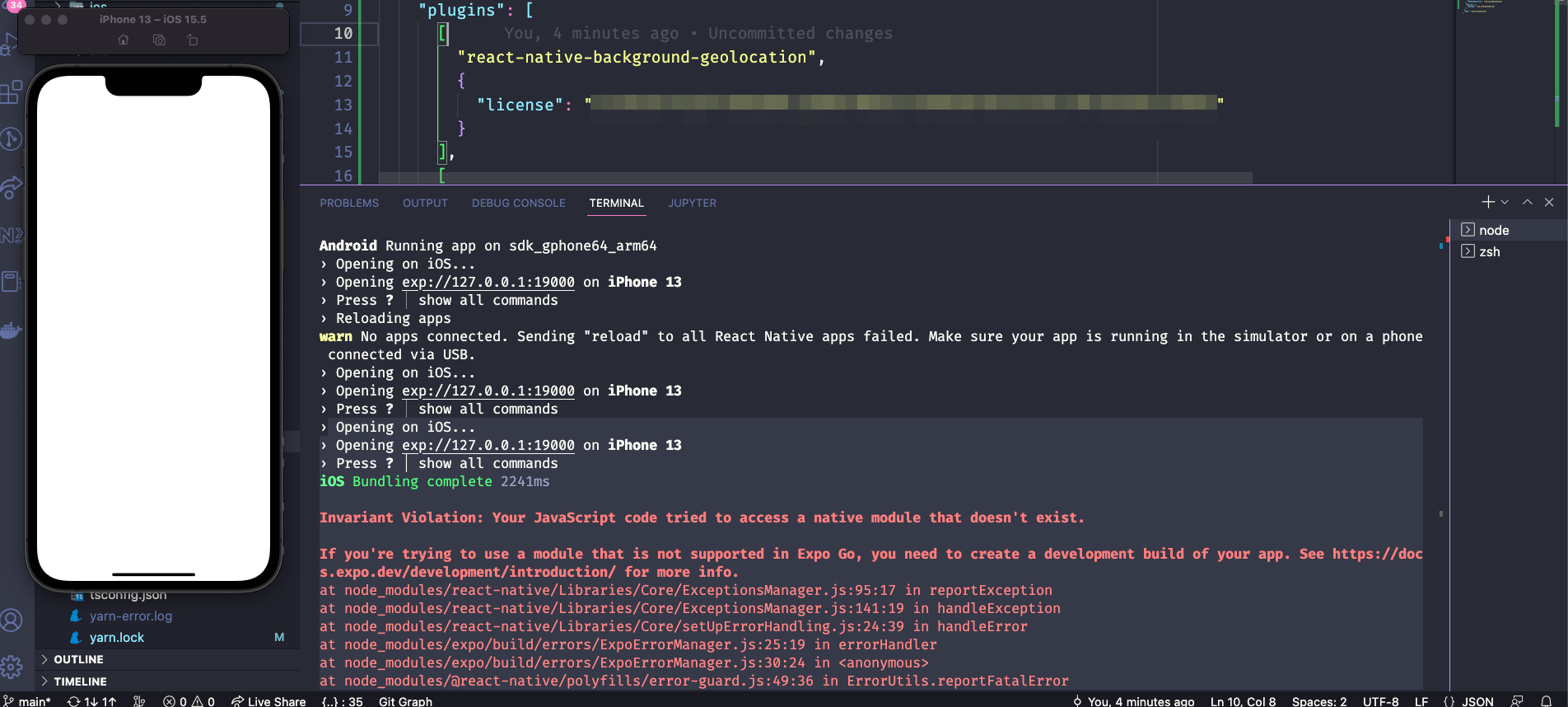
However in ios the app doesn´t work:
Steps to Reproduce
- Create a new project bare workflow with expo
- follow the tutorial on this link: https://github.com/transistorsoft/react-native-background-geolocation/blob/master/help/INSTALL-EXPO.md
- expo start
- press a to open the android version (works) and press I to open the IOS version(got an error)
My package.json:
{
  "name": "zerel-parksharing",
  "version": "1.0.0",
  "main": "index.js",
  "scripts": {
    "start": "expo start --dev-client",
    "android": "expo run:android",
    "ios": "expo run:ios",
    "web": "expo start --web"
  },
  "dependencies": {
    "@expo/vector-icons": "^13.0.0",
    "@hookform/resolvers": "^2.9.10",
    "@react-native-masked-view/masked-view": "0.2.8",
    "@react-navigation/native": "^6.0.13",
    "@react-navigation/native-stack": "^6.9.1",
    "@react-navigation/stack": "^6.3.4",
    "@reduxjs/toolkit": "^1.9.0",
    "expo": "~47.0.6",
    "expo-gradle-ext-vars": "^0.1.1",
    "expo-splash-screen": "~0.17.5",
    "expo-status-bar": "~1.4.2",
    "native-base": "^3.4.22",
    "react": "18.1.0",
    "react-hook-form": "^7.39.4",
    "react-native": "0.70.5",
    "react-native-background-fetch": "^4.1.5",
    "react-native-background-geolocation": "^4.9.3",
    "react-native-gesture-handler": "~2.8.0",
    "react-native-safe-area-context": "4.4.1",
    "react-native-screens": "~3.18.0",
    "react-native-svg": "13.4.0",
    "react-redux": "^8.0.5",
    "styled-components": "^5.3.6",
    "yup": "^0.32.11"
  },
  "devDependencies": {
    "@babel/core": "^7.12.9",
    "@types/react": "17.0.43",
    "@types/react-native": "~0.70.6",
    "@types/styled-components-react-native": "^5.2.0",
    "@typescript-eslint/eslint-plugin": "^5.43.0",
    "@typescript-eslint/parser": "^5.43.0",
    "babel-plugin-module-resolver": "^4.1.0",
    "babel-plugin-root-import": "^6.6.0",
    "eslint": "^8.27.0",
    "eslint-config-airbnb": "^19.0.4",
    "eslint-config-prettier": "^8.5.0",
    "eslint-import-resolver-typescript": "^3.5.2",
    "eslint-plugin-import": "^2.25.3",
    "eslint-plugin-import-helpers": "^1.3.1",
    "eslint-plugin-jsx-a11y": "^6.5.1",
    "eslint-plugin-prettier": "^4.2.1",
    "eslint-plugin-react": "^7.28.0",
    "eslint-plugin-react-hooks": "^4.3.0",
    "prettier": "^2.7.1",
    "typescript": "^4.6.3"
  },
  "private": true,
  "resolutions": {
    "styled-components": "^5",
    "@types/react": "~17.0.43"
  }
}
Debug logs
Logs
 Opening on iOS...
› Opening exp://127.0.0.1:19000 on iPhone 13
› Press ? │ show all commands
iOS Bundling complete 2241ms

Invariant Violation: Your JavaScript code tried to access a native module that doesn't exist.

If you're trying to use a module that is not supported in Expo Go, you need to create a development build of your app. See https://docs.expo.dev/development/introduction/ for more info.
at node_modules/react-native/Libraries/Core/ExceptionsManager.js:95:17 in reportException
at node_modules/react-native/Libraries/Core/ExceptionsManager.js:141:19 in handleException
at node_modules/react-native/Libraries/Core/setUpErrorHandling.js:24:39 in handleError
at node_modules/expo/build/errors/ExpoErrorManager.js:25:19 in errorHandler
at node_modules/expo/build/errors/ExpoErrorManager.js:30:24 in <anonymous>
at node_modules/@react-native/polyfills/error-guard.js:49:36 in ErrorUtils.reportFatalError
at node_modules/metro-runtime/src/polyfills/require.js:237:40 in guardedLoadModule
at http://127.0.0.1:19000/index.bundle?platform=ios&dev=true&hot=false&minify=false:null in global code

Invariant Violation: Failed to call into JavaScript module method AppRegistry.runApplication(). Module has not been registered as callable. Registered callable JavaScript modules (n = 11): Systrace, JSTimers, HeapCapture, SamplingProfiler, RCTLog, RCTDeviceEventEmitter, RCTNativeAppEventEmitter, GlobalPerformanceLogger, JSDevSupportModule, HMRClient, RCTEventEmitter.
        A frequent cause of the error is that the application entry file path is incorrect. This can also happen when the JS bundle is corrupt or there is an early initialization error when loading React Native.
at node_modules/react-native/Libraries/Core/ExceptionsManager.js:95:17 in reportException
at node_modules/react-native/Libraries/Core/ExceptionsManager.js:141:19 in handleException
at node_modules/react-native/Libraries/Core/setUpErrorHandling.js:24:39 in handleError
at node_modules/expo/build/errors/ExpoErrorManager.js:25:19 in errorHandler
at node_modules/expo/build/errors/ExpoErrorManager.js:30:24 in <anonymous>
at node_modules/@react-native/polyfills/error-guard.js:49:36 in ErrorUtils.reportFatalError

Invariant Violation: Failed to call into JavaScript module method AppRegistry.runApplication(). Module has not been registered as callable. Registered callable JavaScript modules (n = 11): Systrace, JSTimers, HeapCapture, SamplingProfiler, RCTLog, RCTDeviceEventEmitter, RCTNativeAppEventEmitter, GlobalPerformanceLogger, JSDevSupportModule, HMRClient, RCTEventEmitter.
        A frequent cause of the error is that the application entry file path is incorrect. This can also happen when the JS bundle is corrupt or there is an early initialization error when loading React Native.
at node_modules/react-native/Libraries/Core/ExceptionsManager.js:95:17 in reportException
at node_modules/react-native/Libraries/Core/ExceptionsManager.js:141:19 in handleException
at node_modules/react-native/Libraries/Core/setUpErrorHandling.js:24:39 in handleError
at node_modules/expo/build/errors/ExpoErrorManager.js:25:19 in errorHandler
at node_modules/expo/build/errors/ExpoErrorManager.js:30:24 in <anonymous>
at node_modules/@react-native/polyfills/error-guard.js:49:36 in ErrorUtils.reportFatalError
About this issue
- Original URL
- State: open
- Created 2 years ago
- Comments: 19 (5 by maintainers)
I see. I’ve never used
expo startbefore.I’d been testing with
expo run:ios. This does work.What’s the difference between
expo startandexpo run:ios?