toolkit-for-ynab: [BUG] ...Total Monthly Goals is incorrect
Describe the bug I created two monthly spending goals. The “Total Monthly Goals” amount in the Inspector does not equal the goals I created.
To Reproduce Steps to reproduce the behavior:
- Go to a category.
- In the Inspector, create a monthly spending goal.
- Perform step 1 and 2 several times.
Expected behavior Add up the monthly spending goals you created. That should equal what is displayed in the Inspector under “Total Monthly Goals”.
Screenshots
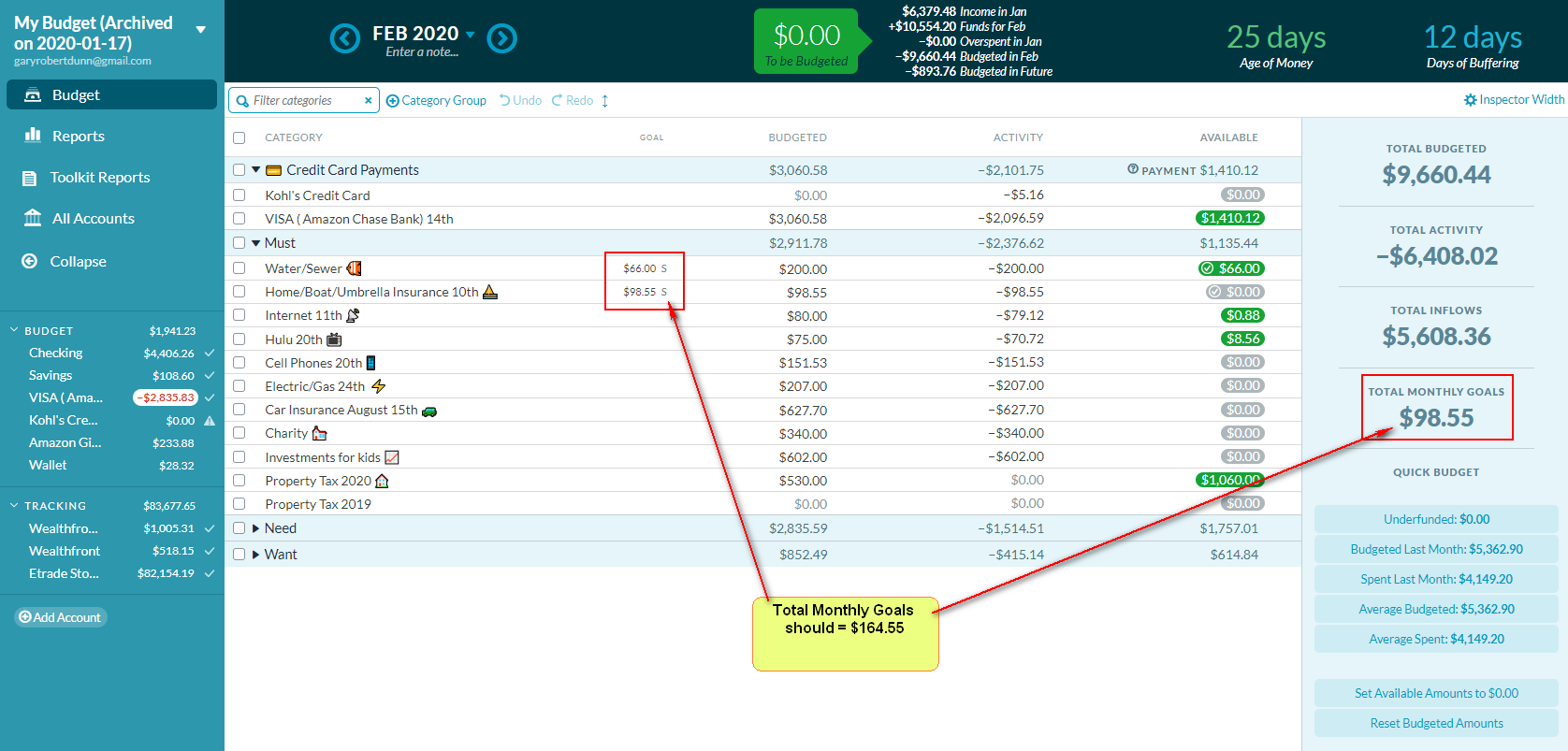
Desktop (please complete the following information):
- OS: [e.g. Windows 10]
- Browser [chrome]
- Version 77.0.3865.90 (Official Build) (32-bit)
Setting Export
Please replace the text below with your exported Toolkit settings. You can export these by going to the Toolkit Options page, click the Import/Export Settings button at the bottom left and copying the text in the modal which appears.
[{"key":"AccountsDisplayDensity","value":"1"},{"key":"AccountsEmphasizedOutflows","value":false},{"key":"AccountsStripedRows","value":false},{"key":"AutoDistributeSplits","value":false},{"key":"AutoEnableRunningBalance","value":false},{"key":"AutomaticallyMarkAsCleared","value":false},{"key":"BetterScrollbars","value":"0"},{"key":"BottomNotificationBar","value":false},{"key":"BudgetCategoryFeatures","value":true},{"key":"BudgetProgressBars","value":"0"},{"key":"BudgetQuickSwitch","value":false},{"key":"BudgetSpendingGoal","value":false},{"key":"BulkManagePayees","value":false},{"key":"CalendarFirstDay","value":"0"},{"key":"CategoryActivityCopy","value":false},{"key":"CategoryActivityPopupWidth","value":"2"},{"key":"CategorySoloMode","value":"cat-toggle-all"},{"key":"ChangeEnterBehavior","value":true},{"key":"ChangeMemoEnterBehavior","value":false},{"key":"CheckCreditBalances","value":false},{"key":"CheckNumbers","value":false},{"key":"ClearSelection","value":false},{"key":"CollapseSideMenu","value":true},{"key":"ColourBlindMode","value":false},{"key":"CompactIncomeVsExpense","value":true},{"key":"CreditCardEmoji","value":true},{"key":"CurrentMonthIndicator","value":true},{"key":"CustomFlagNames","value":false},{"key":"DateOfMoney","value":true},{"key":"DaysOfBuffering","value":true},{"key":"DaysOfBufferingDate","value":true},{"key":"DaysOfBufferingHistoryLookup","value":"0"},{"key":"DeselectTransactionsOnSave","value":false},{"key":"DisableToolkit","value":false},{"key":"DisplayTargetGoalAmount","value":"3"},{"key":"DisplayTotalMonthlyGoals","value":true},{"key":"DisplayUpcomingAmount","value":false},{"key":"EasyTransactionApproval","value":false},{"key":"EditAccountButton","value":"0"},{"key":"EnlargeCategoriesDropdown","value":true},{"key":"EnterToMove","value":false},{"key":"FilterCategories","value":true},{"key":"GoalIndicator","value":true},{"key":"GoalWarningColor","value":true},{"key":"GoogleFontsSelector","value":"0"},{"key":"HideAccountBalancesType","value":"0"},{"key":"HideAgeOfMoney","value":false},{"key":"HideClosedAccounts","value":false},{"key":"HideHelp","value":false},{"key":"HideReferralBanner","value":true},{"key":"HideTotalAvailable","value":true},{"key":"HighlightNegatives","value":false},{"key":"ImportNotification","value":"2"},{"key":"IncomeFromLastMonth","value":"1"},{"key":"IncomeVsExpenseHoverHighlight","value":true},{"key":"LargerClickableIcons","value":false},{"key":"LinkToInflows","value":true},{"key":"MonthlyNotesPopupWidth","value":"2"},{"key":"NavDisplayDensity","value":"1"},{"key":"NotesAsMarkdown","value":false},{"key":"POSStyleCurrencyEntryMode","value":false},{"key":"Pacing","value":"3"},{"key":"PrintingImprovements","value":true},{"key":"PrivacyMode","value":"0"},{"key":"QuickBudgetWarning","value":false},{"key":"ReconciledTextColor","value":"0"},{"key":"RemovePositiveHighlight","value":false},{"key":"RemoveZeroCategories","value":true},{"key":"ResizeInspector","value":true},{"key":"ResizeSidebar","value":true},{"key":"RightClickToEdit","value":true},{"key":"RowHeight","value":"2"},{"key":"RowsHeight","value":"1"},{"key":"RunningBalance","value":"0"},{"key":"SeamlessBudgetHeader","value":true},{"key":"SetMultipleFlags","value":false},{"key":"ShowCategoryBalance","value":false},{"key":"SpareChange","value":false},{"key":"SplitTransactionAutoAdjust","value":false},{"key":"SquareNegativeMode","value":false},{"key":"StealingFromFuture","value":false},{"key":"SwapClearedFlagged","value":false},{"key":"TargetBalanceWarning","value":false},{"key":"ToBeBudgetedWarning","value":false},{"key":"ToggleSplits","value":false},{"key":"ToggleTransactionFilters","value":"2"},{"key":"ToolkitReports","value":true},{"key":"TransactionGridFeatures","value":true},{"key":"ViewZeroAsEmpty","value":true},{"key":"l10n","value":"0"}]
About this issue
- Original URL
- State: closed
- Created 4 years ago
- Comments: 16 (7 by maintainers)
I like them too! I’m using Windows and Chrome. Select a category. Then click on the category name. That brings up a window giving the option to hide it, delete it, or change the name. Right click on the name box and a window pops up, one of the options is Emoji. Left click that and select your desired Emoji. It also gives you the keyboard shortcut, which for Windows is hold down the Windows key, then press the period key.
On Fri, Mar 13, 2020 at 10:34 PM David Baldon notifications@github.com wrote: