dashboard: Unable to access tekton dashboard on ppc64le via browser
Successfully built tekton dashboard on ppc64le:-
[root@pts00452-vm1 dashboard]# docker images
REPOSITORY                                                      TAG                                                                IMAGE ID            CREATED             SIZE
tekton_dashboard                                                1.0                                                                254c3f397109        10 minutes ago      48.4MB

[root@pts00452-vm1 dashboard]# docker image inspect tekton_dashboard:1.0
[
    {
        "Id": "sha256:254c3f39710951cbf185c8659606fbb9d27b3ebac37b430c8304c154e40a0f63",
        "RepoTags": [
            "tekton_dashboard:1.0"
        ],
        "RepoDigests": [],
        "Parent": "sha256:4659b59c06285f00046ffec1f28367be844d0c170b34f1a42c0651f93b96c9c5",
        "Comment": "",
        "Created": "2019-08-22T12:32:57.189863552Z",
        "Container": "329e492799a2270952bebd7e32196c2a7a8bfab125a25fb97960a9e5659dfe14",
        "ContainerConfig": {
            "Hostname": "329e492799a2",
            "Domainname": "",
            "User": "1000",
            "AttachStdin": false,
            "AttachStdout": false,
            "AttachStderr": false,
            "Tty": false,
            "OpenStdin": false,
            "StdinOnce": false,
            "Env": [
                "PATH=/usr/local/sbin:/usr/local/bin:/usr/sbin:/usr/bin:/sbin:/bin",
                "WEB_RESOURCES_DIR=./web"
            ],
            "Cmd": [
                "/bin/sh",
                "-c",
                "#(nop) ",
                "ENTRYPOINT [\"./tekton_dashboard_backend\"]"
            ],
            "ArgsEscaped": true,
            "Image": "sha256:4659b59c06285f00046ffec1f28367be844d0c170b34f1a42c0651f93b96c9c5",
            "Volumes": null,
            "WorkingDir": "/go/src/github.com/tektoncd/dashboard",
            "Entrypoint": [
                "./tekton_dashboard_backend"
            ],
            "OnBuild": null,
            "Labels": {}
        },
        "DockerVersion": "18.06.3-ce",
        "Author": "",
        "Config": {
            "Hostname": "",
            "Domainname": "",
            "User": "1000",
            "AttachStdin": false,
            "AttachStdout": false,
            "AttachStderr": false,
            "Tty": false,
            "OpenStdin": false,
            "StdinOnce": false,
            "Env": [
                "PATH=/usr/local/sbin:/usr/local/bin:/usr/sbin:/usr/bin:/sbin:/bin",
                "WEB_RESOURCES_DIR=./web"
            ],
            "Cmd": null,
            "ArgsEscaped": true,
            "Image": "sha256:4659b59c06285f00046ffec1f28367be844d0c170b34f1a42c0651f93b96c9c5",
            "Volumes": null,
            "WorkingDir": "/go/src/github.com/tektoncd/dashboard",
            "Entrypoint": [
                "./tekton_dashboard_backend"
            ],
            "OnBuild": null,
            "Labels": null
        },
        "Architecture": "ppc64le",
        "Os": "linux",
        "Size": 48367031,
        "VirtualSize": 48367031,
        "GraphDriver": {
            "Data": {
                "LowerDir": "/var/lib/docker/overlay2/6ff86f527d50129d37932ed7fd38562b0e0f4327c02b8d7a83bdeace39874963/diff:/var/lib/docker/overlay2/e8c61c3a8e4480137bc80c17d308d180bf89a3826e6a9673c907a81cf2e2ff16/diff:/var/lib/docker/overlay2/1041272bb6ef5f9e8a4c61d2dd0cd41df16fdf202e4852a7a2c04ff270c19fb9/diff:/var/lib/docker/overlay2/8582a086744a6ea644548ab5660a13222d23176cd6ee8822632fea26780e010e/diff:/var/lib/docker/overlay2/2f6cf042275fe05d000c9b625290a2a0a14345b1ba0f6807d8f5d39e675f6c0d/diff",
                "MergedDir": "/var/lib/docker/overlay2/652f4d0b0514e9fe299cf660fd5b0f741ed9f93e45f2fbb4881e02dbfe6389c5/merged",
                "UpperDir": "/var/lib/docker/overlay2/652f4d0b0514e9fe299cf660fd5b0f741ed9f93e45f2fbb4881e02dbfe6389c5/diff",
                "WorkDir": "/var/lib/docker/overlay2/652f4d0b0514e9fe299cf660fd5b0f741ed9f93e45f2fbb4881e02dbfe6389c5/work"
            },
            "Name": "overlay2"
        },
        "RootFS": {
            "Type": "layers",
            "Layers": [
                "sha256:22963f19a0a3042208f4b179ee45752118f9b0a9e18127fda0deacee878a3f7d",
                "sha256:d8f649dc98c5576030aa5503187adc167cbabdda62847035e26e173405dca9ee",
                "sha256:89942e2a3283d6dba752b33d43dc2b97f4131bbd17b6c96f16ffa54d75d0d596",
                "sha256:06ce915a975fcd407c7d85a0cb64d49cbfecefa4d5af92b5a729471da3219307",
                "sha256:e8d789b474205965d8fcfb1c66379762ed140bd219ada76a78b6e36c808f1556",
                "sha256:2d48f2917a9bf1bb3331043890ff8ca0d83de052b117be016937cd57b88c516a"
            ]
        },
        "Metadata": {
            "LastTagTime": "2019-08-22T18:02:57.767921895+05:30"
        }
    }
]
[root@pts00452-vm1 dashboard]#
Made the following change to the config/release/gcr-tekton-dashboard.yaml file in order to use the locally built tekton dashboard image:-
-        image: gcr.io/tekton-nightly/dashboard:latest
+        image: tekton_dashboard:1.0
Made sure tecktoncd pipeline is deployed and tekton-pipelines namespace is created.
Deployed the dashboard using the following command:-
[root@p006vm32 release]# kubectl apply -f gcr-tekton-dashboard.yaml
serviceaccount/tekton-dashboard created
customresourcedefinition.apiextensions.k8s.io/extensions.dashboard.tekton.dev configured
clusterrole.rbac.authorization.k8s.io/tekton-dashboard-minimal configured
clusterrolebinding.rbac.authorization.k8s.io/tekton-dashboard-minimal configured
deployment.apps/tekton-dashboard created
service/tekton-dashboard created
pipeline.tekton.dev/pipeline0 created
task.tekton.dev/pipeline0-task created
The following kubernetes resources are created:-
[root@p006vm32 release]# kubectl get all --namespace tekton-pipelines
NAME                                               READY     STATUS    RESTARTS   AGE
pod/tekton-dashboard-7cf9b464c9-r8xz5              1/1       Running   0          13m
pod/tekton-pipelines-controller-85d98f87cb-bs9m4   1/1       Running   0          16m
pod/tekton-pipelines-webhook-76c65bcfb8-qphv6      1/1       Running   0          16m

NAME                                  TYPE        CLUSTER-IP       EXTERNAL-IP   PORT(S)    AGE
service/tekton-dashboard              ClusterIP   172.30.58.216    <none>        9097/TCP   13m
service/tekton-pipelines-controller   ClusterIP   172.30.209.209   <none>        9090/TCP   16m
service/tekton-pipelines-webhook      ClusterIP   172.30.157.253   <none>        443/TCP    16m

NAME                                          DESIRED   CURRENT   UP-TO-DATE   AVAILABLE   AGE
deployment.apps/tekton-dashboard              1         1         1            1           13m
deployment.apps/tekton-pipelines-controller   1         1         1            1           16m
deployment.apps/tekton-pipelines-webhook      1         1         1            1           16m

NAME                                                     DESIRED   CURRENT   READY     AGE
replicaset.apps/tekton-dashboard-7cf9b464c9              1         1         1         13m
replicaset.apps/tekton-pipelines-controller-85d98f87cb   1         1         1         16m
replicaset.apps/tekton-pipelines-webhook-76c65bcfb8      1         1         1         16m

NAME                            AGE
pipeline.tekton.dev/pipeline0   13m

NAME                             AGE
task.tekton.dev/pipeline0-task   13m
The Dashboard can be accessed through its ClusterIP Service by running kubectl proxy. Assuming tekton-pipelines is the install namespace for the Dashboard, can access the web UI at localhost:8001/api/v1/namespaces/tekton-pipelines/services/tekton-dashboard:http/proxy/.
[root@p006vm32 ~]# curl -L localhost:8001/api/v1/namespaces/tekton-pipelines/services/tekton-dashboard:http/proxy/
404 page not found
[root@p006vm32 ~]# curl -L localhost:8001/api/v1/namespaces/tekton-pipelines/services/tekton-dashboard
{
  "kind": "Service",
  "apiVersion": "v1",
  "metadata": {
    "name": "tekton-dashboard",
    "namespace": "tekton-pipelines",
    "selfLink": "/api/v1/namespaces/tekton-pipelines/services/tekton-dashboard",
    "uid": "8ebc2507-c7e8-11e9-8aa8-5254002dfe0a",
    "resourceVersion": "1038682",
    "creationTimestamp": "2019-08-26T10:02:05Z",
    "labels": {
      "app": "tekton-dashboard"
    },
    "annotations": {
      "kubectl.kubernetes.io/last-applied-configuration": "{\"apiVersion\":\"v1\",\"kind\":\"Service\",\"metadata\":{\"annotations\":{},\"labels\":{\"app\":\"tekton-dashboard\"},\"name\":\"tekton-dashboard\",\"namespace\":\"tekton-pipelines\"},\"spec\":{\"ports\":[{\"name\":\"http\",\"port\":9097,\"protocol\":\"TCP\",\"targetPort\":9097}],\"selector\":{\"app\":\"tekton-dashboard\"}}}\n"
    }
  },
  "spec": {
    "ports": [
      {
        "name": "http",
        "protocol": "TCP",
        "port": 9097,
        "targetPort": 9097
      }
    ],
    "selector": {
      "app": "tekton-dashboard"
    },
    "clusterIP": "172.30.58.216",
    "type": "ClusterIP",
    "sessionAffinity": "None"
  },
  "status": {
    "loadBalancer": {

    }
  }
}
However I am unable to access the dashboard via the browser. Am I missing anything here? Any help would be greatly appreciated.
About this issue
- Original URL
- State: closed
- Created 5 years ago
- Comments: 15 (7 by maintainers)
@a-roberts very much happy to close this one, appreciate your patience! Thanks once again.
Hi @a-roberts ,
It worked! 😃 I changed the following value in
config/release/gcr-tekton-dashboard.yamlThanks a ton for the response and the suggestions! You made my day!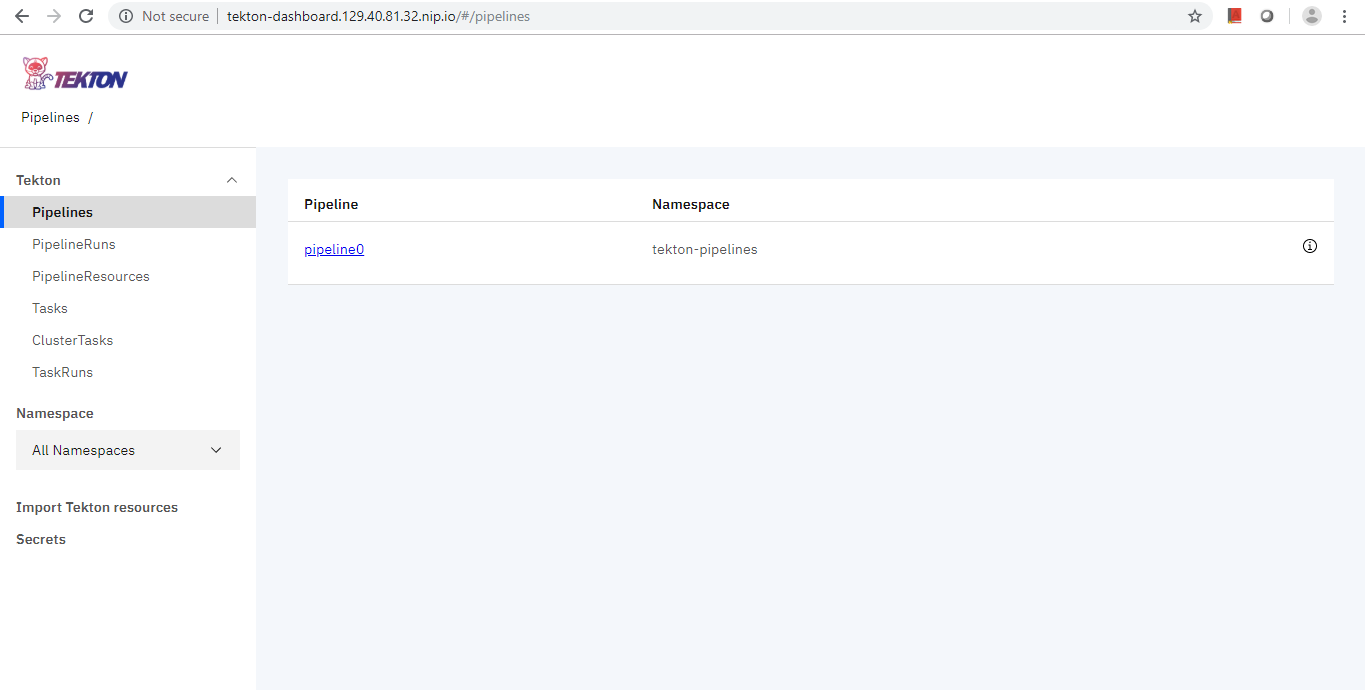
@a-roberts I set the IP correctly by tweaking the command slightly as below:-
ip=$(ifconfig | grep netmask | sed -n 2p | cut -d ' ' -f10)Setup Ingress endpoints for accessing Tekton Dashboard as per steps in README.
Still not able to access the dashboard, getting a
404 page not founderror.