LSP: LSP starts w/o an error but being not functional
Abstract
Following https://github.com/tomv564/LSP/issues/27 and https://lsp.readthedocs.io/en/latest/#php, the LSP seems to start felixfbecker/php-language-server successfully but nothing happens since then (no autocomplete, no go to definition, no diagnosis). log_debug is turned on but still nothing in the console. I do not know how to debug this so post here for requesting some helps.
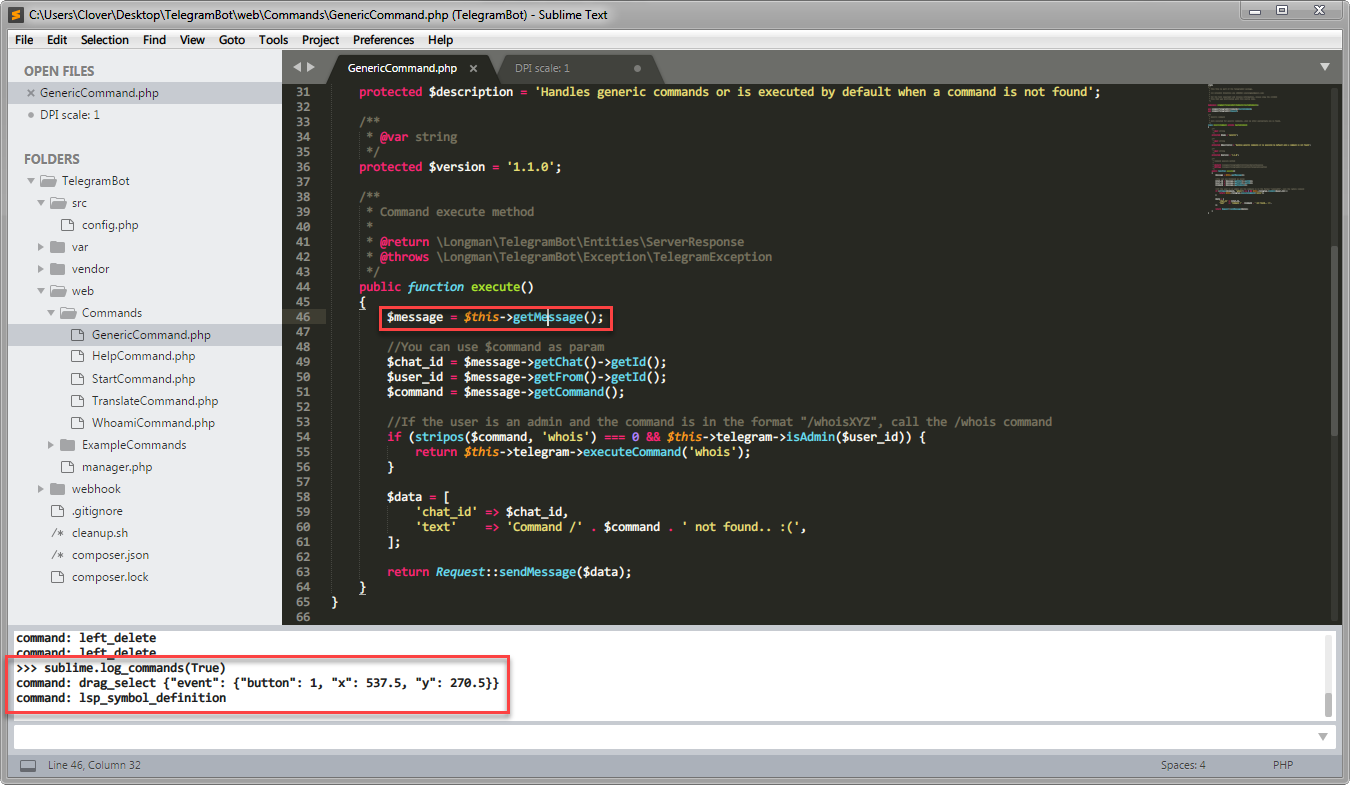 In the screenshot above,
 lsp_symbol_definition is not working here as well and not even fall back to ST’s go_to_definition.
Environments
ST: 3143 x64 Portable (Only Package Control and LSP are installed.)
OS: Windows 7 x64
PHP:
[Clover@Clover-NB Desktop]$ php -v
PHP 7.2.0RC3 (cli) (built: Sep 26 2017 15:28:01) ( NTS MSVC15 (Visual C++ 2017) x86 )
Copyright (c) 1997-2017 The PHP Group
Zend Engine v3.2.0-dev, Copyright (c) 1998-2017 Zend Technologies
    with Zend OPcache v7.2.0RC3, Copyright (c) 1999-2017, by Zend Technologies

[Clover@Clover-NB Desktop]$ php -m
[PHP Modules]
bcmath
bz2
calendar
Core
ctype
curl
date
dom
ds
filter
gd
hash
iconv
igbinary
json
libxml
mbstring
msgpack
mysqli
mysqlnd
openssl
pcre
PDO
pdo_mysql
PDO_ODBC
pdo_sqlite
Phar
readline
redis
Reflection
session
SimpleXML
SPL
sqlite3
standard
tokenizer
wddx
xml
xmlreader
xmlwriter
xsl
Zend OPcache
zip
zlib

[Zend Modules]
Zend OPcache
LSP.sublime-settings:
{
  "clients":
  {
    "phpls": {
      "command": ["php", "C:/Users/Clover/AppData/Roaming/Composer/vendor/felixfbecker/language-server/bin/php-language-server.php", "--memory-limit=512M"],
      "scopes": ["source.php"],
      "syntaxes": ["Packages/PHP/PHP.sublime-syntax"],
      "languageId": "php"
    }
  },
  "show_status_messages": true,
  "show_view_status": true,
  "auto_show_diagnostics_panel": true,
  "show_diagnostics_phantoms": true,
  "show_diagnostics_in_view_status": true,
  // highlight style of code diagnostics: "underline" or "box"
  "diagnostics_highlight_style": "underline",
  // gutter marker for code diagnostics: "dot", "circle", "bookmark", "cross" or ""
  "diagnostics_gutter_marker": "dot",
  "complete_all_chars": true,
  "only_show_lsp_completions": true,
  "resolve_completion_for_snippets": false,
  "log_debug": true,
  "log_server": true,
  "log_stderr": true
}
ST startup messages
DPI scale: 1
startup, version: 3143 windows x64 channel: stable
executable: /D/_Download/Sublime Text Build 3143 x64/sublime_text.exe
working dir: /D/_Download/Sublime Text Build 3143 x64
packages path: /D/_Download/Sublime Text Build 3143 x64/Data/Packages
state path: /D/_Download/Sublime Text Build 3143 x64/Data/Local
zip path: /D/_Download/Sublime Text Build 3143 x64/Packages
zip path: /D/_Download/Sublime Text Build 3143 x64/Data/Installed Packages
ignored_packages: ["Vintage"]
pre session restore time: 0.0731971
startup time: 0.158197
first paint time: 0.161197
reloading plugin Default.auto_indent_tag
reloading plugin Default.block
reloading plugin Default.comment
reloading plugin Default.convert_syntax
reloading plugin Default.copy_path
reloading plugin Default.delete_word
reloading plugin Default.detect_indentation
reloading plugin Default.duplicate_line
reloading plugin Default.echo
reloading plugin Default.exec
reloading plugin Default.fold
reloading plugin Default.font
reloading plugin Default.goto_line
reloading plugin Default.history_list
reloading plugin Default.indentation
reloading plugin Default.install_package_control
reloading plugin Default.kill_ring
reloading plugin Default.mark
reloading plugin Default.new_templates
reloading plugin Default.open_context_url
reloading plugin Default.open_in_browser
reloading plugin Default.pane
reloading plugin Default.paragraph
reloading plugin Default.paste_from_history
reloading plugin Default.profile
reloading plugin Default.quick_panel
reloading plugin Default.run_syntax_tests
reloading plugin Default.save_on_focus_lost
reloading plugin Default.scroll
reloading plugin Default.set_unsaved_view_name
reloading plugin Default.settings
reloading plugin Default.show_scope_name
reloading plugin Default.side_bar
reloading plugin Default.sort
reloading plugin Default.swap_line
reloading plugin Default.switch_file
reloading plugin Default.symbol
reloading plugin Default.transform
reloading plugin Default.transpose
reloading plugin Default.trim_trailing_white_space
reloading plugin Default.ui
reloading plugin CSS.css_completions
reloading plugin Diff.diff
reloading plugin HTML.encode_html_entities
reloading plugin HTML.html_completions
reloading plugin 0_package_control_loader.00-package_control
reloading plugin 0_package_control_loader.01-pygments
reloading plugin 0_package_control_loader.50-markupsafe
reloading plugin 0_package_control_loader.50-python-markdown
reloading plugin 0_package_control_loader.51-python-jinja2
reloading plugin 0_package_control_loader.55-mdpopups
reloading plugin LSP.main
reloading plugin Package Control.1_reloader
reloading plugin Package Control.2_bootstrap
reloading plugin Package Control.Package Control
plugins loaded
LSP: Config added: phpls (enabled)
Package Control: Skipping automatic upgrade, last run at 2017-10-05 21:31:30, next run at 2017-10-05 22:31:30 or after
LSP: no clients found for window 2
LSP: no clients found for window 2
LSP: starting in C:\Users\Clover\Desktop\TelegramBot
LSP: starting ['php', 'C:/Users/Clover/AppData/Roaming/Composer/vendor/felixfbecker/language-server/bin/php-language-server.php', '--memory-limit=512M']
LSP: request 1: initialize
LSP: client registered for window 2 {'phpls': <LSP.main.Client object at 0x0000000004031860>}
About this issue
- Original URL
- State: closed
- Created 7 years ago
- Comments: 20 (18 by maintainers)
@GlassGruber Just a FYI. I had moved to
intelephensebecause I feltfelixfbecker/language-serverwas slow when doing auto completion at that moment. But I haven’t check it for a long time since then.Ah, great to hear! LSP has no control about enabling / receiving diagnostics, that is something to take up with the language server. But there are some settings to control how they are displayed:
I’d recommend keeping an eye on https://github.com/tomv564/LSP/issues/259 as there are two other language servers that may provide LSP support in the near future.
TCP support is now merged into master, I tested the php language server with these settings:
Can you let me know if it works for you?