LSP: LSP plugin install hangs on macOS 10.14
I’m trying to install LSP via Package Control. After I hit Enter, Sublime tries to install plugin. Here’s what console shows:
....
ignored packages updated to: ["LSP", "Vintage"]
reloading settings Packages/User/Package Control.sublime-settings
generating syntax summary
reloading settings Packages/User/Preferences.sublime-settings
Package Control: The dependency 'pygments' is not currently installed; installing...
Package Control: The dependency 'pygments' has successfully been installed or updated
Package Control: The dependency 'python-markdown' is not currently installed; installing...
Package Control: The dependency 'python-markdown' has successfully been installed or updated
Package Control: The dependency 'mdpopups' is not currently installed; installing...
Package Control: The dependency 'mdpopups' has successfully been installed or updated
Package Control: The dependency 'python-jinja2' is not currently installed; installing...
Package Control: The dependency 'python-jinja2' is not available
Package Control: The dependency 'python-jinja2' could not be installed or updated
ignored packages updated to: ["Vintage"]
generating syntax summary
reloading settings Packages/User/Package Control.sublime-settings
reloading settings Packages/User/Preferences.sublime-settings
reloading settings Packages/User/Preferences.sublime-settings
...
After installation process finished, plugin seems to be “half-installed”:
- There is an option “Prefenrences: LPS” in Command Palette, which causes:
error: The settings file "res://Packages/LSP/LSP.sublime-settings" could not be opened - Plugin still can be found with Cmd+Shift+P => Install Package.
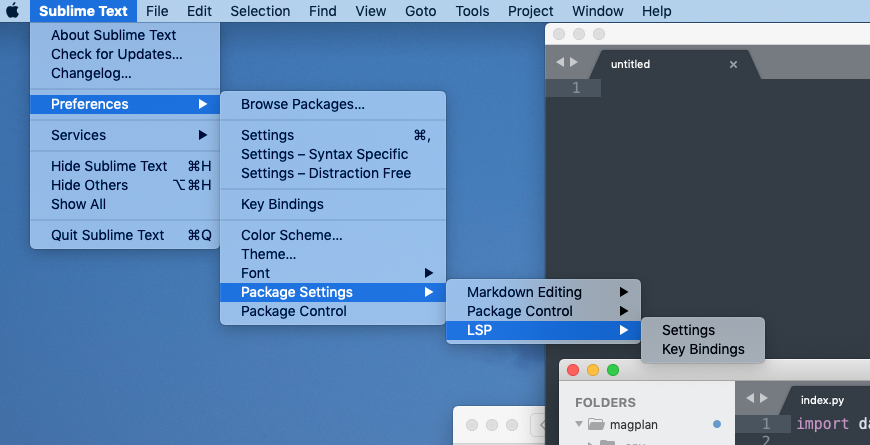

Also, no new options LSP: Enable Language Server is added. After re-open Sublime, it hangs sometimes.
Any ideas? Thank you.
Fresh macOS 10.14, just after install. Sublime 3207. PyLS is installed for system python 3.7:
/usr/local/bin/python
➜  ~ which python3
/usr/local/bin/python3
➜  ~ which pyls
/usr/local/bin/pyls
➜  ~ cat /usr/local/bin/pyls
#!/usr/local/opt/python/bin/python3.7
# -*- coding: utf-8 -*-
import re
...```
About this issue
- Original URL
- State: closed
- Created 5 years ago
- Reactions: 3
- Comments: 15 (6 by maintainers)
I have same problem with you, here is my solution following:
Package Control: Add Channeland paste this URL of channel json I edited: https://raw.githubusercontent.com/0xEEEE/dependencies_st/master/channel_tmp.jsonPackage Control: Remove Channeland select https://packagecontrol.io/channel_v3.json to remove it.Package Control: Install Packageto install LSPAlso you can check detail here https://github.com/0xEEEE/dependencies_st BTW, its just temporary solution, the maintainer of Package Control will fix it soon. Hope it helps you.
I’m assuming this is fixed, please re-open if it’s not.