starship: Starship shell initialization mismatch with binary causes errors
Bug Report
I couldn’t to reproduce same error after ran tmux kill-server; pkill -TERM tmux command and re-enter in tmux. It’s the first time I got this error, any ideas?
Current Behavior
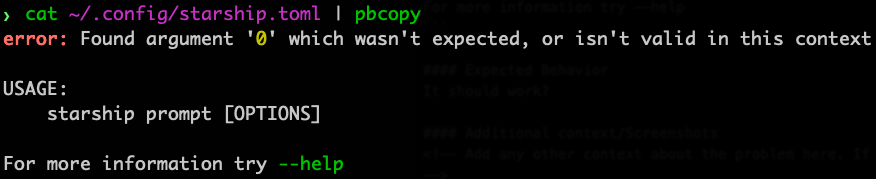
$ cat ~/.config/starship.toml | pbcopy
error: Found argument '0' which wasn't expected, or isn't valid in this context

USAGE:
    starship prompt [OPTIONS]

For more information try --help
Expected Behavior
It should work?
Additional context/Screenshots
Possible Solution
Exit the tmux.
Environment
- Starship version:
1.2.1 - Shell type:
zsh - Shell version:
zsh 5.8 (x86_64-apple-darwin20.1.0) - Shell plugin manager:
oh-my-zsh - Terminal emulator:
iTerm 3.4.14 - Operating system:
macOS 12.1
Relevant Shell Configuration
# Too long to fit in here
Starship Configuration
[kubernetes]
format = '[$symbol$context( \($namespace\))]($style) in '
disabled = false
symbol = '☸ '

[kubernetes.context_aliases]
"dev.local.cluster.k8s" = 'dev'

[gcloud]
disabled = true

[git_branch]
always_show_remote = true

[git_state]
format = '[\($state( $progress_current of $progress_total )\)]($style) '
About this issue
- Original URL
- State: closed
- Created 2 years ago
- Comments: 20 (10 by maintainers)
Okay, based on what I’m seeing in this thread so far, this is most likely going to be an issue if the following is true:
zshznap eval, redirecting the output ofstarship init zsh --print-full-init, or something else)starshipwithout updating the cached init.This will cause a mismatch between what the shell adapter passes and what starship expects, leading to the error.
The simplest way to fix this is to switch to using
starship init, though this may have a few downsides depending on your use case. The second simplest is to clear your cache file (e.g. regenerate it or by deleting the file from$XDG_CACHE_HOME/zsh-snap/eval), though this will not prevent future incompatibilities from occurring.I ran into this one as well when running any pipe
eg.
Environment
Starship version:
1.3.0Shell:zsh 5.8.1 (arm-apple-darwin21.3.0)Shell plugin manager:znap 22.01.21Terminal emulator:kitty 0.24.2Operating system:macOS 12.2.1Starship configuration
Possible Solution
In my
~/.zshrcfile i was initializing starship with the following (I believe as per znap’s guide)Changing too
Seems to have fixed the issue for me, so not sure what has changed/why but hopefully this helps!