bat: `man` syntax doesn't highlight bold functions correctly
Terminals tested: alacritty, mate-terminal, urxvt
bat --version: 0.12.0 (Installed via cargo install bat)
$MANPAGER: bat --paging=never -pl man [1] [2]
[1]: I disabled paging to make sure it’s not a problem with less(1).
[2]: The documentation suggests setting MANPAGER to sh -c "col -b | bat -pl man" however I found using col actually just garbled the output even more, see screenshot further down.
Output with MANPAGER='bat -pl man'

Output with MANPAGER='' or MANPAGER='less'

The issue seems to be with highlighting functions / page references (foo(…)) when bold output is used.
When using col -b as suggested, it becomes even worse:
Output with MANPAGER='sh -c "col -b | bat -pl man"'
About this issue
- Original URL
- State: open
- Created 5 years ago
- Reactions: 11
- Comments: 33 (24 by maintainers)
Commits related to this issue
- Add '-x' flag for 'col', see #652, see #667 — committed to sharkdp/bat by sharkdp 5 years ago
- bat: color and syntax highlighting for man pages You need to set additional option when man already uses ANSI escape sequences. Providing `-c` option via environment variables `MANROFFOPT` fixes wron... — committed to macedigital/dotfiles by macedigital 3 years ago
- Abort if the help message is formatted with \b Backspace formatting for bold characters, done by relics such as man or less (bless them anyways). Graciously explained in [1]. Presents the same zebra... — committed to victor-gp/cmd-help-sublime-syntax by victor-gp 2 years ago
- [fish] fix man paging via `bat` See problem and solution on bat's [github issue #652](https://github.com/sharkdp/bat/issues/652#issuecomment-529032263) — committed to kverb/dotfiles by kverb 8 months ago
- [fish] fix man paging via `bat` See problem and solution on bat's [github issue #652](https://github.com/sharkdp/bat/issues/652#issuecomment-529032263) — committed to kverb/dotfiles by kverb 8 months ago
Well.
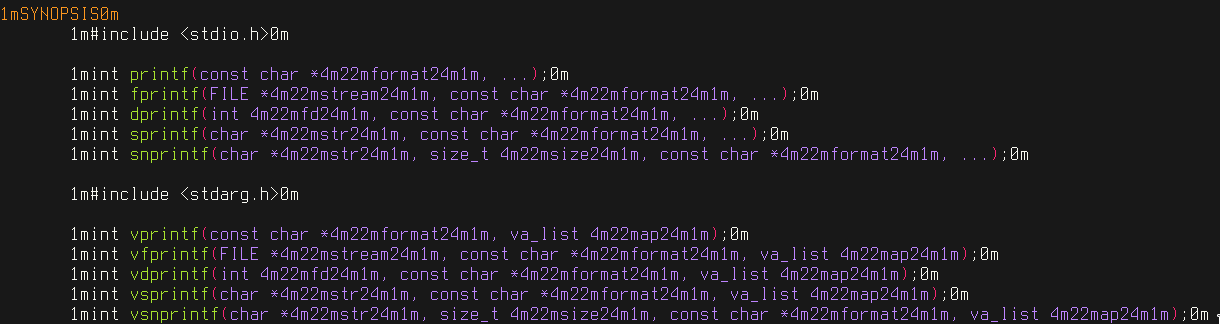
MANROFFOPT="-c" MANPAGER="sh -c 'col -bx | bat -plman'" man sprintfFinally worked. No bold or underlined text, but it finally displays correctly 😄While this presents a working solution for now, I’d suggest either keeping this issue open, or opening a new one, as this is rather hacky. (although it was fun learning experience about the joys of old unix tech!)
for me, working on fedora 35
export MANROFFOPT="-c"helped Thankyou @xeruf @LunarLambdaOkay, phew! I dug in a little more and got a usable
sedcommand, but unfortunately there still seems to be an issue with--language Manpageeven using ANSI codes instead of overstrike.Here’s the command I’m using:
This displays non-colored but correctly decorated pages, as you might expect!
less,catetc. should also work here.However, when using
bat --language Manpage, it seems the color of the syntax highlight gets garbled with the bold/underline codes, similar to the OP report:Is it expected that
batwould correctly handle the syntax highlighting intermingled with the source data having control characters? If so, I’d propose that as the actionable item here, and have it be the user’s responsibility to ensure the input manpage data is “normalized” (i.e. using all ANSI or all overstrike decorations). Thoughts?update from my side: Using nvim/emacs as man viewer now as these can follow links as well 😉
As piping
manto bat works for me, unlike using man pager, fish users may try the following:In case it helps someone
Program versions
Arch Linux man 2.9.4 col from util-linux 2.37 bat 0.18.1
Comparison
Neither
MANROFFOPTnor adding/removing-bforcolseem to change anything for me.Conclusion
Adding colors is nice, but since
batright now does not display the essential highlightings, I am considering to switch back tolessor find an interactive man viewer where I can follow links.You should mention in the README that bold highlighting is unsupported - I was quite confused, and this issue doesn’t really go into that.
I have
col from util-linux 2.33.2.Unfortunately
MANPAGER='sh -c "col -bx | bat -plman"' man sprintfyields the followingThank you for the detailed bug report!
I’m going to assume that you are using
man sprintfin your examples(?).To figure out what’s going on in detail, we can actually use
bat -Ato show what exactlymanoutputs:After finding the corresponding section, we can take a look at how
manprints bold text. It is both fascinating and infuriating. Instead of using ANSI escape sequences, it printsfor a bold
printf(bat -Ashows␈instead of the\bbackspace character). I believe this is how “bold” was done in the times of typewriters. You would hit backspace and then just re-type the same character to give it more weight.On todays terminal emulators, that doesn’t actually work. If you use
MANPAGER=""orMANPAGER="cat", no bold text will be shown. To make sure, we can also callwhich will just print
printfon the terminal.Interestingly,
lesshas a special feature that shows such sequences in bold. Quoting fromman less: “Also, backspaces which appear between two identical characters are treated specially: the overstruck text is printed using the terminal’s hardware boldface capability. Other backspaces are deleted, along with the preceding character”. This is why we see a bold faceprintf, when we callThere is also a similar feature for underlined text:
Back to
bat. When I initially played with this, I noticed that these backspace characters were causing problems when intermixed withbats syntax highlighting. Imagine we havein a man page and the whole line is printed in bold (beginning of
man sprintf). The syntax highlighter will try to highlight certain special characters like the opening parenthesis(. However, that breaks the backspace-for-bold-font-trick and actual backspace characters will start appearing in your output.For this reason, I originally used
col -b(col --no-backspaces), which turns something like"p\bpr\bri\bin\bnt\btf\bfintoprintf:Unfortunately, I missed that
col -b“also replaces any whitespace characters with tabs where possible”. This is what breaks the table layout in the above example. Fortunately, we can switch this off viacols-x/--spacesoption.The following works for me:
I think we should update the instructions in the README to suggest
col -bx.Unfortunately, it looks like your
colcommand does things a little differently. I couldn’t exactly reproduce your screenshots above. My version is:On macOS this happens if you use the
manbinary provided bybrew’sman-dbpackage. I don’t remember why I added it, sobrew uninstall man-dbbrought me back to using the systemmanimplementation, which is more well-behaved about escape sequences.Not sure if that’s viable for anybody else, but removing it was a huge QoL improvement for me (back to
bat’s highlighting, and no more broken escapes written in my manpages), so I figured I’d mention it here in case someone else in the same situation hits it.Example of what the brokenness looked like, since it doesn't quite seem the same as the others, although it's basically the same problem.
(Before)
(After)
Both had some amount of
bathighlighting, but with the extra text it was just unreadable before.