Rocket.Chat.Electron: New v3 version doesn't connect with a valid server

My Setup

  • Operating System: macOS Catalina v10.15.6
  • App Version: 3.0.0
  • Server version: 2.4.11
  • Installation type: brew but update by inapp update system
  • I have tested with the latest version
  • I can simulate the issue easily

Description

After update to latest version get No valid server found at the URL

Current Behavior

Can’t connect to working server (I’m connected on browser)

Expected Behavior

Connect properly to server like on mobile apps and browser.

About this issue

  • Original URL
  • State: closed
  • Created 4 years ago
  • Reactions: 37
  • Comments: 54

Most upvoted comments

Can confirm with a manually created servers.json placed in

/Applications/Rocket.Chat.app/Contents/Resources/

it works again macOS Big Sur Beta 9

for more Info and Syntax of servers.json -> Here

Reverting to v2.17.11 and works fine.

FYI: Both workarounds (trailing slash and/or space & servers-file) did not work for me. Reverted to 2.17

(macos 10.15.6)

Same here. Removing the trailing slash or using http works though.

Since the bug still have not been fixed, here is a workaround for ubuntu/snap version of RocketChat:

Edit file /home/<username>/snap/rocketchat-desktop/current/.config/Rocket.Chat/config.json The servers key will probably be an empty array looking like this:

{
    ...
    "servers": [],
    ...
}

Replace it with following code (Make sure to replace rocketchat.example.com in my code with the url to your rocketchat instance):

	"servers": [
		{
			"url": "https://rocketchat.example.com/",
			"title": "Rocket.Chat - https://rocketchat.example.com/",
			"lastPath": "https://rocketchat.example.com/channel/general",
			"badge": 141,
			"style": {
				"background": "rgb(47, 52, 61) none repeat scroll 0% 0% / auto padding-box border-box",
				"color": "rgb(158, 162, 168)"
			},
			"favicon": "data:image/png;base64,iVBORw0KGgoAAAANSUhEUgAAAGQAAABkCAYAAABw4pVUAAAOtUlEQVR4Xu1dCXAUVRr+/p6BBCKERcIhJCTdPYkHgpaopSsq3uuJlKIlpW7JikdpyZaoi3jrUuutyKqIVykoKwpoAM+SuCKriJxyZKbfJIQoEETMAeSafluvDTEhM91vTjph/qqpCeR///+9/8vrd/3vNSEtrooAuQpNGgzShLjsjyBNSJoQl0XAZXDSLSRNiMsi4DI4MbWQiqKiIxpCoTxPKGQqXm9ts2nWeUKh2vzy8loCQi6rY6eC40iI3+c7WTHNczhwDoC8lo/XppZ+DvwAYLWH8w2NprnxqPLy8k4VlYMItgMhGwsKhnbzeEZxzkcRcCaAwgTg+5KAuc1e79wjS0trE2Cvy5poJWTrkCE99mVkTCVgarJqS8AWTjTXSzS3IBBYkyw/ndluKyEBTfsQwKUpqwzR+8T5izpjS1PmsxM4avfIMjRtBQdOTDHuad5Q6NGC8vL6FPt1pbsOfUhAVb8F0ckpRUu0QjHNR7VgcFFK/brQWdhRVkBVN4HoyFTjJWCazljS+rBU1ycWf2EJMTStPwdWAzgiFqNxlSF6XTeMiYfqfCbiPISp6kgTKAFRVlwBjqEwB5Zwj2dikd//U9viAV3vbYZCBV6iwSGi/gByFCBHfJtAfwXgnKiKc75TAarEzwCsj6koVYW9elXRDz80xQApZUVsJ4ZMVceaRB+kDE17R6s48DUB+RwoEN8AeicAyyYCVnCiFcT5mvqMjHXDNm6sS4DdhJhwnKkHdP1ZcD4pId7cacSEIAhY4+F8bTPnq4rKylYcLKiOhJTl5/dpVpSlIDruYIFMtV/RMgEUc4+nuMjv35xK/46ECDClmjZGARakEphbfHFgsSDH9HqLjywt/TnZuKQIESACqvoeiK5MNiC32ueA6GeKOeezi4LBJcnCKU2Iv6DgdFKUr5IFpDPZ5cBcBZihM/ZNonFLE2K1Ek2bBeBviQbRWe1x4BUP5zO0YHB9ouoQHSG6fi04fytRzruInX0EzGg0zX8fXVa2Jd46RUVIsKCgKKQoKR117K+gJycHGYWFUHr3tj6elm8lO7v1Z6Fr1tQgVFMDs7r6j5/Fv2tq0FBaitAvv8Qbs0jldxDwT52xF+JxEBUhLY+t7QAGxOPUqazSqxcyhw9HxrHHImPYMGQOGwbvkCFOxaR+31xZifq1a1G/fj0aN29Gw+bNiSbpPwTcpzNmSAE6QCkWQsT+hdhJTKhkHHMMskaPRs/TT7dIoO7dE2rfzpggZd+332Lv0qXY+01C+umtnPN/FAaD70RbiYNKSHdd/52E0aPR46STosWeFP1Gvx97BDFLl2LfypXx+eB8ii8Y/Fc0Rg4KIb2vugqHXXABeo4aFQ3WlOs2rF9vkVM9Zw5Cu3bF5N/k/OGiYPAh2cIpJaTXmDHIHj8emccfL4vPFXrNP/1kkSI+5p49UWMiYLLO2NMyBaMiJKCqk0D0rIzhtjqiNQgiepxySrRFXaXfGAyipoUY3twcHTaicT7DmOdUSJqQgKqOB9FsJ4Ntfy9GSX3vuANZZyZ8DBANjITrNmzciN9eew21H4q8kChEghQpQgK6fh44F94zZd1nnXsuBjzxBMQQtqvK7hdfxK5nnommerVcUc4tDAS+i1TIkZCArh/fQkaurOfs665DzgMPyKp3ar26zz7D9ltvjaYOJXpu7rlUUhL2medIiF/TFhNwoazHQTNnIuvss2XVu4ReI2OoOP/8aOrytI+xyeEK2BIS0PUrwfl7sp50I6bJqax51+sZui6PkWi0zzBKDixgT4imSc/K8z7+GN19PnlAXVCzYcMGbL3sMtmafeRjrINyREL8mvZXAt6QsT7w+edx2EUXyah2eZ2aefNQNWWKXD2JrvUZRruRqx0hK0girbTvbbeh76SunAMhF9u2WrtnzcKuxx93Lki0wmcY7bJEIyXK/UXkRjlZzDrrLAx65RUntUPy979Onw7xcRJummcUlpX9d79eWEL8mjadgNudjAkyBClp6RiB5qoqVI4ZA/FtJxx4qpCxu2wJCWjaTgD97AylW4fzn6FMKyGgVGesNY+6QwspVdULFSKR+mIr6dbhFCFYrUOmlRAwUmdMHAPseJNDQNPmArgq2a1j79dfo371ajT8+CO65eVZm1JiEZIypVdnLIiNpaXWppJYKqcePZA5cqT1GPX06eMcsTYa5t691tpUvdgD8XqROWKE9REbZ/GIZCu5SWfM6ow7tBBD09ZyYLgdiH73348+118fM87qt97Czkce6VC+29ChGPjCC8g4+mgp23uXLbOWLUQw24q3f38cfs896CU5J6hftQpVU6eiMRBoZ0fsWvabMgXZ114rhSeckszcRGSvFDJ2U6QWInohkVEeUeJ5XG27+Wbs+eIL2wrmL18OEVQ7qX77bex8+GFbnSPefBM9TzvNVqfu44+x/Xb78YuMnUhOxP5JcMQIWwwELNMZs3br2rUQDngMTXNc6B/6xRfoli+S0aOTmvfeQ9W99zoWchowiL+6yiuvBG9stLWl9OyJIfPmoXtRUUS9iosush57diJjx678lrPPRtMW2wyhH32MHduBkNLCwsFKKFRpZ5wyMqBt2OAY1HAKOyZPRu3ChVJlcxcutPqVcFL9zjvYKbmaPODZZ9HrkkvC2hHJDVsvvlgKT79770WfG26Q0j1Q6ecJE7D3K9ukz0ofY9ZqersWsllVR3qIvrfz2r2wEHlLHOeMYU2Un3EGxHaojPR/7DH0vvrqsKo77rkHtR/IHVsRfUCfCRPC2qmZPx9Vd98tA8ciVZAbi4j+UvSbNlLnY8zaOIqaENHh5n70USy4kCYkYtiafIxZeU/tCJF5ZHkOPxwF30Xc8LIlKv3IihieHT7GBnYgRLZTV9etg+joopV0px4xYpt8jFlj/Q7zkICmOQ578z75BCLJLRZJD3vDRu0bH2PW+DymieGgWbOsjMNYJT0x7BC5V32M3RiphTgunRx28cUY+NxzsfJhldu7fDmat29HaMcOKH36wJuTY03iYlk6afD7EaqqAnXrBu+gQcg88cSYlk7E0LR52zZAUeAdMOD3JZ14l05mzMCvDrEygduLGJsRlhDZxUUx0pJd4oiLuU5cWByB2HrppWiqtJ3aweR8VFEwuCwsIeI/ZZbfxdhejPHTEjkCv73+On6ZNs02RBzY1ZiRkb//rHzMG1Sefv0w5P330S1B5za6GrG8qclqHQcuWHaoJ9EbPsNoXQKIawtXrKYOeFoqh7irxduxPtXvvoud99/vqEfAWJ2x1iPncSc55DzyCLKvucbR8aGksOfLL61tAYmEbFaZm3vk6DZZjHGnAXn69sXg2bMh1rjSAogsxsorroBZ63y1JAF36Yw91TZuCUmUE4nVA6dPt4adh7qUn3qqY2JDS4xKfIx1mMwlLJVUHEkb8OST8A4efMhyIrHv8UdsiC7wGcanBwYrocnWYtNqwFNPIfO4Q+aemtZ4br38cmtfX0qInvMZxt/D6ToSIi4y40SLuORRaCUry2opWeedJ4WtsyuJncDKcePkzyByvsZrmqMLyst/i4kQUSjai8x6jR1rHdbp6iJGU9smToyqmiZweRFjEbdNHVvIfm9MVSeZkucLxR523mLH1K6oKuI2Zen83TbAZU7kShMi7AZ0/RlwHvbZd2DA1NWru+Rxttr5863TuOI2iGhEhgxhLypCLFIkz4wMnjMHPU5O7fW/0QQoWt26JUssIvbFsltK9IHPMK6Q8Zk0QnKLi5Fx1FEyGFytI/oJQYRD1ohdHcIezIlUIGmE5JeUJOzCmFQzJu492X+9hjibHqscmNkuYydphKirVlnXKHUWEXnG+0lo2LQpXthbQTTVZxhvR2soekJUNQiiAidHsRwArV2wADvuusu6eqPtxzvQSshImIg7s0SnLDIgRbKcuKapqaIiUfZTdz3Tpvz8fK/HU+aEXKxtDXrpJSe1dr/fT0a4QiKTPaMlG731wjJxcVl29u8XmrX8LMo6XWAmZtMJDH5buDsJeDSlF5gxVb3GJJrjFOn+06ah97hxTmqtvxePim03Wnv8nVM4fxGK8ozPMFi8FYjqkeXXtJkEOE5No0nGFsPIn8aPj7ceB6v8R+IynnDnzWMFJE2IoWkncMDxRi+xsCi2dmWkbvFibL/jDhlVt+msaiEiqst4ZCohTYhs65A9zLN75kzsevJJGYxu0mEgehWAaBUNyQAmRYhs6xA5UXmLFlmdbCQRj6jdL78McaStk8hOEBUT58UaY8XJfq+JLCELODDGKYB/uuUWHH7nnWHVRG5S9ezZ+O1V8QfmemkA58VEVNytqal4aEXF7lQhdiRE9hY5sX2bu2gRumtaO+x7Pv8cdZ98grpPPwWvd+97vziwjoC14t0iimkWqwm4FDkWEm0J8ft8x5FpigtoHI+0isM1OffdZx3dEssNIh9JECFu+YxRxHm1AIjywXmi3/KzBZyvICLxYpd1nlBorVpWtiNGnAktFpEQpqrZIaJFBNifmmyBI1Z2BQmhX3+NGyABFZxo4v495+3Dh2fV7dlTwIlUbpoFJF53RNRTEMWJshTOe4pvcC5ezlINoMb65ryGt/m3B6gmzn90S/DDBSoiITLn1eOOfBgDHPje6/HcqPr90W04JAPMQbAZKZVUagKYcLycFzeY5sRh5eXiOvNDUsKdD3mCA62XoaQoKo0ceKyQsUdT5M+1btqfMVTVhxSiB1OJlsQr8oge8xnG/1Lp162+WgkJqOqDIJK+EjsBFRLL+DN8hhHbWeMEAHCjiVZCDE07iwPiApPrkghULDcsJGABJ1qYrOWHJOJPuukOfYh4aUuzolxGv7/K+8+JQMCBZUS0wCRaWBQIxL4nmggwLrdhOzFkqipS2k8wiU4Q3wDyWj5e23pxvgaKUgLTXOnhfKVaVmZ/mYjLg5RKeI5LJ+HAVBQVHdEQCglyOlxulVlfvy63sjL+2WEqo+AiXzER4iL8XQ5KmhCXUZomJE2IyyLgMjjpFpImxGURcBmcdAtxGSH/B8P8+bBwIPqQAAAAAElFTkSuQmCC",
			"failed": false,
			"webContentsId": 3
		}
	],

Hi,

I found a wordaround which works for me:

Add the server Url into the config.json located in c:\windows\users\user\AppData\Roaming\Rocket.Chat like this:

{ “internal”: { “migrations”: { “version”: “3.0.1” } }, “currentServerUrl”: “https://yourserver.com/”, “doCheckForUpdatesOnStartup”: true, “isMenuBarEnabled”: true, “isShowWindowOnUnreadChangedEnabled”: false, “isSideBarEnabled”: true, “isTrayIconEnabled”: true, “rootWindowState”: { “focused”: false, “visible”: false, “maximized”: false, “minimized”: false, “fullscreen”: false, “normal”: true, “bounds”: { “x”: 460, “y”: 240, “width”: 994, “height”: 594 } }

Add it in our config made the authentification pass with success. Hopes it will help and still look for the client or server hotfix.

It’s not fixed yet really, @tassoevan image That URL works perfect in Web version RC Server version is 3.6.3 Paid Wildcard certificate
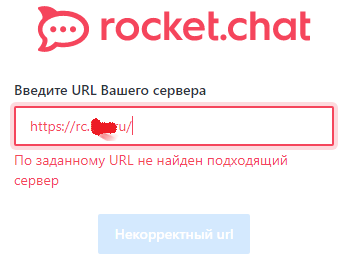
Same here, can’t access my server (using specific Port) like: https://sub.domain.com:4444 Server in v3.6.3

But what if I don’t have/find this servers.json ? What’s the content on it ? My client is installed (win10) on %appadata%\Rocket.Chat\ (and no “resources” folder there)

u must have done something wrong then , servers.json workaround works here on 10.14.x, 10.15.x, and macOS 11

you’re right. my bad.

FYI: Both workarounds (trailing slash and/or space & servers-file) did not work for me. Reverted to 2.17

(macos 10.15.6)

In my case I first put url without https:// and clicked connect and when app corrected the url with https and tell me that url is wrong, I added a space. But I will also revert to 2.17 - version 3 is quite buggy at the moment - I noticed also problems with graphics, moreover app asks server’s address every start, it hung twice on my computer… I thing this app should be in alpha or beta stage because of to these bugs.

Same here

Operating System: Windows 10 Version: 2004 App Version: 3.0.0 Server version: 3.6.3 Installation type: exe from releases over version 2.17.11

Maybe it will help someone:

If you are snap in Ubuntu 18.04 LTS you have to copy file into snap

for example snap/rocketchat-desktop/210/.config/Rocket.Chat/

In my case, I have to uninstall and install rocketChat

As I know, all that problems will be resolved in 3.0.3

No problem 😃 we are using a Rocket Chat server in production environment, the server is a snap in Ubuntu. Onto clients, we add the servers.json to avoid server authentification process and it works fine, tried on w7 and w10. Hopes my english is clear, thanks RC team for support

Ludovic VAUDOIS Responsable informatique ESAD de Reims

tél. : 03.26.89.42.76

www.esad-reims.fr ----- Mail original -----

De: “Sandro Kalbermatter” notifications@github.com À: “RocketChat/Rocket.Chat.Electron” Rocket.Chat.Electron@noreply.github.com Cc: “LudovicVaudois” lvaudois@esaddereims.fr, “Comment” comment@noreply.github.com Envoyé: Lundi 5 Octobre 2020 12:25:20 Objet : Re: [RocketChat/Rocket.Chat.Electron] New v3 version doesn’t connect with a valid server (#1743)

Yes it’s the client I’m talking about 😉 I’m unsure if I understand you correctly - is the RC on snap workaround something that “end users” can reproduce or are you talking about a staging version in a development setup? — You are receiving this because you commented. Reply to this email directly, view it on GitHub , or unsubscribe .

The servers.json fix does not work on snap installed instances because the snap is installed in a readonly FS and cannot be adjusted.

@UnnamedHero you can install 3.0.2 from latest/edge, works fine for me

Desktop app 3.0 pushed the compatibility to Rocket.Chat servers at the version 3.x, rejecting 2.x servers; it’s probably a mistake. @AmatorPhasma Could you please double check your conditions?

Is rejection of 2.x servers an intended change? I didn’t see this in the release notes for this build.

To downgrade on ubuntu following the suggestion from @lucianomlima :

sudo snap refresh rocketchat-desktop --edge

Desktop app 3.0 pushed the compatibility to Rocket.Chat servers at the version 3.x, rejecting 2.x servers; it’s probably a mistake. @AmatorPhasma Could you please double check your conditions?

Same here

Operating System: macOS Catalina v10.15.6 App Version: 3.0.0 Server version: 2.4.11

Confirm that issue! Fixed that by creating valid c:\Program Files\Rocket.Chat\resources\servers.json file with my server in it