react-dates: react-dates style overflows
DateRangePicker’s DateInput components overflow the component. The from component seems to overflow the arrow in between the components and the to component overflows the main box.
Demo
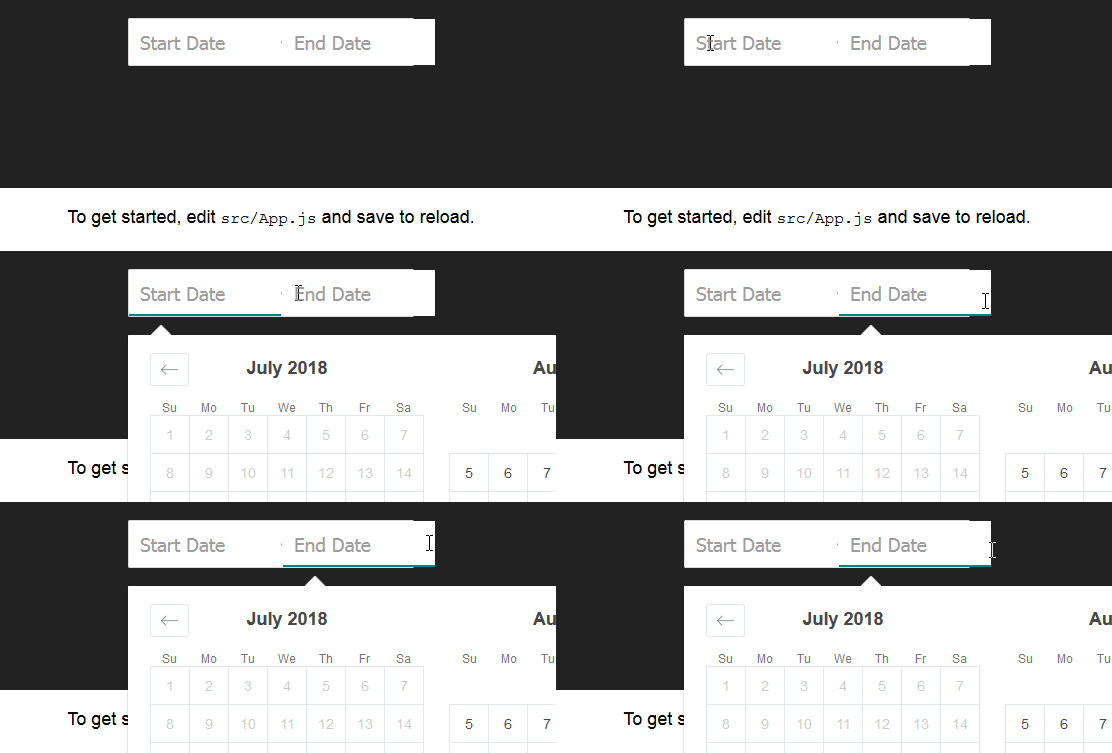
To reproduce:
Create a new project with CRA add
npm install --save react-dates moment@>=#.## react@>=#.## react-dom@>=#.##
or clone the repo from the docs
To see this in action, you can check out https://github.com/majapw/react-dates-demo which adds react-dates on top of a simple create-react-app setup.
Once the project is ready and dependencies are set change the App.js file:
import React, { Component } from "react";
import "./App.css";

import "react-dates/initialize";
import "react-dates/lib/css/_datepicker.css";
import { DateRangePicker } from "react-dates";

class App extends Component {
  constructor(props) {
    super(props);
    this.state = {
      startDate: null,
      endDate: null,
      focusedInput: null
    };
  }

  render() {
    return (
      <div className="App">
        <header className="App-header">
          <DateRangePicker
            startDateId="startDate"
            endDateId="endDate"
            startDate={this.state.startDate}
            endDate={this.state.endDate}
            onDatesChange={({ startDate, endDate }) => {
              this.setState({ startDate, endDate });
            }}
            focusedInput={this.state.focusedInput}
            onFocusChange={focusedInput => {
              this.setState({ focusedInput });
            }}
          />
        </header>
        <p className="App-intro">
          To get started, edit <code>src/App.js</code> and save to reload.
        </p>
      </div>
    );
  }
}

export default App;
About this issue
- Original URL
- State: open
- Created 6 years ago
- Reactions: 2
- Comments: 16 (7 by maintainers)
I have the same issue with SingleDatePicker
@dimalakh @Cr0cky @MFry You should manually add to you css:
Note: This component assumes box-sizing: border-box is set globally in your page’s CSS.