powershell: [BUG] PowerShell 7.1 "Operating System" attribute is empty in Azure Active Directory
I originally raised this issue over at https://github.com/PowerShell/PowerShell/, but have been informed that the issue resides with pnp. I’d have thought it would be a PowerShell problem given this works fine in older versions but anyway, if you could help get this resolved it’ll be appreciated.
Connect-PnpOnline is in this repo: https://github.com/pnp/powershell They would need to make the change to address this.
GitHub**pnp/powershell**PnP PowerShell. Contribute to pnp/powershell development by creating an account on GitHub.
We have a AAD Conditional Access Policy in place which blocks unknown operating systems for our enterprise apps and users.
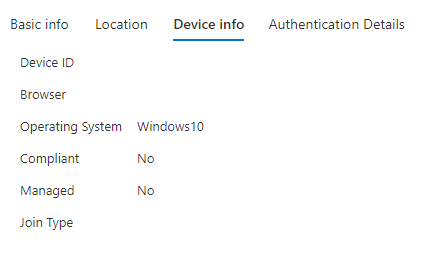
When using PowerShell 7.1.3, the operating system is showing as empty in “device info” under the "sign-in log within AAD. This has resulted in blocking access to our Enterprise App (SharePoint PnP PowerShell).
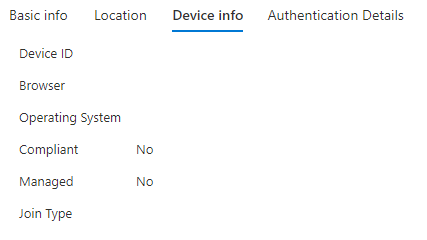
When we use PowerShell 5.1, the operating system; “Windows 10” is shown and access is granted to our Enterprise App.
Steps to reproduce
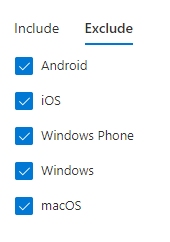
- Create a “Block Access” Conditional Access Policy in AAD with “device platform” condition set to:
Include = “any device” Exclude = “Android, iOS, Windows Phone, Windows, macOS”
- in PowerShell 7, run command: Connect-PnPOnline -Url https://www.xxxxxxxx.com/sites/commsSite -Credentials (Get-Credential)
- Enter credentials
Expected behaviour
Access token is provided.
Actual behaviour
Access token is not provided:
Connect-PnPOnline: AADSTS53003: Access has been blocked by Conditional Access policies. The access policy does not allow token issuance.
Trace ID: a99d8841-0ad6-4d71-b9a5-c602ee844301
Correlation ID: 79c2241b-37af-4ff2-9e66-fe0e2d4c0f81
Timestamp: 2021-05-27 09:50:37Z
Environment data
Name                           Value
----                           -----
PSVersion                      7.1.3
PSEdition                      Core
GitCommitId                    7.1.3
OS                             Microsoft Windows 10.0.18363
Platform                       Win32NT
PSCompatibleVersions           {1.0, 2.0, 3.0, 4.0…}
PSRemotingProtocolVersion      2.3
SerializationVersion           1.1.0.1
WSManStackVersion              3.0
About this issue
- Original URL
- State: closed
- Created 5 years ago
- Comments: 24 (2 by maintainers)
Commits related to this issue
- added operating system identifier to user agent. Issue #737 — committed to pnp/powershell by erwinvanhunen 5 years ago
- Updated version string as per issue #737 — committed to pnp/powershell by erwinvanhunen 5 years ago
Brilliant! Tested using 1.7.38 (nightly) with PowerShell 7.1.4 and “Operating System” is now coming through in AAD so no more conditional policy failures! Thank you @KoenZomers for fixing this and @veronicageek for your help too.
Unfortunately you cannot test it yet unless you build a custom version of PnP Framework out of my branch and compile your own custom PnP PowerShell build against that. We have to wait for @jansenbe to return from vacation to approve the PR so it can be included in the next nightly build. From thereon you will be able to easily test this yourself by updating your PnP PowerShell to the latest prerelase version.
@veronicageek We have truly little we can do from the PowerShell side. The module controls the header it uses to connect to a service. In this case, you need to adjust your code to deal with this issue. PowerShell does not server as a middleman between .NET and the module for a C# module. In fact, it looks like if we tried, you would override our settings:
https://github.com/pnp/powershell/blob/0120ed972265a949a17b40f8ed3d3dd99efacc61/src/Commands/Base/PnPConnection.cs#L563
They are sending the PowerShell assembly version in the
UserAgent. For windows PowerShell this can be mapped to an OS Version, but for PowerShell 6.0 and newer, this cannot. I don’t know where this contract is defined or who can modify it, but this assembly is the one that needs to be updated.PR in PnP Framework has been merged. You can try it with the nightly build of tomorrow to see if the issue is resolved for you. Please provide feedback if this topic can be closed after validating this.
I could reproduce the issue. Took me a bit to figure out where the magic happened, but the above PR should fix this issue.
We have added now the Operating System identifier to the user agent. Please try again with the upcoming nightly build: 1.6.2 which will be available tomorrow:
install-module -name PnP.PowerShell -AllowPrerelease
I’ve seen you’ve reopened their issue, so I’ll close this one as this is not PnP.PowerShell specific.