powershell: [BUG] PNP-SetListItem - Update Person Field with Multiple People
Issue
Expected behavior
When I use this commandlet with the -Values attribute having multiple email address on either a SP List or a Document Library, when I visited the List/Library I see all inputted Users in the Column.
Actual behavior
Commandlet works with SP List. I see all inputted Users in the column. Commandlet does not work with Document Library. I see 1 inputted user in the column.
Steps to reproduce behavior
- Create a List with a Person column and enable the option Allow Multiple Values.
- Create a Document Library with a Person column and enable the option Allow Multiple Values.
- Add dummy content to both the List & Document Library
- Run the below commands, changed to match your environment
Set-PnPListItem -List "TestList" -Identity 1 -Values @{PersonColumn=@("user1@contoso.onmicrosoft.com", "user2@contoso.onmicrosoft.com")}

Set-PnPListItem -List "TestDocumentLibrary" -Identity 1 -Values @{PersonColumn=@("user1@contoso.onmicrosoft.com", "user2@contoso.onmicrosoft.com")}
What is the version of the Cmdlet module you are running?
1.3.0, 1.4.0 & 1.5.0
Which operating system/environment are you running PnP PowerShell on?
- Windows
- Linux
- MacOS
- Azure Cloud Shell
- Azure Functions
- Other : please specify
Notes
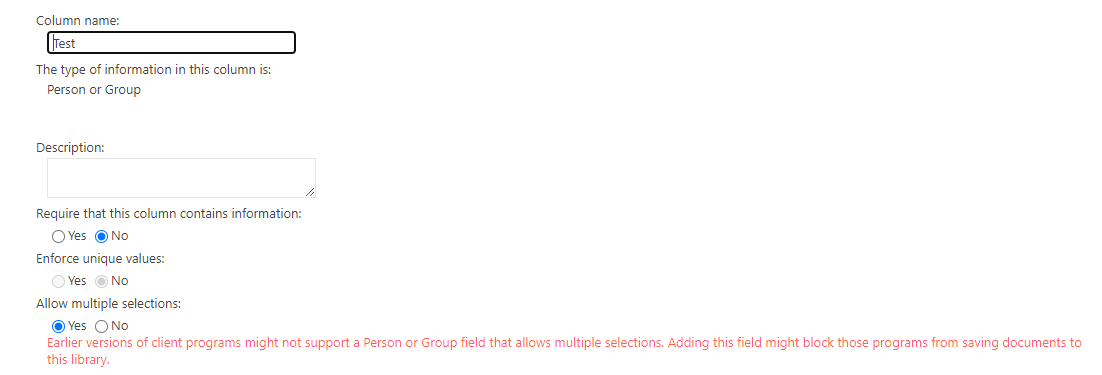
On a document library you will see the below warning when you run through the reproduction steps and open “List Settings”>“Column”
Workaround
Use the validateUpdateListItem REST API through the Invoke-PnPRestMethod commandlet.
About this issue
- Original URL
- State: closed
- Created 6 years ago
- Comments: 18 (1 by maintainers)
I can reproduce this issue. The issue lies on the server side I’m afraid. Nothing we can do about it from PnP PowerShell. @abjfdi are you able to open a support ticket with Microsoft Support on this? You may reference my name for the support engineer to contact for further information.
Closing as there’s nothing we can do.