Viewers: Embedded viewer does not include Authorization headers when fetching dicom instances, stand-alone does
Bug Report
When setting up a requestOptions.auth element for dicomWeb in OHIF’s config, the embedded viewer only includes the Authorization header for GET requests to dicom-web/studies, dicom-web/studies/xxx/series and dicom-web/studies/xxx/series/yyyy/metadata.
Requests to studies/xxx/series/yyy/instances/zzz1/frames/1, studies/xxx/series/yyy/instances/zzz2/frames/1, etc. do not include the Authorization header. This leads to a 401 Unauthorized response from the dicom-web server.
I experience this using the latest ovif release via an embedded script pointing to https://unpkg.com/@ohif/viewer (see below). When I build OVIF for production, as per the documentation; so from latest master, the Authorization header is included and the instance requests receive a 200 response.
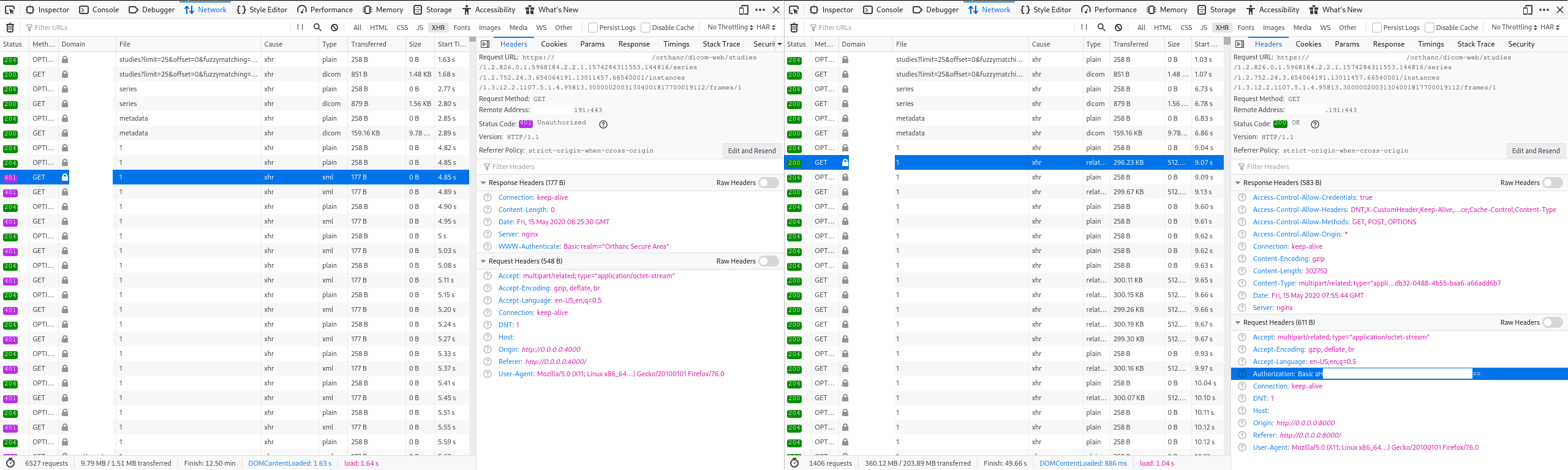
I’ve included two screenshots of the XHR requests of the embedded and the production viewer below. Embedded is on the left, production on the right. The first screenshot compares the CORS preflight requests. The second the actual requests for retrieving the dicom instances. Note that already in the CORS preflight requests, the Access-Control-Request-Headers header does not include authorization in the embedded viewer. It does in the standalone. In the actual requests, the authorization header is missing in the embedded viewer.
Describe the Bug
Embedded viewer does not include Authorization headers for dicom-web dicom instance requests
What steps can we follow to reproduce the bug?
- Setup an embedded ovif viewer coupled with a dicom-web server that expects Authorization (basic) headers
- Try to view a dicom series in the viewer
- The viewer fails to render, inspection of the network traffic reveals 401 Unauthorized responses
  <script src="https://unpkg.com/@ohif/viewer" crossorigin></script>
  <script>
    var containerId = "root";
    var componentRenderedOrUpdatedCallback = function(){
      console.log('OHIF Viewer rendered/updated');
    }

window.config = {
  // default: '/'
  routerBasename: '/',
  extensions: [],
  showStudyList: true,
  filterQueryParam: false,
  servers: {
    dicomWeb: [
      {
        name: 'scorthanc',
        wadoUriRoot: 'https://orthanc.yyy.zzz/orthanc/wado',
        qidoRoot: 'https://orthanc.yyy.zzz/orthanc/dicom-web',
        wadoRoot: 'https://orthanc.yyy.zzz/orthanc/dicom-web',
        qidoSupportsIncludeField: true,
        imageRendering: 'wadors',
        thumbnailRendering: 'wadors',
        requestOptions: {
          auth: 'user:password',
        },
      },
    ],
  },
  cornerstoneExtensionConfig: {},
  // Following property limits number of simultaneous series metadata requests.
  // For http/1.x-only servers, set this to 5 or less to improve
  //  on first meaningful display in viewer
  // If the server is particularly slow to respond to series metadata
  //  requests as it extracts the metadata from raw files everytime,
  //  try setting this to even lower value
  // Leave it undefined for no limit, sutiable for HTTP/2 enabled servers
  // maxConcurrentMetadataRequests: 5,
};

    window.OHIFViewer.installViewer(
      window.config, containerId, componentRenderedOrUpdatedCallback);
	</script>
Details of a preflight CORS request (embedded left, production build right):

Details of a dcm instance request (embedded left, production build right):
About this issue
- Original URL
- State: closed
- Created 4 years ago
- Reactions: 2
- Comments: 21 (2 by maintainers)
https://github.com/OHIF/Viewers/blob/709f14708e2b0f912b5ea509114acd87af3149cb/platform/viewer/src/config.js#L45-L60
At line 47 I’ve managed to workaround this issue by passing to
getAuthorizationHeadermy dicomWeb configuration as follows:salam , in config.js try change this code :
beforeSend: function(xhr) {const headers = OHIF.DICOMWeb.getAuthorizationHeader();if (headers.Authorization) {xhr.setRequestHeader('Authorization', headers.Authorization);}},to this :beforeSend: function (xhr) {debuggerconst state = window.store.getState();const activeServer = state.servers.servers.find(t => t.active);const headers = OHIF.DICOMWeb.getAuthorizationHeader(activeServer);debuggerif (headers.Authorization) {xhr.setRequestHeader('Authorization', headers.Authorization);}},the answer is here: https://cloud.google.com/healthcare/docs/how-tos/authentication
I started a new firebase project from scratch. the usual way is to set an endpoint to retrieve it (your token). because you need to sign it using your service account RSA private key. so you need to keep it safe.
I used cloud functions with express for creating an api.
this.http.get(this.api + '/sign', { responseType: 'text' }).subscribe( result => this.token = result );then you have to use the ‘requestOptions’ parameter on the ohif servers settings (remove odic);
token needs to be signed and include a valid date/expiration
see:
https://jwt.io/ https://firebase.google.com/docs/auth/admin/create-custom-tokens https://github.com/auth0/node-jsonwebtoken (used to sign the token)