ngx-highlightjs: Unable to load hljs library TypeError: hljs.registerLanguage is not a function
Bug Report or Feature Request (mark with an x)
- [X] bug report -> please search issues before submitting
- [ ] feature request
- [ ] question
OS and Version?
MacOS Catalina version 10.15.3
Versions
Angular CLI: 9.1.4 Node: 12.16.1 OS: darwin x64
Repro steps
I just followed the steps given in the documentation https://www.npmjs.com/package/ngx-highlightjs#import-highlighting-languages
Below is my app.module.ts file
import { BrowserModule } from '@angular/platform-browser';
import { NgModule } from '@angular/core';

import { HighlightModule, HIGHLIGHT_OPTIONS } from 'ngx-highlightjs';

import { AppRoutingModule } from './app-routing.module';
import { AppComponent } from './app.component';
import { NoInternetComponent } from './components/no-internet/no-internet.component';
import { HomeComponent } from './components/home/home.component';
import { DateExtensionComponent } from './components/date-extension/date-extension.component';

/**
 * Import specific languages to avoid importing everything
 * The following will lazy load highlight.js core script (~9.6KB) + the selected languages bundle (each lang. ~1kb)
 */
export function getHighlightLanguages() {
  return {
    typescript: () => import('highlight.js/lib/languages/typescript'),
    css: () => import('highlight.js/lib/languages/css'),
  };
}

@NgModule({
  declarations: [
    AppComponent,
    NoInternetComponent,
    HomeComponent,
    DateExtensionComponent
  ],
  imports: [
    BrowserModule,
    AppRoutingModule,
    HighlightModule
  ],
  providers: [
    {
      provide: HIGHLIGHT_OPTIONS,
      useValue: {
        languages: getHighlightLanguages()
      }
    }
  ],
  bootstrap: [AppComponent]
})
export class AppModule { }
The log given by the failure
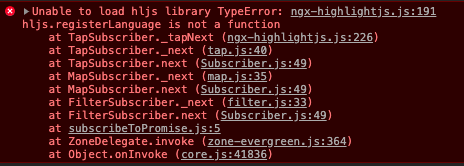
Desired functionality
I should not see the above-shown error in the browser console and the library should work properly.
Mention any other details that might be useful
About this issue
- Original URL
- State: closed
- Created 4 years ago
- Reactions: 7
- Comments: 19 (3 by maintainers)
Guys, I just noticed a change in highlight.js@10.x.x, if you are using the latest version of highlight.js, use
highlight.js/lib/coreinstead ofhighlight.js/lib/highlightI will update the docs!
So the issue is closed because there is workaround? is it possible to fix the issue before finally closing this?
work ok!
To workaround the issue you can use version 9 of highlight.js:
Don’t understand why this has been closed, because the issue definitely still exists. The downgrading to highlight.js 9.18.1 workaround worked for me. So I’m good, but I hate hacky workarounds. 😦
I agree with @cmer4. It should automatically resolve and install the correct dependencies.
I was facing the same issue when I visited the stackblitz demo here https://stackblitz.com/edit/ngx-highlightjs?file=src%2Fapp%2Fapp.module.ts they are using the latest beta version and it’s working fine.
see the app.module.ts how they have used with some extra packages
package.json
app.module.ts
import * as hljs from 'highlight.js';(document.defaultView as any).hljs = hljs;it has fixed my issue. Hope it will be helpful.