ngx-highlightjs: Import only 1 highlighting language not working
- [x] bug report -> please search issues before submitting
- [ ] feature request
- [ ] question
OS and Version?
macOS Catalina
Versions
Angular CLI: 9.0.4 Node: 13.2.0 OS: darwin x64
Angular: 9.0.4 … animations, cli, common, compiler, compiler-cli, core, forms … language-service, platform-browser, platform-browser-dynamic … router Ivy Workspace: Yes
Package Version
@angular-devkit/architect 0.900.4 @angular-devkit/build-angular 0.900.4 @angular-devkit/build-optimizer 0.900.4 @angular-devkit/build-webpack 0.900.4 @angular-devkit/core 9.0.4 @angular-devkit/schematics 9.0.4 @angular/cdk 9.1.0 @angular/material 9.1.0 @angular/material-moment-adapter 9.1.0 @ngtools/webpack 9.0.4 @schematics/angular 9.0.4 @schematics/update 0.900.4 rxjs 6.5.4 typescript 3.7.5 webpack 4.41.2
Repro steps
In a lazy loaded module I imported HighlightModule and there I defined the provider for HIGHLIGHT_OPTIONS like so?:
  providers: [
    {
      provide: HIGHLIGHT_OPTIONS,
      useValue: {
        languages: getHighlightLanguages(),
      },
    },
  ],
and the function also on that file:
function getHighlightLanguages() {
  return {
    json: () => import('highlight.js/lib/languages/json'),
  };
}
then when I run ng build --prod --stats-json and then webpack-bundle-analyzer dist/stats.json
I got this:

Desired functionality
Only core lib + json language is imported into the prod bundle and not all the languages
Thank you in advance for any help!
About this issue
- Original URL
- State: closed
- Created 4 years ago
- Reactions: 3
- Comments: 23 (10 by maintainers)
@MurhafSousli that’s the problem, if you import the whole library then this causes all applications that use your library to compile the whole thing. So even though is not loaded on the client side it is unnecessary.
My suggestion is, instead of you use
import('the whole library')you could first check if the consumer app is requiring some language (maybe checkingHIGHLIGHT_OPTIONS), if not, then you could throw some exception.If we think about this, rather any application would need to feature highlight all the languages right? I would say that by default this library should only load the languages specified by the consumer. It’s only my opinion, you’re the library creator, so you should decide if makes sense 😃
@x1c0 @MurhafSousli Another solution could be to load only 2-3 popular, predefined languages by default. And this could be extend by further configuration. (So it won’t throw exception… just an idea)
@x1c0 I am open for changes
@istibekesi Yes, I do, but it is not loaded!
@MurhafSousli @x1c0 In my dist folder I can see 3 bundles related to this. Most probably, the 2 small ones are
highlight.jsincluding only the configured languages and thehighlightjs-line-numbers.js. The 3rd big bundle (parsed size is approx 860kB) includes all the languages though. It seems it is not loaded indeed, but it is definitely part of the build.@MurhafSousli - can you check if you can find such a big bundle in your dist folder?
Two small bundles:
Third big one: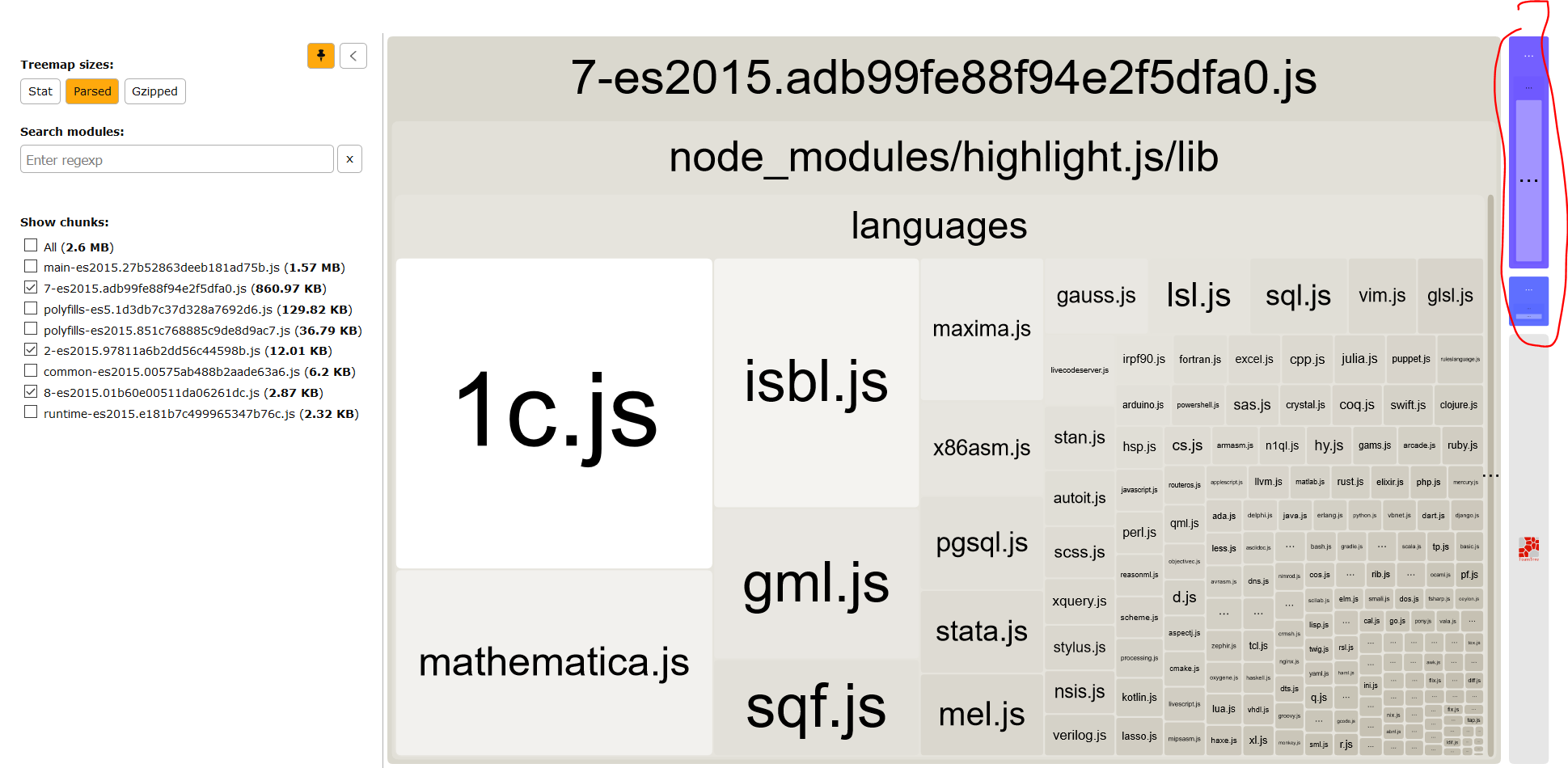
Hi
The same issue reproduces for me. I selected only 6 six languages in the provider config. But it seems that generated bundle (about 800 kb) contains all the languages included in Highlight.js
Angular: 9.0.7 (Ivy)