mne-python: Bug in vector source estimate plotting
Describe the bug
This was reported to me by @rythorpe. The vector source estimate does not plot arrows for the somato data.
Steps and/or code to reproduce
Here is a gist to reproduce the problem. I don’t see any issue with the script. Indeed, if you do:
print(stc)
you get:
<VectorSourceEstimate | 8155 vertices, subject : 01, tmin : -199.79521315838787 (ms), tmax : 199.79521315838792 (ms), tstep : 3.3299202193064645 (ms), data shape : (8155, 3, 121)>
and if you do:
print(stc.data.shape)
you get:
(8155, 3, 121)
indicating that the stc is vector.
Expected results
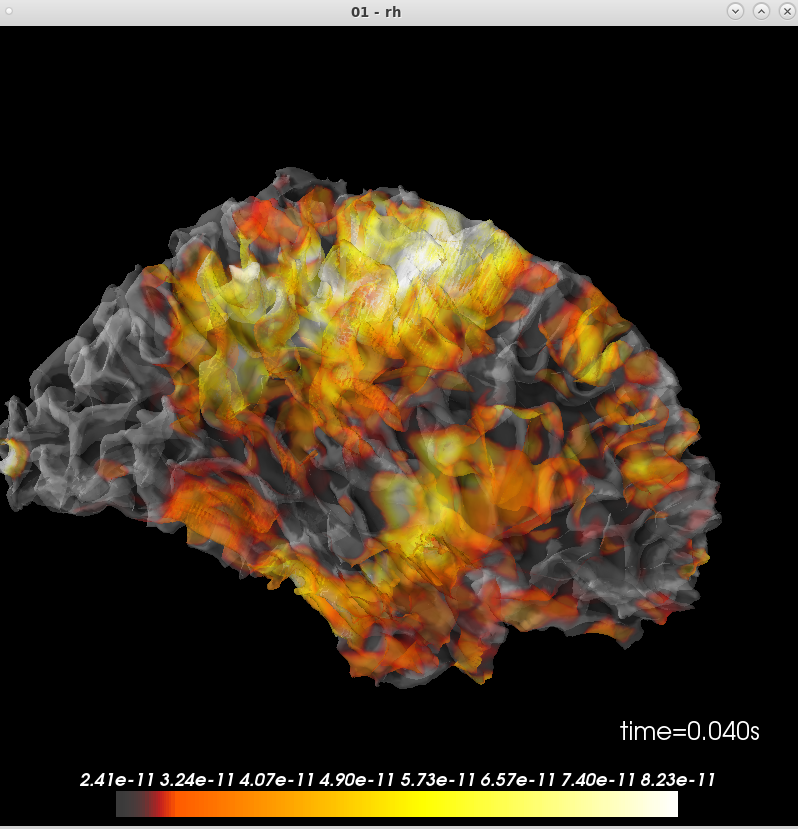
There should be an arrow plot
Actual results
but the plot shows:
Additional information
I’m on the latest master, commit 42948689e.
and mne.sys_info() gives:
Platform:      Linux-3.10.0-957.1.3.el7.x86_64-x86_64-with-centos-7.6.1810-Core
Python:        3.6.7 | packaged by conda-forge | (default, Feb 28 2019, 09:07:38)  [GCC 7.3.0]
Executable:    /autofs/space/meghnn_001/users/mjas/anaconda3/envs/mne/bin/python
CPU:           x86_64: 64 cores
Memory:        125.3 GB

mne:           0.20.dev0
numpy:         1.15.4 {blas=mkl_rt, lapack=mkl_rt}
scipy:         1.2.1
matplotlib:    3.0.2 {backend=Qt5Agg}

sklearn:       0.20.2
numba:         Not found
nibabel:       2.3.3
cupy:          Not found
pandas:        0.24.1
dipy:          0.15.0
mayavi:        4.7.0.dev0 {qt_api=pyqt5, PyQt5=5.9.2}
pyvista:       Not found
vtk:           8.1.2
About this issue
- Original URL
- State: closed
- Created 5 years ago
- Comments: 18 (18 by maintainers)
@GuillaumeFavelier feel free to try out the 3D version to see if you can get something satisfying. We can have an option for
glyph='arrow2d' | 'arrow3d'or so if it ends up looking goodI haven’t looked at how this is currently handled in the code, so maybe this is a dumb idea, but it seems to me that you will never want your longest arrow to be longer than, say, 1/5 the width of a cerebral hemisphere at most. Would it be enough to always scale such that the longest arrow ends up that size?
On November 5, 2019 8:24:08 AM PST, Mainak Jas notifications@github.com wrote:
@GuillaumeFavelier maybe can you have a look? thanks