vscode: Unexpected show snippets once enter key pressed without prefix
- VSCode Version: 1.26.1
- OS Version: macOS 10.13.6
Steps to Reproduce:
- I have a customized user snippet file
vue.json:
{
  "i18n support": {
    "prefix": "i18n",
    "body": [
      "<i18n>",
      "{",
      "\t\"zh\": {",
      "\t\t$1",
      "\t},",
      "\t\"en\": {",
      "\t\t$2",
      "\t}",
      "}",
      "</i18n>"
    ],
    "documentation": "vue-i18n support"
  }
}
- Open a
vuefile, and pressenterkey. It will jump to a new line and showi18nsnippet even I don’t typei18nprefix.
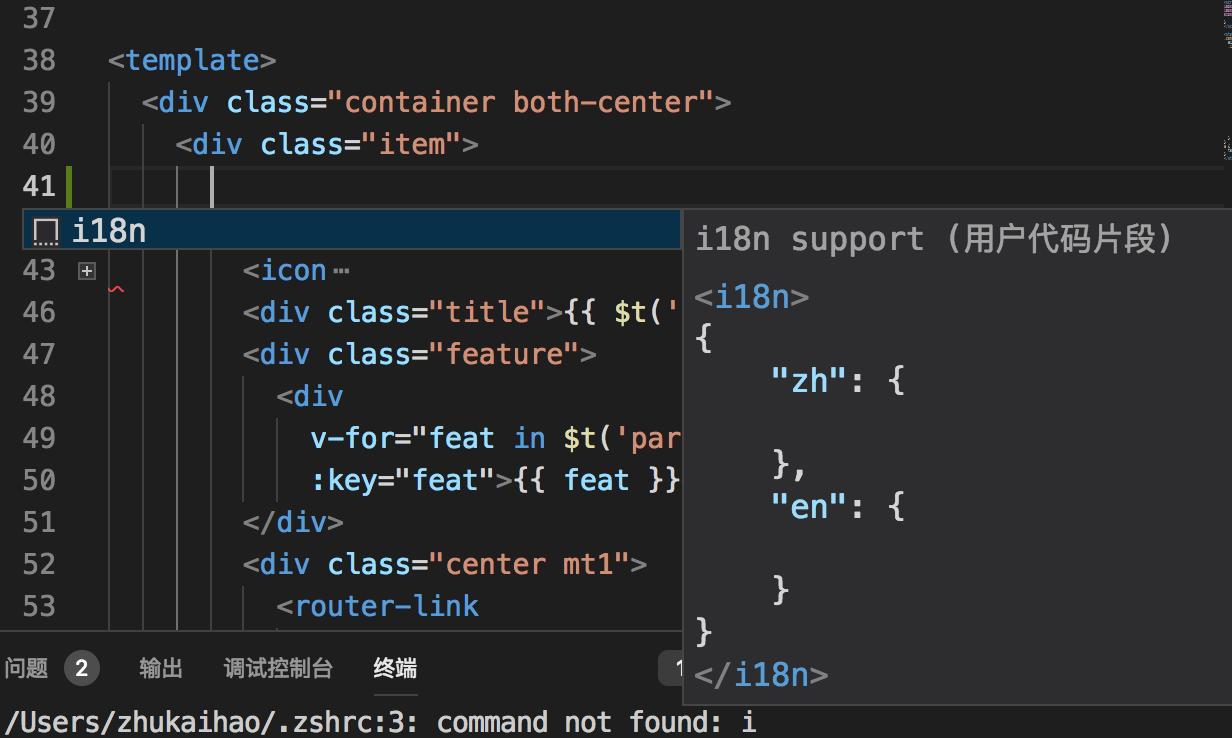
It happens when I update to the latest version. In previous version the snippet will appear only when I type i18n. Now it shows whenever I press enter. I have to disabled it.
I have searched relevant documents and questions but have no solution. Could you please view that? I will appreciate.
Does this issue occur when all extensions are disabled?: No
About this issue
- Original URL
- State: closed
- Created 6 years ago
- Comments: 26 (13 by maintainers)
I write the snippet definition in
html.jsonafter setting language mode asHTMLand the editor shows the snippet as expected. Just pressenterwon’t show it: