vscode: unexpected colour overlay when revealing active file in explorer
- VSCode Version: 1.51.1
- OS Version: Darwin x64 19.6.0
Steps to Reproduce:
- I have these colour codings.
"workbench.colorCustomizations": {
    ...
    "list.activeSelectionBackground": "#1a1a1a",
    "list.activeSelectionForeground": "#848484",
    "list.focusBackground": "#1a1a1a",
    "list.focusForeground": "#848484",
    "list.highlightForeground": "#2979FF",
    "list.hoverBackground": "#1a1a1a",
    "list.hoverForeground": "#848484",
    "list.inactiveFocusBackground": "#1a1a1a",
    "list.inactiveSelectionBackground": "#1a1a1a",
    "list.inactiveSelectionForeground": "#848484",
    ...
}
- I have this keyboard shortcut.

- With
ctrl+eI am switching focus between explorer and editor. Here you see that the background and foreground colours change in ways the theme is not configured. My expectation would be that the foreground colour of the untracked file stays greenish. My expectation would be that the background of the focussed explorer column remains to be#1a1a1a. Though what happens is that foreground changes and background gets overlaid with some magic layer that I cannot identify. I cannot find any configuration to fix this. I could not identify anything obvious to me in the DOM and CSS when inspecting with the developer tools. Any help with this is appreciated.
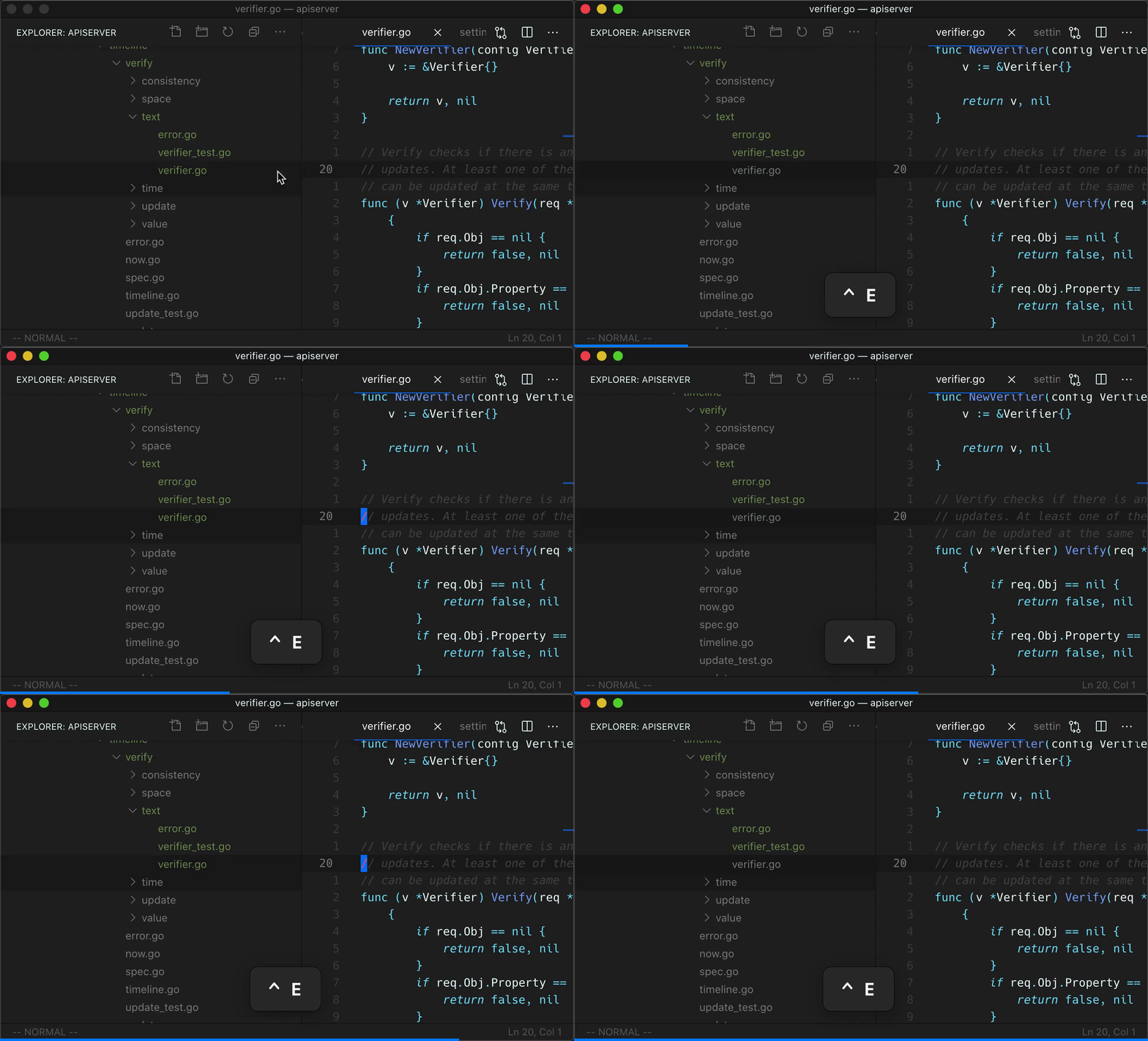
Does this issue occur when all extensions are disabled?: Yes
About this issue
- Original URL
- State: closed
- Created 4 years ago
- Comments: 19 (11 by maintainers)
@joaomoreno There is code that creates (and removes) dynamic CSS for different combinations of decorations: asDecoration is a good start for reading into this
@jrieken Where in the code do we inject label decoration foreground color? I want to make sure that wins over the list foreground color.
I think this got fixed with one of the recent releases. Can anyone confirm work happened so that it wasn’t an accident? On my end I see a more consistent shading. The experience is now solid. Though I noticed the command palette colours changed, which I had to fix like this to accommodate my custom colour scheme.
yea I think we added this because we didn’t want to add another color token, since the list already has so many tokens. I think it makes sense to keep the row selection stable regardless of focus and adding a new color token, but would have to try this out first. I just attempted to do this to play with it but got lost multiple times with the selection/focus logic 🤷♂️
Got it, there is indeed an issue here. Thanks for the persistence @xh3b4sd. The problem started in https://github.com/microsoft/vscode/commit/37e74c3135364bcbb8e5769aa1d9bef8c4179fd4 with: https://github.com/microsoft/vscode/blob/master/src/vs/platform/theme/common/styler.ts#L241
There is an implicit darkening of the list row selection background color, when the list doesn’t have DOM focus. @misolori Should we instead keep the row selection background color stable, regardless of DOM focus, and just have a default lighter color for
listFocusAndSelectionBackground, and expose that as a customizable theme color?