vscode: High CPU Usage (Windows)
Issue Type: Bug
If I launch VS Code and use “Open Folder” on a certain project’s folder then VS Code repeatedly and indefinitely spawns a child WMI process very ~1 second that eats up a lot of CPU. The query it runs is “wmic process get CommandLine,CreationDate,ParentProcessId,ProcessId”.
I tried to track it down myself to no avail. I’ve tried --disable-extensions as well as -n, same issue.
Can’t see what’s special about the project either (Not using autoAttachChildProcesses).
Any idea what could be causing this?
VS Code version: Code 1.27.2 (f46c4c469d6e6d8c46f268d1553c5dc4b475840f, 2018-09-12T16:17:45.060Z) OS version: Windows_NT x64 10.0.17134
About this issue
- Original URL
- State: closed
- Created 6 years ago
- Reactions: 10
- Comments: 18 (5 by maintainers)
A coworker of mine discovered that we had the workspace setting “debug.node.autoAttach” set to true. Setting this to either “off” or “disabled” stops the wmic.exe “spam”.
I tracked it down to here: https://github.com/Microsoft/vscode-node-debug/blob/493460bf3a96f31887f35dc5fd52a092bc04a670/src/node/extension/processTree.ts#L76
Which is called repeatedly within a setTimeout with a timeout of 1000 here: https://github.com/Microsoft/vscode-node-debug/blob/master/src/node/extension/autoAttach.ts#L148
Interesting that I even ran into this issue because that extension’s README says
I’m using Node.js v10.9.0.
Not sure if you’d like me to just close this issue and create an issue in that repository instead. Please advice. 😃
@RMacfarlane yes, “wmic” is used for the “auto-attach” feature. Since this feature is implemented in an extension, it cannot use the “windows-process-tree” module because that uses native code.
@SimonGustavsson So the workaround is: turn auto-attach off if it results in lots of CPU load. In general the “wmic” call does not produce significant load. But a few users see a lot of load for unknown reasons.
Oh wow, I’ve been lamenting for the past few weeks how my laptop has constant fan when it’s plugged in and a VS Code instance is running. Unplug the laptop --> fan near-instantly off. I’ve been using my plugged-in laptop (doing nothing in VS Code, but it was open-launched) for the past hour and the fan has been on the whole time. I just pressed Auto Attach in the status bar (toggled it to Off) fan stopped in <10 seconds!
(In the past weeks I tried modifying my laptop’s plugged-in power settings to be like the battery settings, but that never seemed to help with reducing the fan while it was plugged in).
Disabling the node auto attach worked for me as well after about a week of trouble. The issue may have started for me when I installed nvm and started switching node versions a while back. I’ve been running node 12.13.1 and was having nearly constant 100% CPU usage merely opening vscode before even running any node processes. I almost switched to VIM. So glad for this github issue that saved me.
I just fixed my WMIC issue by turning of auto attach with the following versions (thx for the tip)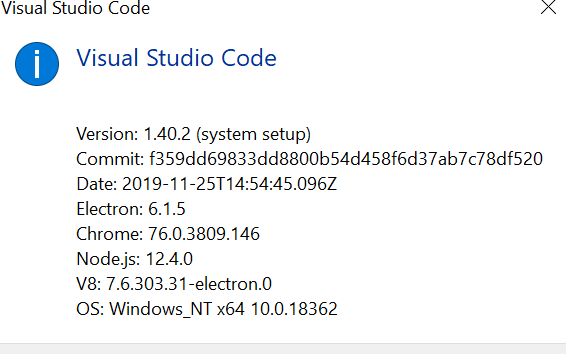
@SimonGustavsson Thank you so much (and thank your coworker), you saved me from hours of continued frustration with “WMIC.exe” and high CPU consumption. I indeed, had recently changed that debug setting to true, resulting in this, and failing to pinpoint the source:
Changing that setting to “off” and the WMIC.exe process is gone, finally. You now have a permanent line in my settings file! 😉