PowerToys: [PT Run] VSCode workspaces doesn't show workspaces
Microsoft PowerToys version
“0.51.1”
Running as admin
- Yes
Area(s) with issue?
PowerToys Run
Steps to reproduce
-
Open a workspace from a .code_workspace file.
-
Attempt to use PT Run
{command to open the code_workspace
PowerToysReport_2021-12-09-09-58-28.zip
✔️ Expected Behavior
I’m expecting workspaces to show in powertoys run not just folders.
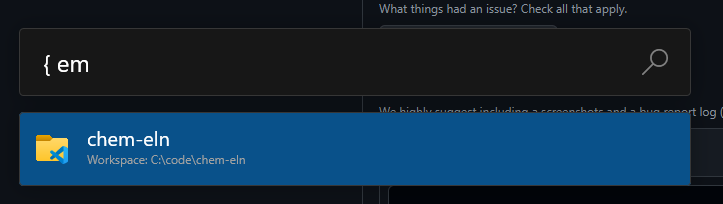
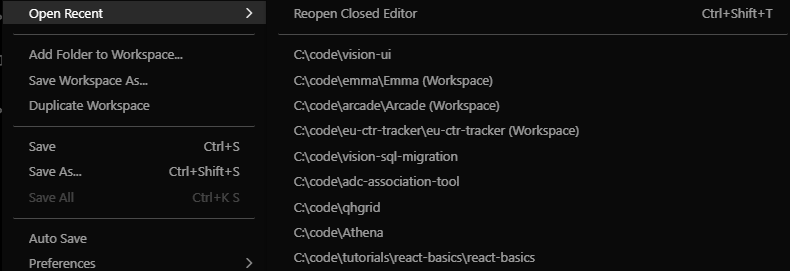
In the example below { em should show Emma (Workspace) as an option
❌ Actual Behavior
Searching for “emma” gives no results in PTR, despite being in my recently opened list.
Other Software
VSCode 1.63.0 (user setup)
About this issue
- Original URL
- State: closed
- Created 3 years ago
- Reactions: 2
- Comments: 15 (5 by maintainers)
Commits related to this issue
- #14931 Show previous opened VSCode workspaces — committed to ricardosantos9521/PowerToys by ricardosantos9521 3 years ago
- #14931 Show previous opened VSCode workspaces (#15108) — committed to microsoft/PowerToys by ricardosantos9521 3 years ago
The was fixed in in 0.53. Head over to https://aka.ms/installpowertoys to try it out
Yes, for the duplication it will solve the issue, i think.
For the rest we need to develop a solution. We have two options:
@costeabc Can you go to the control panel and see if you only have “Microsoft Visual Studio Code (User)” installed or do you have the admin version too?
I can repro this. The difference here is that this is a saved workspace (file). If I am correct all the other entries (without
workspace) in it`s name should work. Is this correct?After repro I have this data in the json: