uptime-kuma: Invalid Date displayed on UI
⚠️ Please verify that this bug has NOT been raised before.
- I checked and didn’t find similar issue
🛡️ Security Policy
- I agree to have read this project Security Policy
Description
I just noticed that I have this display errors in the UI:
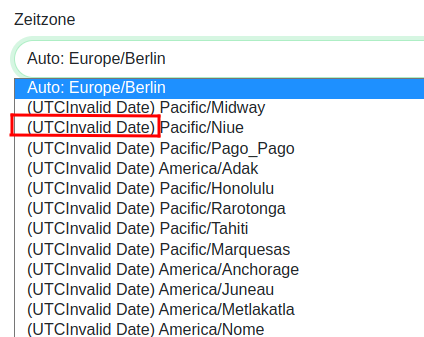

I tried to look into the DB but the datestamps look alright:
sqlite> select * from heartbeat limit 10;
1|1|1|1|200 - OK|2022-09-12 08:19:02.186|223|0|0
2|0|1|1|200 - OK|2022-09-12 08:20:02.420|174|60|0
3|0|1|1|200 - OK|2022-09-12 08:21:02.602|164|60|0
4|0|1|1|200 - OK|2022-09-12 08:22:02.774|199|60|0
5|0|1|1|200 - OK|2022-09-12 08:23:02.982|270|60|0
6|0|1|1|200 - OK|2022-09-12 08:24:03.262|324|60|0
7|0|1|1|200 - OK|2022-09-12 08:25:03.595|190|60|0
8|0|1|1|200 - OK|2022-09-12 08:26:03.796|189|60|0
9|0|1|1|200 - OK|2022-09-12 08:27:03.994|205|60|0
10|0|1|1|200 - OK|2022-09-12 08:28:04.210|152|60|0
Kind regards, Alex
👟 Reproduction steps
Just started with docker-compose without any specialties.
👀 Expected behavior
The UI should show the correct timestamps
😓 Actual Behavior
All timestamps show Invalid Date
🐻 Uptime-Kuma Version
1.18.5
💻 Operating System and Arch
Ubuntu 20.04
🌐 Browser
Chromium
🐋 Docker Version
Docker version 20.10.20, build 9fdeb9c
🟩 NodeJS Version
No response
📝 Relevant log output
No response
About this issue
- Original URL
- State: closed
- Created 2 years ago
- Reactions: 2
- Comments: 15 (7 by maintainers)
The person who decided to create so many space characters and the no-width character should be put in jail honestly.
It is not the first time that create a trouble for me and it is not the last time too I believe.
I just decided to fix it in Uptime Kuma first by copying the timezone plugin from dayjs.
Thanks for the hint! Arch and Gentoo are rolling release, and Firefox and Chromium uses node.js IIRC, so I googled and I think I found the cause: https://github.com/nodejs/node/issues/45171 and https://github.com/nodejs/node/issues/45753.
I guess the environment with this problem (including you and me) have ICU 72.1 installed and browsers are using it. The issues are closed and the fix will be released eventually (maybe with Node.js v19.2.0?).
Wao thanks for that, I will report Upstream and to the Arch devs. The character is a https://www.compart.com/en/unicode/U+202F so a non breaking small space. Semantically this makes totally sense, but from a coder point of view I totally get why this is …, lets call it problematic 😉. I guess there is some configuration locale default that has a format string set to this, as Archlinux is very close to upstream it might happen on other distros and OS’s too once the dependency that causes this is updated. So really nice you found this early. From my point of view you can close this issue, I will refer to it in the upstream reports.
Ok, I just checked with Manjaro and I get the same behavior as on my System. This was a clean Manjaro VM with German locales and Europ/Berlin timezone.