lottie-react-native: Unable to build with React Native 0.61
Description
Installed lottie-react-native into our react native project. Although we’re using RN 0.61, we were unable follow the latest steps so had to add them in manually.
We have added both packages to our package.json file and added the following lines to our Podfile
pod 'lottie-react-native', :path => '../node_modules/lottie-react-native'
pod 'lottie-ios', '~> 3.1.3'
When we build, we get the following errors:
Undefined symbols for architecture x86_64:
  "_swift_getFunctionReplacement", referenced from:
      _swift_getFunctionReplacement50 in libswiftCompatibilityDynamicReplacements.a(DynamicReplaceable.cpp.o)
     (maybe you meant: _swift_getFunctionReplacement50)
  "_swift_getOrigOfReplaceable", referenced from:
      _swift_getOrigOfReplaceable50 in libswiftCompatibilityDynamicReplacements.a(DynamicReplaceable.cpp.o)
     (maybe you meant: _swift_getOrigOfReplaceable50)
ld: symbol(s) not found for architecture x86_64
clang: error: linker command failed with exit code 1 (use -v to see invocation)
About this issue
- Original URL
- State: closed
- Created 5 years ago
- Reactions: 15
- Comments: 19
I solved the problem in that way.
yarn add lottie-react-nativeyarn add lottie-ios@3.1.3pod install (in the ios folder of course)
open .xcworkspace file
Select your project folder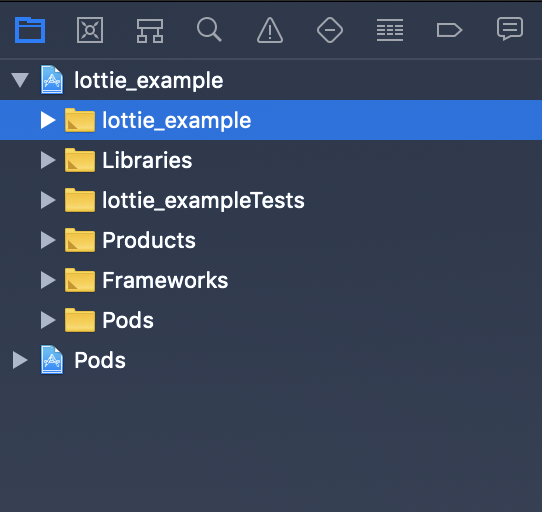
Create new Swift File (remember the targets)
It will automatically appear this view -> Specify “Create Bridging Header”.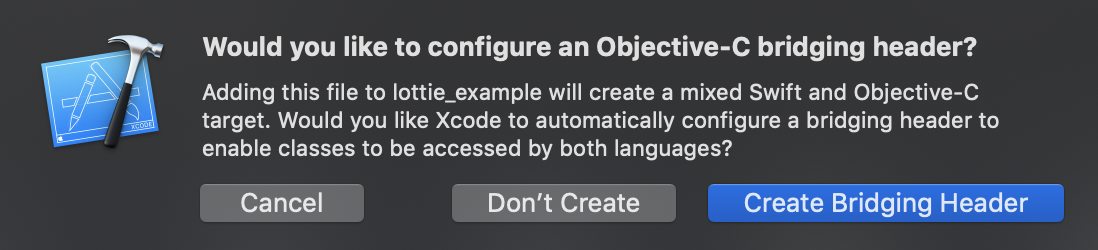
Go to your project Build Settings, you should see those stuffs.
Clean your project and run
AND ADD THIS WORK FOR ME:
remove “Library search paths” $(TOOLCHAIN_DIR)/usr/lib/swift/$(PLATFORM_NAME) OR/AND remove “Library search paths” $(TOOLCHAIN_DIR)/usr/lib/swift5.0/$(PLATFORM_NAME)
I added another step to the subordinate step。
Simultaneously,set Dead Code Stripping to YES
This work for me
@roubo
This was the culprit:
^^ That doesn’t fix it for me. Any other ideas?
you need to create File Swift Bridging header. here: https://stackoverflow.com/questions/37268368/swift-bridging-header-file-wont-work-with-use-frameworks
I have the same issue. Build works fine but have this issue when try to create an archive. Swift file and bridge header already created. Tried to use the latest version and the one that in the post above.