longhorn: [BUG] Volume unable to recover when upgrading several StatefulSets
A volume is stuck with Unknown health, and several can’t be mounted because they’re already attached. This probably happened after restarting the Longhorn manager instances.
Warning FailedAttachVolume 3m22s (x36 over 60m) attachdetach-controller AttachVolume.Attach failed for volume “pvc-ef1550da-b248-4b74-995f-4af189bfcfaa” : rpc error: code = Aborted desc = The volume pvc-ef1550da-b248-4b74-995f-4af189bfcfaa is already attached but it is not ready for workloads
and
Warning FailedAttachVolume 3m5s (x36 over 60m) attachdetach-controller AttachVolume.Attach failed for volume “pvc-1a16cfdb-6b14-472a-a104-c8a654da0102” : rpc error: code = FailedPrecondition desc = The volume pvc-1a16cfdb-6b14-472a-a104-c8a654da0102 cannot be attached to the node connect-b since it is already attached to the node connect-a
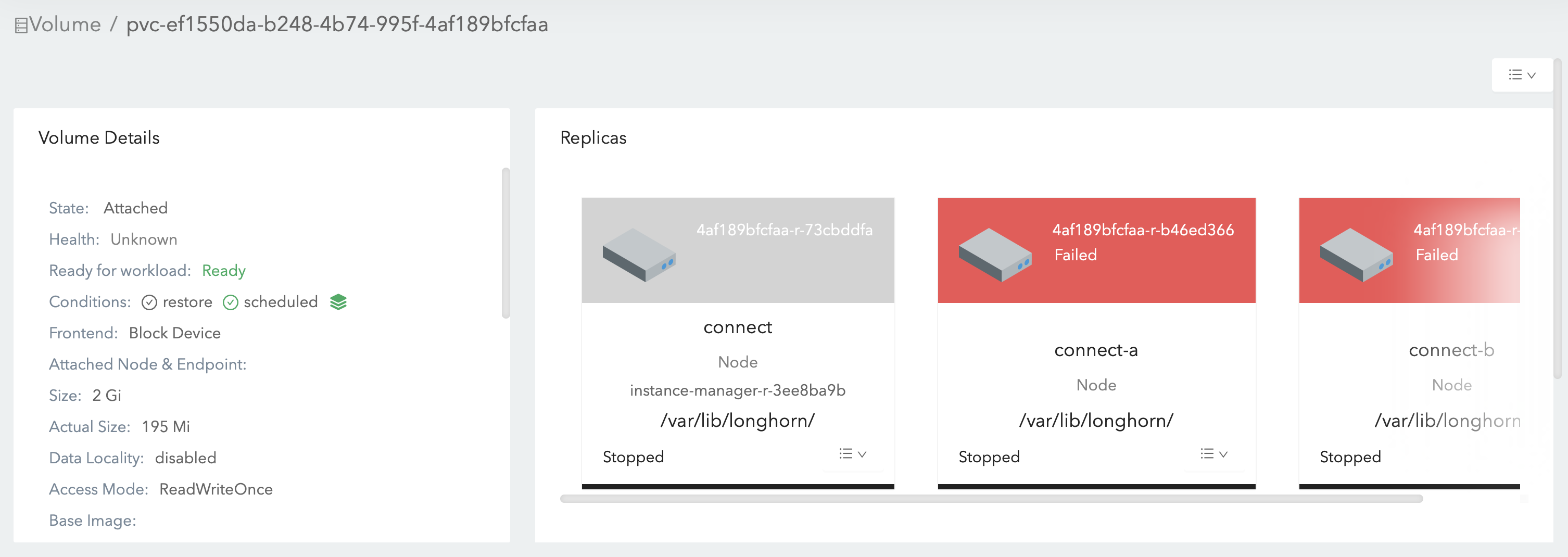
I’m surprised they aren’t automatically fixed based on https://longhorn.io/docs/1.1.0/high-availability/recover-volume/.
Version: v1.1.0
Support bundle attached: longhorn-support-bundle_ee48a964-d6ec-4141-af7a-84f62c5cea44_2021-03-11T21-31-07Z.zip
About this issue
- Original URL
- State: closed
- Created 3 years ago
- Comments: 19 (12 by maintainers)
I was able to recover all volumes by: stopping the pods attempting to use them, detaching the volumes in the UI, then starting the pods.
Ideally this would be done automatically.
For volume
pvc-ef1550da-b248-4b74-995f-4af189bfcfaa-e-b5bb8817Workaround: Directly delete the longhorn manager pod on node
connect-athat the volume/engine is also on. Then Longhorn will automatically restart the longhorn manager pod, mark the volume asFaulted, then recover the volume.Root cause:
errorbut the engine is still staterunning. Ideally, the engine should error out and the volume should becomeFaulted, then auto salvage will help recover the volume. But the fieldspec.failedAtin replicapvc-ef1550da-b248-4b74-995f-4af189bfcfaa-r-73cbddfais empty, which doesn’t match its stateerror. This replica blocks the flow.currentreplicaaddressmap:pvc-ef1550da-b248-4b74-995f-4af189bfcfaa-r-73cbddfa: 10.32.0.8:10015. But somehow there is no record in enginereplicamodemap. Based on the implementation, Longhorn will rely on the record inreplicamodemapto setspec.failedAtfor the replica. Actually the replica is still in the engine process with modeERRconnect-astops monitoring the engine and cleans upreplicamodemap,endpoint, as well as some other fields. I am not sure if the wrong owner id change is caused by the cluster node inconsistency. e.g.: There is a node disconnected from others but the longhorn manager on this node considers that other nodes as unavailable and itself is still healthy.connect-agets the engine back later. But the engine controller on this node didn’t restart the monitoring. This is a longhorn bug: When the current engine controller stops the monitoring with this function(due to the owner ID), the engine monitor map is not cleaned up. When the engine is back later, the engine controller will wrongly consider that it’s still monitoring the engine.For volume
pvc-1a16cfdb-6b14-472a-a104-c8a654da0102Workaround: Manually detach the volume (via Longhorn UI) and clean up the related VolumeAttachment
csi-569be94630dc21616bb66ba5383a0930da5a6d0537f29457642d021d9a4cf5b0:Then wait for Kubernetes to retry the attachment for the workload.
Root cause: When the volume is crashed then becomes detached (the crash seems to be caused by the instance manager pod crash), Kubernetes sends a CSI detach request to the CSI plugin. At that time, though
spec.nodeIDis not empty, the volume is temporarily becomedetachedthen the plugin will wrongly response that the detachment success. As a result, Kubernetes considers this volume as ready to be attached to another node. This is also a Longhorn bug. And I had encountered and reported this bug before. But I cannot find the issue number.@joshimoo Is this good to test as I see https://github.com/longhorn/longhorn-manager/pull/854 is not merged ?
Update: https://github.com/longhorn/longhorn-manager/pull/854 is merged now.
Reproduce steps:
Problem 01: kubernetes + longhorn out of sync
Problem 02: salvage deadloop preventing volume updates
Problem 03: monitoring / ownership issue, @PhanLe1010 is working on this in https://github.com/longhorn/longhorn-manager/pull/854
Test Setup: This fixes issues with salvage of multiple replicas as well, it’s just easier to test with a single replica case.
Test steps: