longhorn: [BUG] Scheduled backups didn't complete and leave tons of snapshots behind
Hi guys, don’t know if it is a bug or not. Most of the 37 volumes running at the K8s cluster had some backup schedule assigned to.
About 9 of them are suffering from some issue where the backup operation didn’t occur and leave behind a lot of snapshots (4 snapshots for each backup execution for each volume) and they must be deleted manually, pretty much like in #1826
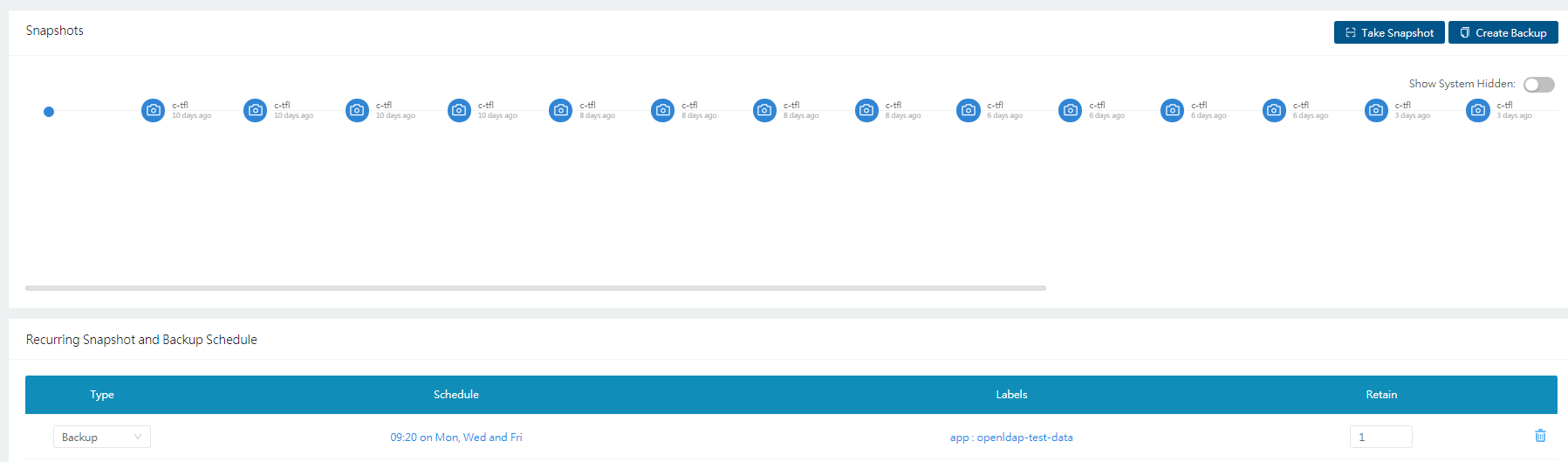 And the backup doesn’t occur:

What I noticed is that the pod created by the job to run the backup fails; each time this pod runs it takes a snapshot then fail and restart, it does this 4 times and this is why I come up with 4 new snapshots each backup run.
I’d picked one workload, stopped then started its pod and run again a scheduled backup. It ran ok. But this doesn’t worked for all the others. These 9 volumes hosts 2 types of workloads but I have other volumes for the same workload types that runs its scheduled backups ok. Other thing to consider is that some of them are ‘old’ and others were created a few days ago. The failing backup pods throw this error before restart:
time="2020-12-02T13:05:57Z"
level=fatal msg="Error taking snapshot: failed to complete backupAndCleanup for pvc-c0acdcbc-f258-4764-8ef5-68214842df74: Post \"http://longhorn-backend:9500/v1/volumes/pvc-c0acdcbc-f258-4764-8ef5-68214842df74?action=snapshotCreate\": context deadline exceeded (Client.Timeout exceeded while awaiting headers)"
Any idea of what is happening? How can I diagnose / debug what’s going on at the backup pod or the volume itself?
Thanks for the attention and best regards, Fabio Carvalho
About this issue
- Original URL
- State: open
- Created 4 years ago
- Comments: 34 (20 by maintainers)
@innobead re-open as that was reverted?
@FCarvMobil Can you please send it to longhorn-support-bundle@rancher.com ?