livebook: Output's "copy" button does not work
Environment
Latest docker image.
- Elixir & Erlang/OTP versions (elixir --version):
Erlang/OTP 24 [erts-12.1.5] [source] [64-bit] [smp:4:4] [ds:4:4:10] [async-threads:1] [jit]Elixir 1.13.0 (compiled with Erlang/OTP 24)
- Operating system:
- Host, image or client?
- Host:
Ubuntu 21.10 - Image:
Debian GNU/Linux 11 (bullseye) - Client:
macOS Monterey 12.0.1 (21A559) MacBookPro16,1
- How have you started Livebook (mix phx.server, livebook CLI, Docker, etc): Shell script, docker run
- Livebook version:
latesttag (currently0.4.1) - Browsers that reproduce this bug (the more the merrier):
- Latest Brave [Mac]
Version 1.32.113 Chromium: 96.0.4664.45 (Official Build) (x86_64) - Latest Safari [Mac]
15.1 (17612.2.9.1.20)
- Latest Brave [Mac]
- Include what is logged in the browser console: Nothing
- Include what is logged to the server console: Nothing
Current behavior
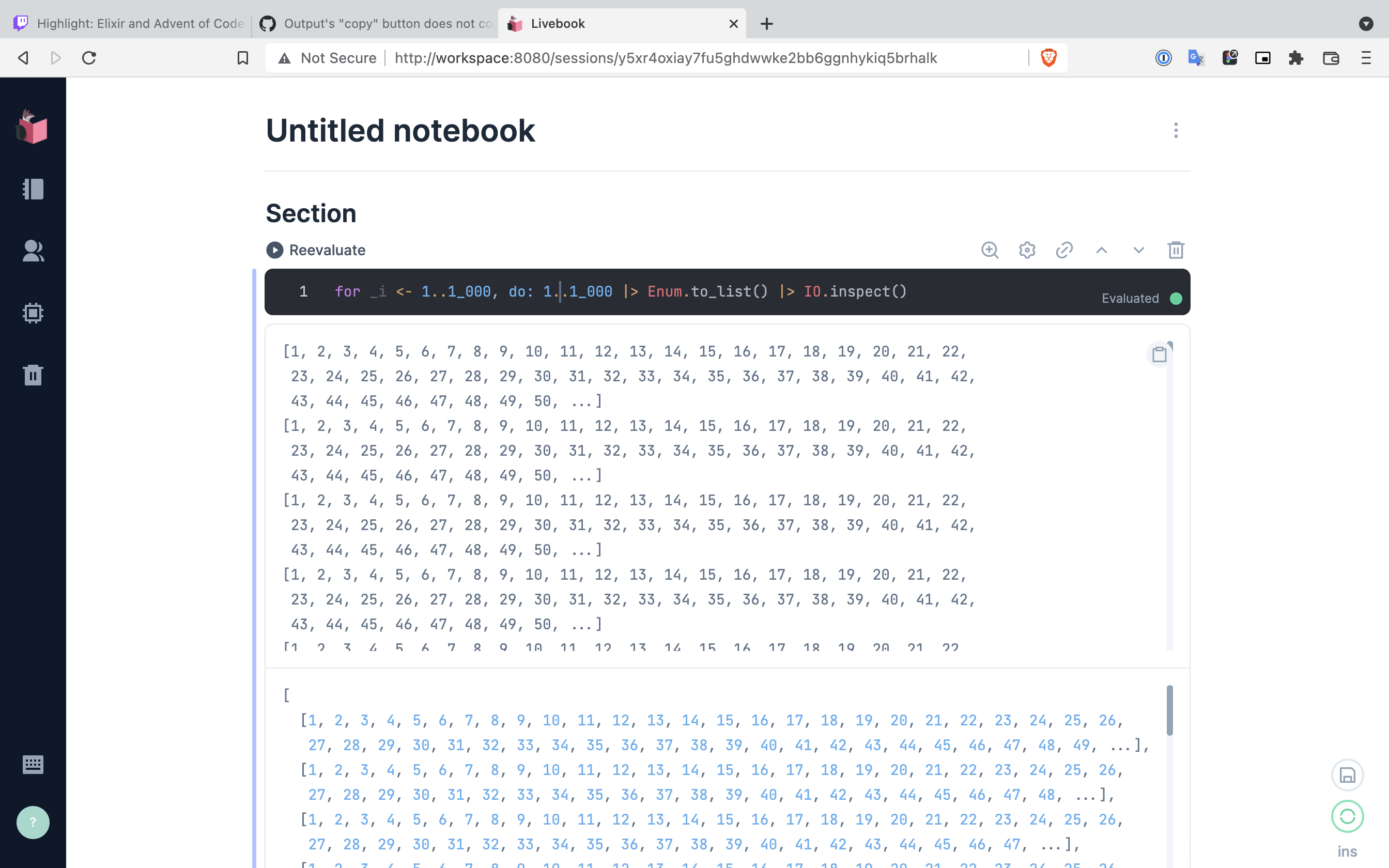
Open a livebook and execute the following code:
for _i <- 1..1_000, do: 1..1_000 |> Enum.to_list() |> IO.inspect()
The output of IO.inspect/1 is shown as expected. Hovering the mouse above the output element will display a small “copy” icon in the upper right corner of the element. This presents two problems:
- It is very hard to scroll on long lists, because the icon hides the scroll bar.
- Clicking the copy button and pasting the output in a local editor results in nothing being pasted. (clipboard empty, or old value from before clicking)
The behaviour and look is the same across Safari, Chrome and Brave.
Expected behavior
- The button just needs a tiny bit of margin, so that we can click on the scroll bar.
- Clicking the copy button and pasting the output into a local editor should result in a copy of the element content (
IO.inspect/1output)
About this issue
- Original URL
- State: closed
- Created 3 years ago
- Comments: 15 (7 by maintainers)
I can reproduce the margin issue but the button is working fine here. It does copy everything inside.
@josevalim Yes, sounds good. Will jump on it 👍
There is already a PR for the margin, but I think we should address this issue by showing a warning or a tooltip if the user tries to click the clipboard and it is disabled. WDYT? Do you want to send a PR for this?
Hey @jeantux thanks for your reply, I’ve now confirmed the same bug on my iPad and my wife’s older Macbook Chrome.
I’ll attempt a breakpoint like you did, in the morning and report back 😃
Can you please post a screenshot? There is no overlap here but that will depend on the OS+browser+settings.