resharper-unity: Was working, then suddenly "Cannot resolve symbol UnityEngine"
For a while on the first file I was editing, everything seemed like it was working just fine. But then I tried opening a second file, and…something broke. Rider can’t seem to find any Unity symbols anymore, which basically blocks Unity development with Rider for me.
I’ve tried:
- Restarting Rider
- Restarting Unity
- Restarting the entire computer
- Removing and readding the Unity plugin to Rider
- Invalidate Caches and Restart
Nothing changed anything.
I am getting the following warnings, which I don’t think I got the first time I started rider:
11:26 AM	Project 'Assembly-CSharp' load finished with warnings: The reference assemblies for framework ".NETFramework,Version=v4.5" were not found. To resolve this, install the SDK or Targeting Pack for this framework version or retarget your application to a version of the framework for which you have the SDK or Targeting Pack installed. Note that assemblies will be resolved from the Global Assembly Cache (GAC) and will be used in place of reference assemblies. Therefore your assembly may not be correctly targeted for the framework you intend. at (1111:5)

11:26 AM	Project 'Assembly-CSharp-Editor-firstpass' load finished with warnings: The reference assemblies for framework ".NETFramework,Version=v4.5" were not found. To resolve this, install the SDK or Targeting Pack for this framework version or retarget your application to a version of the framework for which you have the SDK or Targeting Pack installed. Note that assemblies will be resolved from the Global Assembly Cache (GAC) and will be used in place of reference assemblies. Therefore your assembly may not be correctly targeted for the framework you intend. at (1111:5)

11:26 AM	Project 'Assembly-CSharp-Editor' load finished with warnings: The reference assemblies for framework ".NETFramework,Version=v4.5" were not found. To resolve this, install the SDK or Targeting Pack for this framework version or retarget your application to a version of the framework for which you have the SDK or Targeting Pack installed. Note that assemblies will be resolved from the Global Assembly Cache (GAC) and will be used in place of reference assemblies. Therefore your assembly may not be correctly targeted for the framework you intend. at (1111:5)
However, none of those seem related to Unity.
Version info:
Rider 2017.1 EAP
Build #RS-171.4456.575, built on June 15, 2017
Rider EAP User
Expiration date: July 15, 2017
JRE: 1.8.0_112-release-736-b17 amd64
JVM: OpenJDK 64-Bit Server VM by JetBrains s.r.o
Windows 10 10.0
Unity 5.6.1f1 Personal.
About this issue
- Original URL
- State: closed
- Created 7 years ago
- Comments: 20 (13 by maintainers)
Hi! I also have this issue occurring on my end:
Solution: Go in unity and SAVE -> The errors will then disappear.
When creating and opening a script from Unity, once Rider opens up, a Plugin folder is automatically created in Unity. I guess saving “links” the 2 together.
Just my 2 cents in case someone was having the same issue 😃
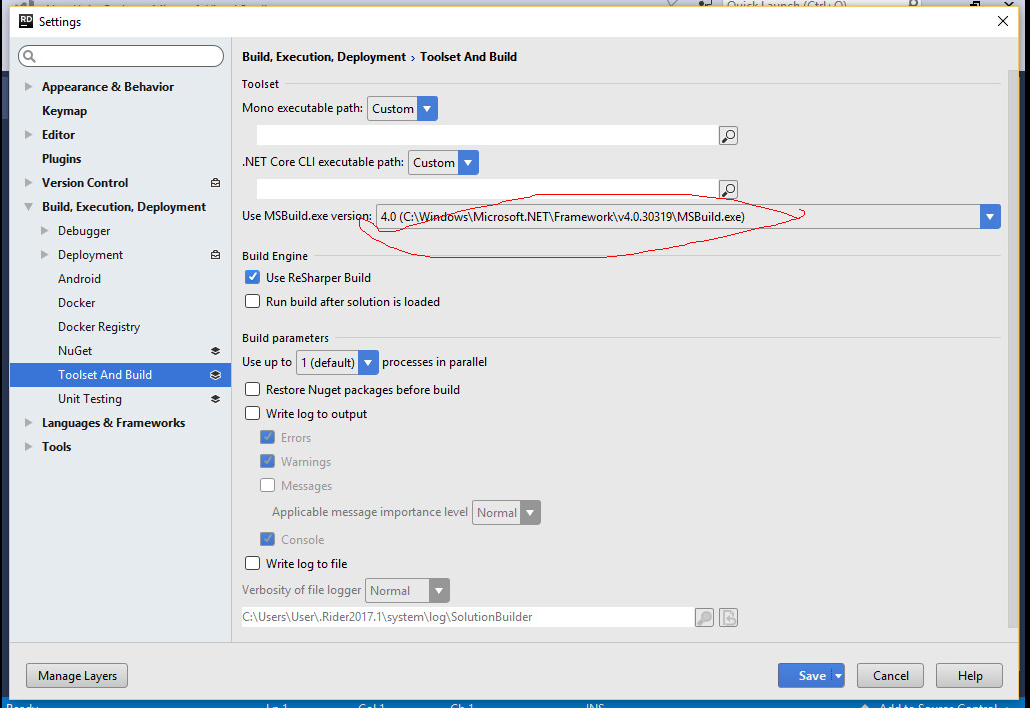
Other workaround is to switch MSBuild to 4.0 in Rider settings