oh-my-posh: Theme not loading in WSL2
Code of Conduct
- I agree to follow this project’s Code of Conduct
What happened?
Setting up the ,profile like so eval "$(oh-my-posh --init --shell bash --config ~/.poshthemes/jandedobbeleer.omp.json)
Changing to any theme makes no difference, all i get is the following

Works perfectly well on powershell. Made sure that the theme folder does exist and that the theme files are there. Also tried replacing the theme folder to the windows one using /mnt/c/Users.... bust still nothing
Theme
jandedobbeleer.omp.json or any other for that matter
What OS are you seeing the problem on?
Linux
Which shell are you using?
bash
Log output
2021/12/07 08:34:42 getPathSeperator duration: 100ns, args:
2021/12/07 08:34:42 hasFiles duration: 2.5µs, args: venv
2021/12/07 08:34:42 getcwd duration: 0s, args:
2021/12/07 08:34:42 getPathSeperator duration: 0s, args:
2021/12/07 08:34:42 hasFiles duration: 2.4µs, args: .venv
2021/12/07 08:34:42 getcwd duration: 100ns, args:
2021/12/07 08:34:42 getcwd duration: 0s, args:
2021/12/07 08:34:42 getcwd duration: 100ns, args:
2021/12/07 08:34:42 getPathSeperator duration: 0s, args:
2021/12/07 08:34:42 hasFiles duration: 16.6µs, args: *.rb
2021/12/07 08:34:42 getcwd duration: 0s, args:
2021/12/07 08:34:42 getPathSeperator duration: 0s, args:
2021/12/07 08:34:42 hasFiles duration: 3µs, args: Rakefile
2021/12/07 08:34:42 getcwd duration: 100ns, args:
2021/12/07 08:34:42 getPathSeperator duration: 100ns, args:
2021/12/07 08:34:42 hasFiles duration: 2.5µs, args: Gemfile
2021/12/07 08:34:42 getcwd duration: 0s, args:
2021/12/07 08:34:42 getcwd duration: 0s, args:
2021/12/07 08:34:42 getcwd duration: 0s, args:
2021/12/07 08:34:42 getPathSeperator duration: 100ns, args:
2021/12/07 08:34:42 hasFiles duration: 2.6µs, args: host.json
2021/12/07 08:34:42 getcwd duration: 100ns, args:
2021/12/07 08:34:42 getPathSeperator duration: 0s, args:
2021/12/07 08:34:42 hasFiles duration: 2.7µs, args: local.settings.json
2021/12/07 08:34:42 getcwd duration: 0s, args:
2021/12/07 08:34:42 getPathSeperator duration: 0s, args:
2021/12/07 08:34:42 hasFiles duration: 2.4µs, args: function.json
2021/12/07 08:34:42 getcwd duration: 0s, args:
2021/12/07 08:34:42 debug: getenv

2021/12/07 08:34:42 getenv duration: 800ns, args: AWS_VAULT
2021/12/07 08:34:42 debug: getenv

2021/12/07 08:34:42 getenv duration: 700ns, args: AWS_PROFILE
2021/12/07 08:34:42 debug: getenv

2021/12/07 08:34:42 getenv duration: 600ns, args: AWS_REGION
2021/12/07 08:34:42 debug: getenv

2021/12/07 08:34:42 getenv duration: 500ns, args: AWS_DEFAULT_REGION
2021/12/07 08:34:42 debug: getenv

2021/12/07 08:34:42 getenv duration: 500ns, args: AWS_CONFIG_FILE
2021/12/07 08:34:42 error: getFileContent
open /root/.aws/config: no such file or directory
2021/12/07 08:34:42 getFileContent duration: 1.161ms, args: /root/.aws/config
2021/12/07 08:34:42 getcwd duration: 100ns, args:
2021/12/07 08:34:42 isRunningAsRoot duration: 400ns, args:
2021/12/07 08:34:42 getcwd duration: 0s, args:
2021/12/07 08:34:42 executionTime duration: 100ns, args:
2021/12/07 08:34:42 getcwd duration: 100ns, args:
2021/12/07 08:34:42 lastErrorCode duration: 100ns, args:
2021/12/07 08:34:42 getcwd duration: 100ns, args:
2021/12/07 08:34:42 getShellName duration: 100ns, args:
2021/12/07 08:34:42 getcwd duration: 100ns, args:
2021/12/07 08:34:42 error: doGet
Get "http://127.0.0.1:9863/query": dial tcp 127.0.0.1:9863: connect: connection refused
2021/12/07 08:34:42 doGet duration: 338.8µs, args: http://127.0.0.1:9863/query
2021/12/07 08:34:42 getcwd duration: 100ns, args:
2021/12/07 08:34:42 getBatteryInfo duration: 13.5µs, args:
2021/12/07 08:34:42 getcwd duration: 100ns, args:
About this issue
- Original URL
- State: closed
- Created 3 years ago
- Comments: 23 (11 by maintainers)
Found the culprit, it’s powerline. Specifically the sourcing of the powerline.sh in their instructions for the bash prompt:
Posting the eval line below this block triggers the error on opening a new shell. Sourcing .bashrc alone doesn’t:
I’m not sure what in that script is causing it, but simply moving the eval line above it fixes it. Again, after opening a new shell: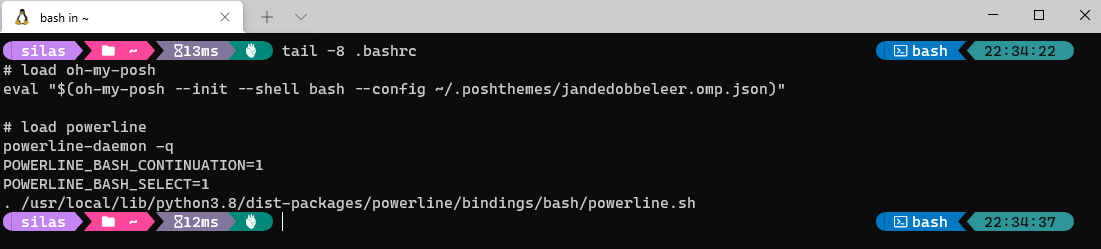
@manhoodofhumanity https://github.com/MicrosoftDocs/terminal/pull/632
For those who came from Microsoft docs . Info there is deprecated… Wrong: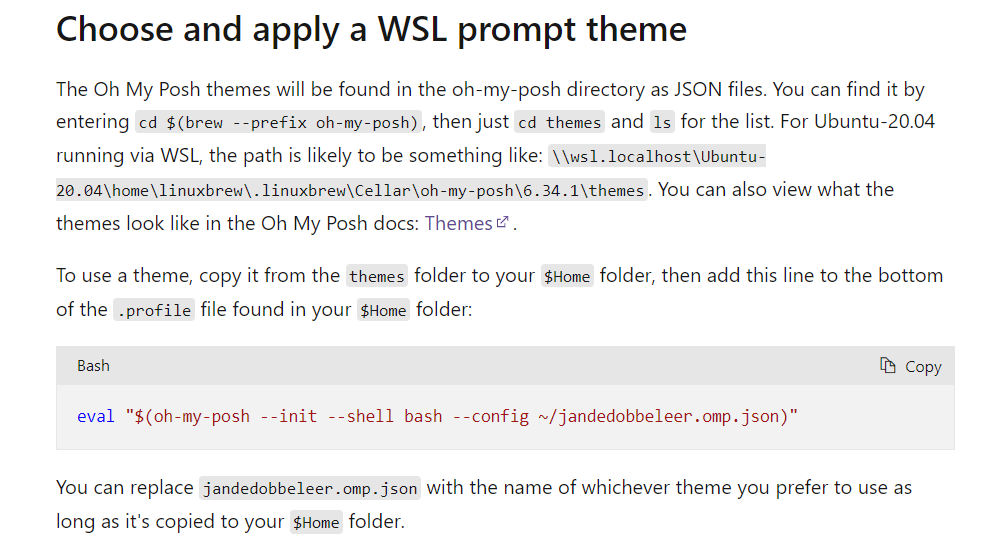
Right: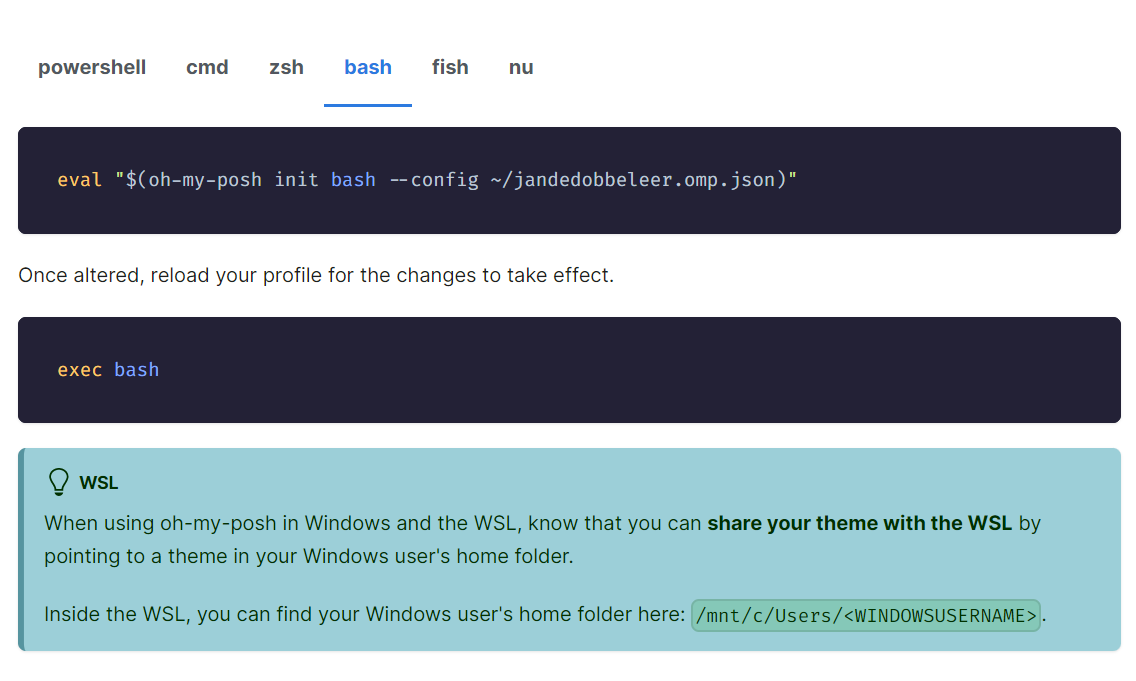
https://ohmyposh.dev/docs/installation/customize
I’m stuck with the exact same problem. WSL2 on W10 running a new Ubuntu 20.04 installation. Followed the official manual installation instructions. If I run
oh-my-posh --config ~/.poshthemes/jandedobbeleer.omp.jsonit displays the prompt string with the loaded config. I can also load other configs just fine:Adding the eval in my .bashrc leads to the missing config prompt. I’ve added a simple echo to verifiy that the .bashrc is actually loaded: