ignite: Ignite new app does not work
What’s going on?
Attempting to ignite a new app gives the following error:
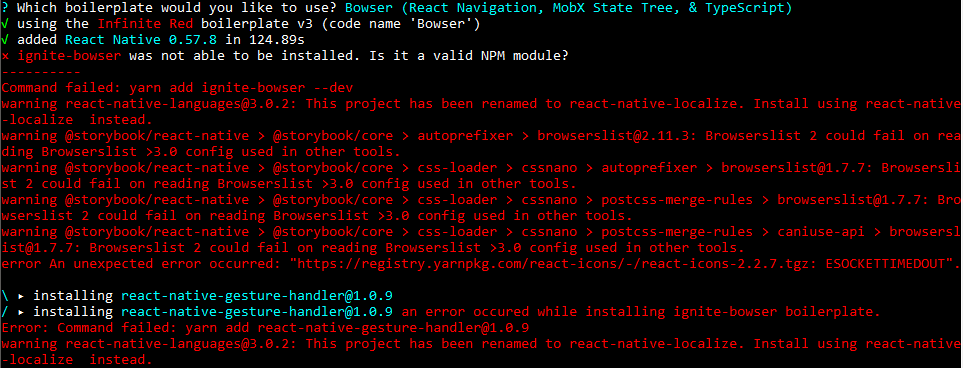
I have tried using npm to install the boilerplate for bowser using the command below, and it throws a template not found error.
ignite boilerplate-install ignite-bowser MyAwesomeApp --debug --npm
Steps to reproduce
ignite new MyApp
ignite doctor results:
System
  platform           win32
  arch               x64
  cpu                8 cores      Intel(R) Core(TM) i7-8550U CPU @ 1.80GHz
  directory          D:\

JavaScript
  node               11.9.0       C:\Program Files\nodejs\node.EXE
  npm                6.5.0        C:\Program Files\nodejs\npm.CMD
  yarn               1.13.0       C:\Users\user\AppData\Roaming\npm\yarn.CMD

React Native
  react-native-cli   2.0.1

Ignite
  ignite             2.2.2        C:\Users\user\AppData\Roaming\npm\ignite.CMD

Android
  java               -            C:\ProgramData\Oracle\Java\javapath\java.EXE
  android home       -            undefined
About this issue
- Original URL
- State: closed
- Created 5 years ago
- Comments: 18 (5 by maintainers)
I have been facing the same issues. Tried using an older version of ignite-cli to no success.
Using the exact solution suggested by @jamonholmgren works. Thanks!
Hey I am facing the same issue here, it seems like the issue is with the
react-nativeversion that is being installed withignite-androsserror Cannot use React Native CLI to initialize project with version lower than 0.60.0.If you run ignite with
--debugyou’ll see more verbose logs which might give you more info to debug this.@jamonholmgren changing node version from
12.10.0to11.10.0got me past the previous failure involvingprocess.chdir@jamonholmgren
OS: OS X 10.15 Beta (catalina) Node Version: 12.10.0 Package Manager: yarn
FWIW
@raooll Can you use the newest alphas and see if those work?
@diegotejadav I think the other issue is unrelated, but I could be wrong.