harvester: [Bug] Shutdown from inside the VM results in VM rebooting/UI stuck?
Hi team,
I’m currently seeing the following behavior for Linux and Windows VMs: when I try to shutdown the VM from the guest OS, Harvester restarts the VM automatically.
I tweaked the settings (see below) to reach a sort of middle ground: Harvester doesn’t restart the VM anymore, however the Harvester UI is not reflecting the “true” state of the VM and stays in a “pending” state.
Here is what I did and which results I have:
- Create/Modify a VM > edit the YAML config
- Replace the
spec.runningbyspec.runStrategy
...
spec:
  runStrategy: RerunOnFailure
...
- Add the KubeVirt
spec.spec.domain.features.acpicapability
...
spec:
  spec:
    domain:
      features:
        acpi:
          enabled: true
...
- Start/Connect to the VM
- Shutdown the VM
Results:
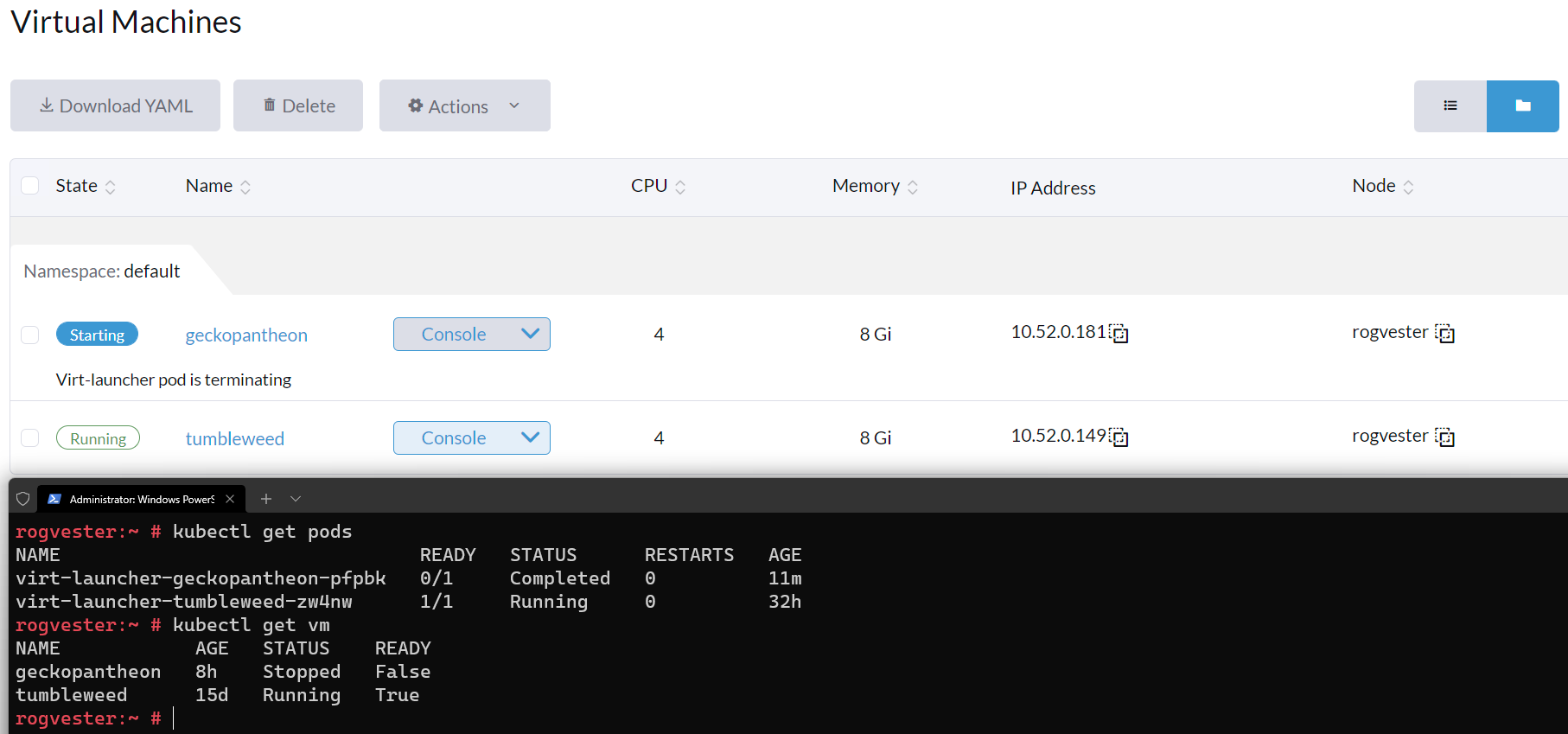
While the VM will correctly shutdown, Harvester UI will “hang” on Starting with the message Virt-launcher pod is terminating.
The kubectl get pods will show the VM pod as Completed and kubectl get vm will show the VM as Stopped:
Additional notes/hints:
When the VM is stopped, if I click on Stop and check the VM config, I can see that spec.runStrategy has switched to halted.
I hope this is clear 😄
_Originally posted by @nunix in https://github.com/harvester/harvester/issues/574#issuecomment-1022457166_
About this issue
- Original URL
- State: closed
- Created 2 years ago
- Reactions: 2
- Comments: 24 (19 by maintainers)
Test Plan and Step
sudo poweroffin VM to shutdown VM