harvester: [BUG] Expand volume size to which exceed the system limit failed silently
Describe the bug While expanding the volume size of a VM, If the specified size exceeds the system limit, Harvester didn’t show any error message, but the size expansion actually failed. Checked by logged into the VM and verify the actual disk size.
To Reproduce Steps to reproduce the behavior:
- Create a VM with 10G volume
- Stop the VM
- Go to “Volumes” page and expand the volume to 100G (or any number which would exceed the system limit)
- Click Save
- GUI doesn’t show any error message, and the volume size did become 100G
- Start the VM and log into it, see the size of the disk remains as 10G.
-
100G Volume

-
Actual size
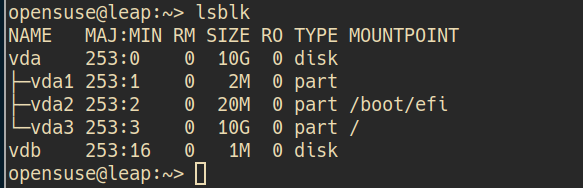
-
Storage size reported by Harvester Dashboard (not the real system capacity). To me this is a bit misleading

-
Allocated size reported by Longhorn (the real system capacity)

Expected behavior Volume expansion that exceeds the system limit should be prohibited.
Support bundle
Environment:
- Harvester ISO version: v0.3.0-rc1
- Underlying Infrastructure (e.g. Baremetal with Dell PowerEdge R630): KVM
Additional context
- The error event:
0s          Normal    Resizing                 persistentvolumeclaim/leap-disk-0-4spmj                     External resizer is resizing volume pvc-bfbdef45-3361-42eb-a971-7f73f65c3ee2
0s          Warning   VolumeResizeFailed       persistentvolumeclaim/leap-disk-0-4spmj                     resize volume "pvc-bfbdef45-3361-42eb-a971-7f73f65c3ee2" by resizer "driver.longhorn.io" failed: rpc error: code = OutOfRange desc = Bad response statusCode [500]. Status [500 Internal Server Error]. Body: [detail=, message=unable to expand volume pvc-bfbdef45-3361-42eb-a971-7f73f65c3ee2: error while CheckReplicasSizeExpansion for volume pvc-bfbdef45-3361-42eb-a971-7f73f65c3ee2: cannot schedule 96636764160 more bytes to disk 0dca0ed2-d19f-4bd1-8b6e-3354c29d7cfd with &{StorageAvailable:55469670400 StorageMaximum:82462621696 StorageReserved:24738786508 StorageScheduled:64434995200 OverProvisioningPercentage:200 MinimalAvailablePercentage:25}, code=Server Error] from [http://longhorn-backend:9500/v1/volumes/pvc-bfbdef45-3361-42eb-a971-7f73f65c3ee2?action=expand]
About this issue
- Original URL
- State: closed
- Created 3 years ago
- Comments: 18 (16 by maintainers)
If the vm volume is resizing, users should not be allowed to start the VM. I’m going to add a start action validation for the VM.
@futuretea The frontend pr has been merged, please help test it and move it to ready-for-testing, thanks.
@WuJun2016 backend code has been merged. Need to add an action
cancelExpandto volume.I will temporarily remove the
area/uilabel. If there are problems that need to be handled by the frontend later, please addrequire/ui. cc @futuretea🤔 I didn’t see resizing, should be in-use too
@lanfon72
Test plan: