filament: Depth buffer overflow?
Describe the bug
When there’s a “camera” plane, transparent occluder, and regular object in the scene, following issue occurs (yellow - camera plane, gray - clearcolor):

Render priorities: camera plane 0, transparent occluder 4 and regular geometry 5.
An important note that is depth culling is disabled for camera plane, bug disappears:
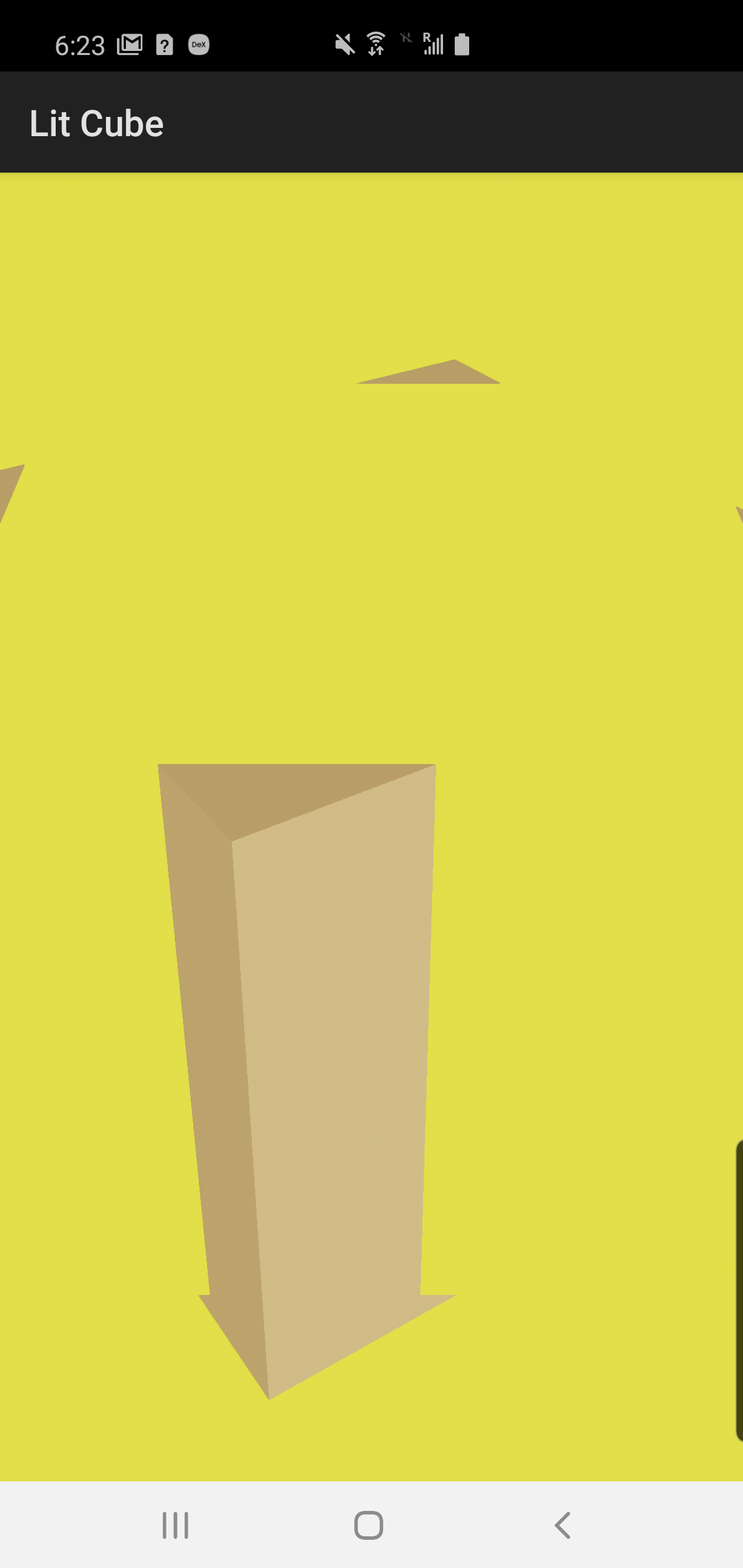
To Reproduce
Apply included patch and run lit-cube sample:
diff --git a/android/samples/sample-lit-cube/src/main/java/com/google/android/filament/litcube/MainActivity.kt b/android/samples/sample-lit-cube/src/main/java/com/google/android/filament/litcube/MainActivity.kt
index 80d4664f..ab6bd3ea 100644
--- a/android/samples/sample-lit-cube/src/main/java/com/google/android/filament/litcube/MainActivity.kt
+++ b/android/samples/sample-lit-cube/src/main/java/com/google/android/filament/litcube/MainActivity.kt
@@ -24,15 +24,17 @@ import android.view.Choreographer
 import android.view.Surface
 import android.view.SurfaceView
 import android.view.animation.LinearInterpolator
-
 import com.google.android.filament.*
-import com.google.android.filament.RenderableManager.*
-import com.google.android.filament.VertexBuffer.*
+import com.google.android.filament.IndexBuffer.Builder.IndexType
+import com.google.android.filament.RenderableManager.PrimitiveType
+import com.google.android.filament.VertexBuffer.AttributeType
+import com.google.android.filament.VertexBuffer.VertexAttribute
 import com.google.android.filament.android.DisplayHelper
 import com.google.android.filament.android.UiHelper
-
 import java.nio.ByteBuffer
 import java.nio.ByteOrder
+import java.nio.FloatBuffer
+import java.nio.ShortBuffer
 import java.nio.channels.Channels

 class MainActivity : Activity() {
@@ -42,6 +44,14 @@ class MainActivity : Activity() {
         init {
             Filament.init()
         }
+
+        val CAMERA_VERTICES = floatArrayOf(-1.0f, 1.0f, 1.0f, -1.0f, -3.0f, 1.0f, 3.0f, 1.0f, 1.0f)
+        val CAMERA_UVS = floatArrayOf(0.0f, 0.0f, 0.0f, 2.0f, 2.0f, 0.0f)
+        val CAMERA_INDICES = shortArrayOf(0, 1, 2)
+        const val VERTEX_COUNT = 3
+        const val POSITION_BUFFER_INDEX = 0
+        const val UV_BUFFER_INDEX = 1
+        const val FLOAT_SIZE_IN_BYTES = java.lang.Float.SIZE / 8
     }

     // The View we want to render into
@@ -66,13 +76,19 @@ class MainActivity : Activity() {
     // Should be pretty obvious :)
     private lateinit var camera: Camera

-    private lateinit var material: Material
-    private lateinit var materialInstance: MaterialInstance
-    private lateinit var vertexBuffer: VertexBuffer
-    private lateinit var indexBuffer: IndexBuffer
+    private lateinit var cubeMaterial: Material
+    private lateinit var cubeMaterialInstance: MaterialInstance
+    private lateinit var cubeVertexBuffer: VertexBuffer
+    private lateinit var cubeIndexBuffer: IndexBuffer
+    private lateinit var occluderMaterial: Material
+    private lateinit var cameraVertexBuffer: VertexBuffer
+    private lateinit var cameraIndexBuffer: IndexBuffer
+    private lateinit var cameraMaterial: Material

     // Filament entity representing a renderable object
-    @Entity private var renderable = 0
+    @Entity private var cubeRenderable = 0
+    @Entity private var occluderRenderable = 0
+    @Entity private var cameraRenderable = 0
     @Entity private var light = 0

     // A swap chain is Filament's representation of a surface
@@ -118,7 +134,10 @@ class MainActivity : Activity() {
     }

     private fun setupView() {
-        scene.skybox = Skybox.Builder().color(0.035f, 0.035f, 0.035f, 1.0f).build(engine)
+        renderer.clearOptions = renderer.clearOptions.also {
+            it.clearColor = floatArrayOf(0.5f, 0.5f, 0.5f, 1.0f)
+            it.clear = true
+        }

         // NOTE: Try to disable post-processing (tone-mapping, etc.) to see the difference
         // view.isPostProcessingEnabled = false
@@ -133,27 +152,44 @@ class MainActivity : Activity() {
     private fun setupScene() {
         loadMaterial()
         setupMaterial()
-        createMesh()
+        createCubeMesh()
+        createCameraMesh()

-        // To create a renderable we first create a generic entity
-        renderable = EntityManager.get().create()
-
-        // We then create a renderable component on that entity
-        // A renderable is made of several primitives; in this case we declare only 1
-        // If we wanted each face of the cube to have a different material, we could
-        // declare 6 primitives (1 per face) and give each of them a different material
-        // instance, setup with different parameters
+        cubeRenderable = EntityManager.get().create()
+        RenderableManager.Builder(1)
+                .priority(5)
+                .boundingBox(Box(0.0f, 0.0f, 0.0f, 1.0f, 1.0f, 0.01f))
+                .geometry(0, PrimitiveType.TRIANGLES, cubeVertexBuffer, cubeIndexBuffer, 0, 6 * 6)
+                .material(0, cubeMaterialInstance)
+                .build(engine, cubeRenderable)
+        scene.addEntity(cubeRenderable)
+
+        occluderRenderable = EntityManager.get().create()
         RenderableManager.Builder(1)
-                // Overall bounding box of the renderable
-                .boundingBox(Box(0.0f, 0.0f, 0.0f, 1.0f, 1.0f, 1.0f))
-                // Sets the mesh data of the first primitive, 6 faces of 6 indices each
-                .geometry(0, PrimitiveType.TRIANGLES, vertexBuffer, indexBuffer, 0, 6 * 6)
-                // Sets the material of the first primitive
-                .material(0, materialInstance)
-                .build(engine, renderable)
+                .priority(4)
+                .boundingBox(Box(0.0f, 0.0f, 0.0f, 1.0f, 1.0f, 0.01f))
+                .geometry(0, PrimitiveType.TRIANGLES, cubeVertexBuffer, cubeIndexBuffer, 0, 6 * 6)
+                .material(0, occluderMaterial.defaultInstance)
+                .build(engine, occluderRenderable)
+        scene.addEntity(occluderRenderable)
+        val occluderTransformMatrix = FloatArray(16)
+        Matrix.setIdentityM(occluderTransformMatrix, 0)
+        Matrix.translateM(occluderTransformMatrix, 0, 0.0f, 0.1f, 0.1f)
+        engine.transformManager.setTransform(engine.transformManager.getInstance(occluderRenderable), occluderTransformMatrix)
+
+        cameraRenderable = EntityManager.get().create()
+        RenderableManager.Builder(1)
+                .castShadows(false)
+                .receiveShadows(false)
+                .culling(false)
+                // Always draw the camera feed last to avoid overdraw
+                // .priority(7)
+                .priority(0) // YES!
+                .geometry(0, RenderableManager.PrimitiveType.TRIANGLES, cameraVertexBuffer, cameraIndexBuffer)
+                .material(0, cameraMaterial.defaultInstance)
+                .build(engine, cameraRenderable);
+        scene.addEntity(cameraRenderable)

-        // Add the entity to the scene to render it
-        scene.addEntity(renderable)

         // We now need a light, let's create a directional light
         light = EntityManager.get().create()
@@ -184,26 +220,73 @@ class MainActivity : Activity() {
     }

     private fun loadMaterial() {
-        readUncompressedAsset("materials/lit.filamat").let {
-            material = Material.Builder().payload(it, it.remaining()).build(engine)
+        readUncompressedAsset("materials/camera.filamat").let {
+            cameraMaterial = Material.Builder().payload(it, it.remaining()).build(engine)
+        }
+        readUncompressedAsset("materials/cube.filamat").let {
+            cubeMaterial = Material.Builder().payload(it, it.remaining()).build(engine)
+        }
+        readUncompressedAsset("materials/occluder.filamat").let {
+            occluderMaterial = Material.Builder().payload(it, it.remaining()).build(engine)
         }
     }

     private fun setupMaterial() {
         // Create an instance of the material to set different parameters on it
-        materialInstance = material.createInstance()
+        cubeMaterialInstance = cubeMaterial.createInstance()
         // Specify that our color is in sRGB so the conversion to linear
         // is done automatically for us. If you already have a linear color
         // you can pass it directly, or use Colors.RgbType.LINEAR
-        materialInstance.setParameter("baseColor", Colors.RgbType.SRGB, 1.0f, 0.85f, 0.57f)
+        cubeMaterialInstance.setParameter("baseColor", Colors.RgbType.SRGB, 1.0f, 0.85f, 0.57f)
         // The default value is always 0, but it doesn't hurt to be clear about our intentions
         // Here we are defining a dielectric material
-        materialInstance.setParameter("metallic", 0.0f)
+        cubeMaterialInstance.setParameter("metallic", 0.0f)
         // We increase the roughness to spread the specular highlights
-        materialInstance.setParameter("roughness", 0.3f)
+        cubeMaterialInstance.setParameter("roughness", 0.3f)
+    }
+
+    private fun createCameraMesh() {
+        val indexBufferData = ShortBuffer
+                .allocate(CAMERA_INDICES.size)
+                .put(CAMERA_INDICES)
+                .rewind()
+        cameraIndexBuffer = IndexBuffer.Builder()
+                .indexCount(CAMERA_INDICES.size)
+                .bufferType(IndexType.USHORT)
+                .build(engine)
+        cameraIndexBuffer.setBuffer(engine, indexBufferData)
+
+        val vertexBufferData = FloatBuffer
+                .allocate(CAMERA_VERTICES.size)
+                .put(CAMERA_VERTICES)
+                .rewind()
+        cameraVertexBuffer = VertexBuffer.Builder()
+                .vertexCount(VERTEX_COUNT)
+                .bufferCount(2)
+                .attribute(
+                        VertexAttribute.POSITION,
+                        POSITION_BUFFER_INDEX,
+                        AttributeType.FLOAT3,
+                        0,
+                        CAMERA_VERTICES.size / VERTEX_COUNT * FLOAT_SIZE_IN_BYTES)
+                .attribute(
+                        VertexAttribute.UV0,
+                        UV_BUFFER_INDEX,
+                        AttributeType.FLOAT2,
+                        0,
+                        CAMERA_UVS.size / VERTEX_COUNT * FLOAT_SIZE_IN_BYTES)
+                .build(engine)
+        cameraVertexBuffer.setBufferAt(engine, POSITION_BUFFER_INDEX, vertexBufferData)
+
+        val cameraUvBuffer = ByteBuffer.allocateDirect(CAMERA_UVS.size * FLOAT_SIZE_IN_BYTES)
+                .order(ByteOrder.nativeOrder())
+                .asFloatBuffer()
+                .put(CAMERA_UVS)
+                .rewind()
+        cameraVertexBuffer.setBufferAt(engine, UV_BUFFER_INDEX, cameraUvBuffer)
     }

-    private fun createMesh() {
+    private fun createCubeMesh() {
         val floatSize = 4
         val shortSize = 2
         // A vertex is a position + a tangent frame:
@@ -276,7 +359,7 @@ class MainActivity : Activity() {
                 .flip()

         // Declare the layout of our mesh
-        vertexBuffer = VertexBuffer.Builder()
+        cubeVertexBuffer = VertexBuffer.Builder()
                 .bufferCount(1)
                 .vertexCount(vertexCount)
                 // Because we interleave position and color data we must specify offset and stride
@@ -288,7 +371,7 @@ class MainActivity : Activity() {

         // Feed the vertex data to the mesh
         // We only set 1 buffer because the data is interleaved
-        vertexBuffer.setBufferAt(engine, 0, vertexData)
+        cubeVertexBuffer.setBufferAt(engine, 0, vertexData)

         // Create the indices
         val indexData = ByteBuffer.allocate(6 * 2 * 3 * shortSize)
@@ -302,11 +385,11 @@ class MainActivity : Activity() {
         indexData.flip()

         // 6 faces, 2 triangles per face,
-        indexBuffer = IndexBuffer.Builder()
+        cubeIndexBuffer = IndexBuffer.Builder()
                 .indexCount(vertexCount * 2)
                 .bufferType(IndexBuffer.Builder.IndexType.USHORT)
                 .build(engine)
-        indexBuffer.setBuffer(engine, indexData)
+        cubeIndexBuffer.setBuffer(engine, indexData)
     }

     private fun startAnimation() {
@@ -320,7 +403,7 @@ class MainActivity : Activity() {
             override fun onAnimationUpdate(a: ValueAnimator) {
                 Matrix.setRotateM(transformMatrix, 0, a.animatedValue as Float, 0.0f, 1.0f, 0.0f)
                 val tcm = engine.transformManager
-                tcm.setTransform(tcm.getInstance(renderable), transformMatrix)
+                tcm.setTransform(tcm.getInstance(cubeRenderable), transformMatrix)
             }
         })
         animator.start()
@@ -350,12 +433,12 @@ class MainActivity : Activity() {

         // Cleanup all resources
         engine.destroyEntity(light)
-        engine.destroyEntity(renderable)
+        engine.destroyEntity(cubeRenderable)
         engine.destroyRenderer(renderer)
-        engine.destroyVertexBuffer(vertexBuffer)
-        engine.destroyIndexBuffer(indexBuffer)
-        engine.destroyMaterialInstance(materialInstance)
-        engine.destroyMaterial(material)
+        engine.destroyVertexBuffer(cubeVertexBuffer)
+        engine.destroyIndexBuffer(cubeIndexBuffer)
+        engine.destroyMaterialInstance(cubeMaterialInstance)
+        engine.destroyMaterial(cubeMaterial)
         engine.destroyView(view)
         engine.destroyScene(scene)
         engine.destroyCamera(camera)
@@ -364,7 +447,7 @@ class MainActivity : Activity() {
         // (components), not the entity itself
         val entityManager = EntityManager.get()
         entityManager.destroy(light)
-        entityManager.destroy(renderable)
+        entityManager.destroy(cubeRenderable)

         // Destroying the engine will free up any resource you may have forgotten
         // to destroy, but it's recommended to do the cleanup properly
diff --git a/android/samples/sample-lit-cube/src/main/materials/camera.mat b/android/samples/sample-lit-cube/src/main/materials/camera.mat
new file mode 100644
index 00000000..187018dd
--- /dev/null
+++ b/android/samples/sample-lit-cube/src/main/materials/camera.mat
@@ -0,0 +1,28 @@
+material {
+    "name" : "Camera",
+    "parameters" : [
+        {
+           "type" : "samplerExternal",
+           "name" : "cameraTexture"
+        }
+    ],
+    "requires" : [
+        "uv0"
+    ],
+    "vertexDomain" : "device",
+    "depthWrite" : false,
+    // NOTE: Disabling depth culling fixes the issue, yet this means that depth buffer value is probably
+    // gets into overflow/underflow values by transparent occluder geometry?
+    // depthCulling: false,
+    "shadingModel" : "unlit",
+    "doubleSided" : true
+}
+fragment {
+    void material(inout MaterialInputs material) {
+        prepareMaterial(material);
+
+        // vec4 color = texture(materialParams_cameraTexture, getUV0());
+        // material.baseColor.rgb = inverseTonemapSRGB(color.rgb);
+        material.baseColor = vec4(1.0, 1.0, 0.0, 1.0);
+    }
+}
diff --git a/android/samples/sample-lit-cube/src/main/materials/lit.mat b/android/samples/sample-lit-cube/src/main/materials/cube.mat
similarity index 100%
rename from android/samples/sample-lit-cube/src/main/materials/lit.mat
rename to android/samples/sample-lit-cube/src/main/materials/cube.mat
diff --git a/android/samples/sample-lit-cube/src/main/materials/occluder.mat b/android/samples/sample-lit-cube/src/main/materials/occluder.mat
new file mode 100644
index 00000000..6b788a65
--- /dev/null
+++ b/android/samples/sample-lit-cube/src/main/materials/occluder.mat
@@ -0,0 +1,6 @@
+material {
+    name : transparent_occluder,
+    shadingModel : unlit,
+    colorWrite : false,
+    depthWrite : true,
+}
Expected behavior Since rendering priority is set that camera plane is rendered first, it’s color data should not be affected by transparent occluder.
About this issue
- Original URL
- State: closed
- Created 4 years ago
- Comments: 22 (10 by maintainers)
The problem is that GAPID apparently doesn’t know how to handle
RGBA16Fbuffers anymore. The easiest way to work around this is to change the rendering quality of yourView’shdrColorBuffertoQualityLevel.LOW. It will force Filament to use anRGB888buffer instead and GAPID will work. You can also completely disable post-processing to get rendering directly into the surface’s framebuffer.gl_Position = mesh_positionreproduces the bug hereThe size of the artifact here changes depending on things like MSAA, we are fairly confident it’s an issue with early Z rejection (and it would explain why the artifact looks the way it does). And we’ve only been able to reproduce this on Qualcomm GPUs so far.
I can reproduce on a Pixel 4 as well.