expo: [expo-updates] Native iOS crash when new OTA update is available
Summary
Seeing a native iOS crash consistently when updating from sdk 42 app version to sdk 43 app version, when there is a new OTA update available for the sdk 43 version. Built via EAS Build.
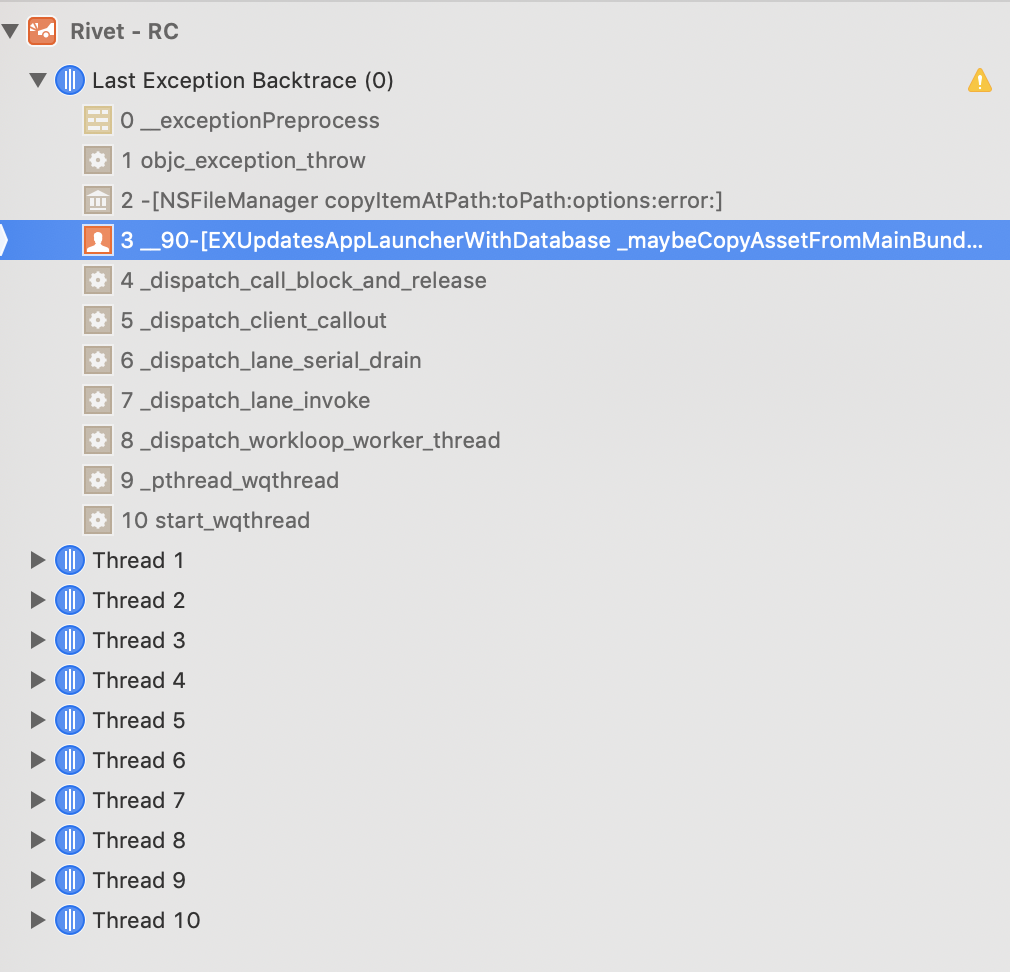
From crash report, looks like the native error is:
#3 0x10412022c in __90-[EXUpdatesAppLauncherWithDatabase _maybeCopyAssetFromMainBundle:withLocalUrl:completion:]_block_invoke ()
Managed or bare workflow? If you have ios/ or android/ directories in your project, the answer is bare!
managed
What platform(s) does this occur on?
iOS
SDK Version (managed workflow only)
43
Environment
  Expo CLI 4.4.6 environment info:
    System:
      OS: macOS Mojave 10.14.6
      Shell: 3.2.57 - /bin/bash
    Binaries:
      Node: 17.0.1 - /usr/local/bin/node
      Yarn: 1.22.17 - /usr/local/bin/yarn
      npm: 6.9.0 - /usr/local/bin/npm
      Watchman: 2021.10.18.00 - /usr/local/bin/watchman
    Managers:
      CocoaPods: 1.11.2 - /usr/local/bin/pod
    SDKs:
      iOS SDK:
        Platforms: iOS 13.2, DriverKit 19.0, macOS 10.15, tvOS 13.2, watchOS 6.1
    IDEs:
      Android Studio: 3.5 AI-191.8026.42.35.6010548
      Xcode: 11.3/11C29 - /usr/bin/xcodebuild
    npmPackages:
      @expo/webpack-config: ^0.16.2 => 0.16.2
      expo: ^43.0.1 => 43.0.1
      react: 17.0.1 => 17.0.1
      react-dom: 17.0.1 => 17.0.1
      react-native: 0.64.2 => 0.64.2
      react-native-web: 0.17.1 => 0.17.1
    Expo Workflow: managed
Reproducible demo or steps to reproduce from a blank project
- Have two app builds in Testflight, both built via EAS Build, but one is on Expo SDK 42 (tied to release channel
"sdk42-release-candidate-v0"), and the other has been updated to Expo SDK 43 (tied to release channel"sdk43-release-candidate-v0"). - From TestFlight, download SDK 42 build
- Publish an OTA update to SDK 43 release channel (
"sdk43-release-candidate-v0") - Download SDK 43 build from TestFlight
- Open, hard close, and reopen app. On second open, see native crash
About this issue
- Original URL
- State: closed
- Created 3 years ago
- Reactions: 2
- Comments: 25 (20 by maintainers)
Hi all – expo-updates@0.10.13 is out now with what should be the final fix for this issue. Thanks to everyone who provided comprehensive reports and information about this bug, and apologies once again that we let it slip through the cracks. Please let me know if this patch resolves things for you.
Hey everyone, thanks for the reports. We’ve just published @zhigang1992 's patch (thanks again for the PR!) in expo-updates@0.10.10, which should at least mitigate this issue and prevent any more crash loops while we continue to investigate the root cause.
Awesome, thank you so much @esamelson. I’ve just tested
expo-updates@0.10.13and now works perfectly 👍 Tested on iOS 15.1, iPhone X.Yes, we’ve finally been able to identify and reproduce the root issue here. A fix is in flight and should be coming later today. Hang tight – we’re really sorry for the inconvenience!!
Confirming @RodolfoGS 's experience even after updating to expo-updates v0.10.12. We’ve got a bare workflow app, and the following path is broken:
We still can’t ship with the app behaving this way, though. Any movement here?
thanks all. really sorry about this issue, it’s been difficult to track down, but we’ve now released expo-updates@0.10.11 with a more comprehensive fix. if you’re still running into this issue, 0.10.11 should resolve the problem, but please do let me know if not!
I’ve the same issue upgrading from
expo:42.0.3, expo-updates:0.8.4toexpo:43.0.1, expo-updates:0.10.9iOS Hermes disabled. Described perfectly by @mackenziekira and @zhigang1992 This is a stopper to launch to production for me.This is the line showed on Xcode (
EXUpdatesAppLauncherWithDatabase line 266)This was happening for a lot for us as well, we are blocked on release for this.
We have Hermes enabled btw
here is a crashlog
ios_crash.log
and when it happens, relaunch the app will not be able to fix it.
it will keeps crashing until the app is removed and reinstalled
@esamelson I had
"0.8.0"installed in the sdk 42 buildUpgrading the expo-updates solved this issue for me. Thanks!
@esamelson Yes, the same code and the same fonts. No one line changed in the code of App.js, 100% equal.
Edit: Also,
expo-fontwas updated,@expo/vector-iconshave the same version. In SDK 42 I had: