expo: expo doctor fails on fresh install with SDK 45
Summary
expo doctor fails on a brand new app
Managed or bare workflow? If you have ios/ or android/ directories in your project, the answer is bare!
managed
What platform(s) does this occur on?
iOS
SDK Version (managed workflow only)
45
Environment
  expo-env-info 1.0.5 environment info:
    System:
      OS: macOS 12.5
      Shell: 5.1.12 - /opt/homebrew/bin/bash
    Binaries:
      Node: 16.0.0 - ~/.asdf/installs/nodejs/16.0.0/bin/node
      Yarn: 1.22.17 - ~/.asdf/installs/nodejs/16.0.0/.npm/bin/yarn
      npm: 8.3.0 - ~/.asdf/plugins/nodejs/shims/npm
      Watchman: 2022.06.06.00 - /opt/homebrew/bin/watchman
    Managers:
      CocoaPods: 1.11.3 - ~/.asdf/shims/pod
    SDKs:
      iOS SDK:
        Platforms: DriverKit 21.4, iOS 15.5, macOS 12.3, tvOS 15.4, watchOS 8.5
    IDEs:
      Android Studio: 2021.2 AI-212.5712.43.2112.8609683
      Xcode: 13.4.1/13F100 - /usr/bin/xcodebuild
    npmPackages:
      expo: ~45.0.0 => 45.0.6
      react: 17.0.2 => 17.0.2
      react-dom: 17.0.2 => 17.0.2
      react-native: 0.68.2 => 0.68.2
      react-native-web: 0.17.7 => 0.17.7
    npmGlobalPackages:
      eas-cli: 0.46.0
      expo-cli: 6.0.1
    Expo Workflow: managed
Reproducible demo
$ npx create-expo-app my-app
$ cd my-app
$ expo doctor
Expected package @expo/config-plugins@^4.1.0
Found invalid:
  @expo/config-plugins@5.0.0
  (for more info, run: npm why @expo/config-plugins)
About this issue
- Original URL
- State: closed
- Created 2 years ago
- Reactions: 9
- Comments: 36 (6 by maintainers)
Delete lock file and regenerate it, this will get solved
npm i expo@45.0.8 solved for me
when i run expo doctor, i got this output
Expected package @expo/config-plugins@~6.0.0 Found invalid: @expo/config-plugins@4.1.1 (for more info, run: npm why @expo/config-plugins)
and I have @expo/config-plugins@~6.0.0 in my package-json what can cause this
expo updatesolved it for meHi,
I add this to
package.jsonand remove
node_modulesandyarn.lock…then I rerunyarnandexpo doctor.I use expo 47.0.13 and node 16.16.0
it works for me.
@toddbauermeister I’ve tried this & it’s working
“resolutions”: { “@expo/config-plugins”: “~4.1.0”, “@expo/prebuild-config”: “~4.0.0”, “expo-modules-autolinking”: “0.9.0” },
That does not solve the expo doctor error.
we published new versions of packages that had a loose @expo/config-plugins version dependency and locked that dependency instead. this does not happen on new projects anymore, and existing projects can run
expo doctor --fix-dependenciesto install the latest version of these packages.@Abelcor
So I found the plugin @react-native-voice/voice@3.2.4 that is causing issues, but its already up to date. Any suggestions on how to fix it
`├─┬ @react-native-voice/voice@3.2.4 │ └── @expo/config-plugins@2.0.4 ├─┬ expo-camera@12.5.0 │ └── @expo/config-plugins@5.0.4 ├─┬ expo-dev-client@1.3.1 │ ├── @expo/config-plugins@5.0.4 deduped │ ├─┬ expo-dev-launcher@1.3.1 │ │ └── @expo/config-plugins@5.0.4 deduped │ └─┬ expo-dev-menu@1.3.1 │ └── @expo/config-plugins@5.0.4 deduped ├─┬ expo-location@14.3.0 │ └── @expo/config-plugins@5.0.4 deduped ├─┬ expo-media-library@14.2.0 │ └── @expo/config-plugins@5.0.4 deduped └─┬ expo@46.0.20 ├─┬ @expo/cli@0.3.3 │ ├── @expo/config-plugins@5.0.4 deduped │ ├─┬ @expo/config@7.0.3 │ │ └── @expo/config-plugins@5.0.4 deduped │ ├─┬ @expo/metro-config@0.4.0 │ │ └─┬ @expo/config@7.0.1 │ │ └── @expo/config-plugins@5.0.4 deduped │ └─┬ @expo/prebuild-config@5.0.7 │ └── @expo/config-plugins@5.0.4 deduped └─┬ expo-file-system@14.1.0 └── @expo/config-plugins@5.0.4 deduped
`
Any assistance would be appreciated
I tried running
expo doctor --fix-dependenciesand I get the same issue as before complaining aboutinvalid: @expo/config-plugins@5.0.0. I’m still using SDK 45, was I supposed to upgrade anything before retrying?@azeez-abp I have also received this error and then I did the following:
npm ls @expo/config-pluginssame here
@patrikmojzis’s solution worked for me
Steps
@kindthr This actually worked for me. I did try using resolutions but I did not know anything about the
@expo/prebuild-configandexpo-modules-autolinkingpackages. Thanks!I have the same issue. In my case it’s due to
expo-updates. I tried to re-install expo-updates withexpo installbut it didn’t solve the wrong dependency. Does anyone know how to fix it?In my case I was using
"jest-expo": "^47.0.1",somewhere in my workspace which was causing the issue. Downgrading it to 45 fixed it (found the issue withnpm why @expo/config-plugins)same problem for me, any help?
Same problem for me: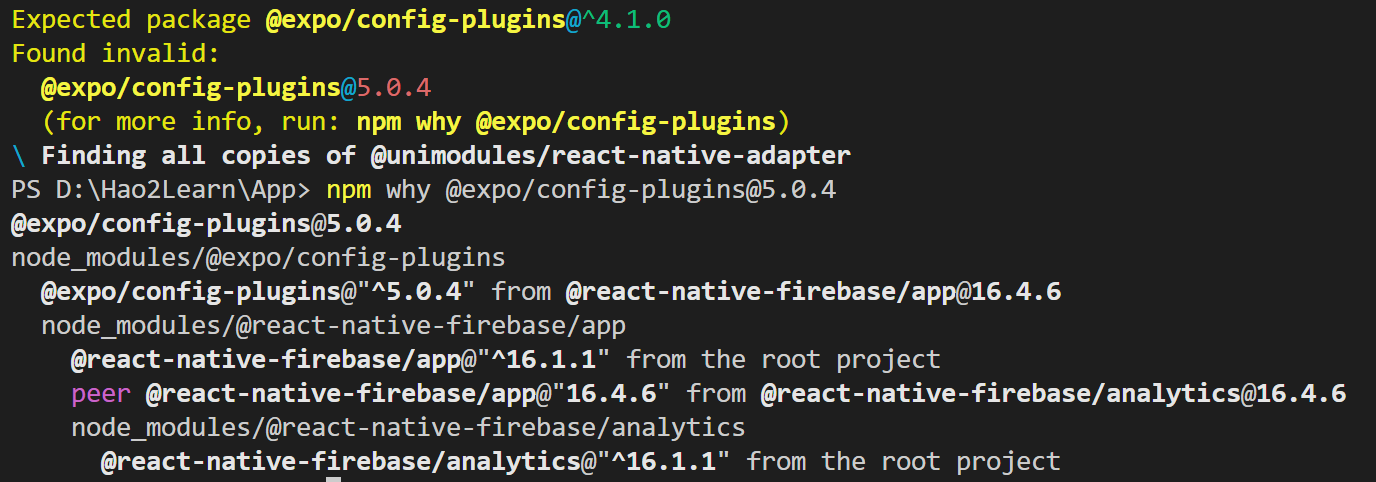 I guess I have to downgrade firebase? But how would I know which older version of firebase depends on the correct version of @expo/config-plugins?
Anyone tried anything else that worked? I’m on Expo45 and using Yarn and can’t get this fixed 😅
Also does anyone know what kinds of practical issues this causes within projects, like what actually breaks because of this bug?
@ayaanqui Delete the node_modules folder and package-loc.json and run
expo doctor --fix-dependenciesagain. That worked for meWe’re seeing this error as well. Here’s the output of
npm ls @expo/config-plugins