expo: [expo-device] isDevice returns true when app is running in emulator
Summary
What I’m expecting is to detect what kind of device the app is running on and then open/close notification service based on this. In simulator, expo-device detects correctly and isDevice returns -> false, but in an android emulator it’s true. It should be false as well.
I’m running project Mac M1 chip, this can be another reason why I see this.
Here is another link about this problem but from the other way around. https://forums.expo.dev/t/expo-device-package-api-bug/56802
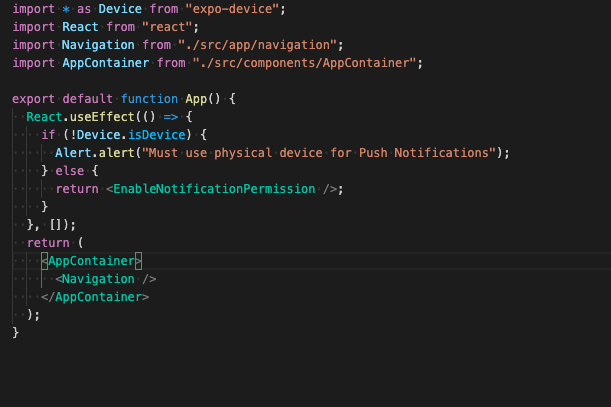
Managed or bare workflow? If you have ios/ or android/ directories in your project, the answer is bare!
bare
What platform(s) does this occur on?
Android
SDK Version (managed workflow only)
No response
Environment
Expo CLI 5.0.3 environment info: System: OS: macOS 12.1 Shell: 5.8 - /bin/zsh Binaries: Node: 14.17.3 - /usr/local/bin/node Yarn: 1.22.17 - /usr/local/bin/yarn npm: 6.14.13 - /usr/local/bin/npm Managers: CocoaPods: 1.11.2 - /opt/homebrew/bin/pod SDKs: iOS SDK: Platforms: DriverKit 21.2, iOS 15.2, macOS 12.1, tvOS 15.2, watchOS 8.3 Android SDK: API Levels: 29, 30, 31, 32 Build Tools: 29.0.2, 30.0.2, 30.0.3, 32.0.0 System Images: android-31 | Google APIs ARM 64 v8a, android-31 | Google Play Intel x86 Atom_64, android-32 | Google APIs ARM 64 v8a Android NDK: 22.1.7171670 IDEs: Android Studio: 2020.3 AI-203.7717.56.2031.7935034 Xcode: 13.2.1/13C100 - /usr/bin/xcodebuild npmPackages: expo: ~43.0.2 => 43.0.4 react: 17.0.1 => 17.0.1 react-dom: 17.0.1 => 17.0.1 react-native: 0.64.3 => 0.64.3 react-native-web: 0.17.1 => 0.17.1 npmGlobalPackages: expo-cli: 5.0.3 Expo Workflow: bare
Reproducible demo
It works with snacks as normal.
About this issue
- Original URL
- State: closed
- Created 2 years ago
- Reactions: 4
- Comments: 26 (10 by maintainers)
Where
XX0X.000000.000/0000000is a random alpha numeric code.IMO, this looks like a good patch.
still getting this issue
@keith-kurak @kbrandwijk the issue is still present (2022 August).
no “emulator” in any names
As a workaround, I added this line, but I hope it won’t be necessary in the future
else if (isAndroid && Device.productName?.includes("emulator")) { Alert.alert("Must use physical device for Push Notifications");}Thank you, that confirms my suspicion. I have a fix in the works that I linked above to address this issue.