App: [HOLD for payment 2022-10-20] [$500] Mac/Safari - request money flow: user display list is blank or cut off reported by @thesahindia
If you haven’t already, check out our contributing guidelines for onboarding and email contributors@expensify.com to request to join our Slack channel!
Action Performed:
- Login to staging.new.expensify.com via Mac/Safari
- Press green + icon and click on
Request money - Enter money amount and click on the next button
- Observe users list, see it is blank or the image is cut off
- Repeat 2-3 with different browsers Zoom levels (cmd + / cmd -)
Expected Result:
The user should be able to use money request flow without any display issues
Actual Result:
Users list in money request flow do not fit correctly or is blank in some zoom levels
Workaround:
Unknown
Platform:
Where is this issue occurring?
- Web
Version Number: 1.1.92.0
Reproducible in staging?: Yes
Reproducible in production?: Yes
Email or phone of affected tester (no customers): any
Logs: https://stackoverflow.com/c/expensify/questions/4856
Notes/Photos/Videos: Any additional supporting documentation
Expensify/Expensify Issue URL:
Issue reported by: Applause - Internal Team
Slack conversation:
About this issue
- Original URL
- State: closed
- Created 2 years ago
- Comments: 43 (22 by maintainers)
@oogushikun I agree that the scope of the issue may have extended a little bit beyond what was described in the issue body. I can see increasing this to $750 total – does that sound fair to you?
⚠️ Looks like this issue was linked to a possible regression on PRODUCTION here
If you are the assigned CME please investigate whether the linked PR caused a regression and leave a comment with the results.
If a production regression has occurred a Root Cause Analysis is required. Please follow the instructions here.
If a regression has occurred and you are the assigned CM follow the instructions here.
If this regression could have been avoided please consider also proposing a recommendation to the PR checklist so that we can avoid it in the future.
📣 @oogushikun You have been assigned to this job by @stephanieelliott! Please apply to this job in Upwork and leave a comment on the Github issue letting us know when we can expect a PR to be ready for review 🧑💻 Keep in mind: Code of Conduct | Contributing 📖
Thanks for the clarification @oogushikun. Yes you’re right that the transitions are getting overwritten with
react-native-modal.@oogushikun’s proposal here https://github.com/Expensify/App/issues/10608#issuecomment-1250098928 looks fine to be. Just that I would want to move
100toCONST.js🎀 👀 🎀 C+ reviewed
@AndrewGable Up for your review.
Thanks, all paid now!
All paid up!
works for me @stephanieelliott, thanks a lot 😃.
Applied on upwork. It’ll take me a day(after being approved) to create the PR. Thanks 😃
Apologies @mananjadhav for the late reply. As you’ve mentioned the values I passed in my previous comment are defined by react-native-animatable. The reason it’s not working is because currently when passing the animation type as a string i.e ‘slideInRight’, the transition value is 1920 instead of 100.
https://user-images.githubusercontent.com/23414844/193454744-5b3d3ff1-3514-4511-b82e-edd83fddd871.mov
This is being caused by react-native-modal which also uses react-native-animatable as a depedency. React-native-modal declares it’s own custom animations: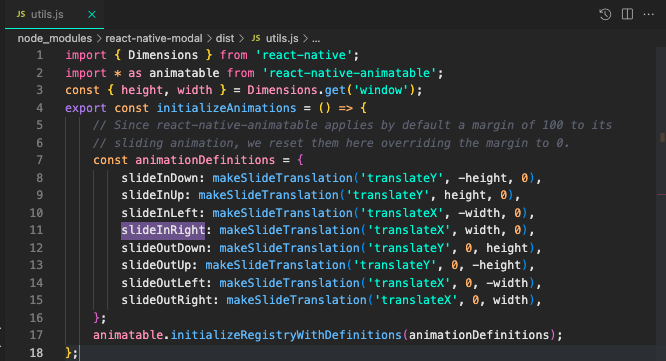
https://github.com/react-native-modal/react-native-modal/blob/6624b5abb326470820f9fedec8b3ecdb35520869/src/utils.ts#L1-L25
This overrides what was declared by react-native-animatable(100) and now uses the browser’s viewport width, 1920 in my case.
Hey @mananjadhav have you had a chance to review this one?
Missed the proposal here from @oogushikun. Please allow me a day to confirm. I am trying to check if this is a regression because this should’ve been working earlier!
Weird, I’m still not able to repro the blank screen behavior – tried both Chrome and Safari on staging and prod, multiple zoom levels. Either way, I agree these are very likely related! I updated this issue to include both the blank screen and the distorted display and raised it to $500.
I see a blank page when clicking Next after filling in the money amount.
@thesahindia also experiences the same:
https://expensify.slack.com/archives/C01GTK53T8Q/p1661708190183589
This bug will be dependent on the above bug.