App: [$250] App on ios emulator not detecting correct emulator to use
Context https://expensify.slack.com/archives/C03TQ48KC/p1666362417121579
Problem
Apparently when trying to run the ios app, it is not finding correctly the latest emulator I have installed and for some reason is looking for iPhone13, when I only have iPhone14 installed.
Error:
➜  App git:(main) npm run ios

> new.expensify@1.2.18-4 ios
> scripts/set-pusher-suffix.sh && npx react-native run-ios --port=8082

Using PUSHER_DEV_SUFFIX from ../Web-Expensify/_config.local.php
Found suffix: 65b74ba46c7c4edfaf0d7dc4b6c4caf6
Updating .env
warn Package react-native-safe-area-context contains invalid configuration: "dependency.platforms.android.cmakeListsPath" is not allowed. Please verify it's properly linked using "react-native config" command and contact the package maintainers about this.
warn Package react-native-flipper contains invalid configuration: "dependency.platforms.ios.project" is not allowed. Please verify it's properly linked using "react-native config" command and contact the package maintainers about this.
info Found Xcode workspace "NewExpensify.xcworkspace"
error No simulator available with name "iPhone 13".
info Run CLI with --verbose flag for more details.
My emulators:
info Run CLI with --verbose flag for more details.
➜  App git:(main) xcrun simctl list devices
== Devices ==
-- iOS 16.0 --
    iPhone SE (3rd generation) (1880E442-085D-45CA-B198-F59D19EC0919) (Shutdown)
    iPhone 14 (E3112A94-F1BA-4B56-9B0F-59B9E48E0546) (Shutdown)
    iPhone 14 Plus (E3537629-E979-4D64-A9D6-D0581584FE98) (Shutdown)
    iPhone 14 Pro (5B1AF5C8-23D9-43AC-8499-2A6B251513DB) (Shutdown)
    iPhone 14 Pro Max (5F4913AB-1821-4C74-8C09-9D5B40755356) (Shutdown)
    iPad (9th generation) (7761FF05-80C3-488A-9638-02AB93151AC8) (Shutdown)
    iPad Pro (11-inch) (3rd generation) (EB1FC844-8E82-48F8-9335-A4F3DE2DE162) (Shutdown)
    iPad Pro (12.9-inch) (5th generation) (53EF422D-533C-4D2A-BEF1-65051AEB9465) (Shutdown)
    iPad Air (5th generation) (3A8C0CCC-B5EF-4F42-93B5-4CCC85D0F3C8) (Shutdown)
    iPad mini (6th generation) (8B66D73F-F99F-4AD1-B354-563A36337D7A) (Shutdown)
Workaround: run npx react-native run-ios --simulator='iPhone 14' instead of npm run ios
About this issue
- Original URL
- State: closed
- Created 2 years ago
- Reactions: 1
- Comments: 33 (25 by maintainers)
Updating the RN form is kind of a PITA and I havent had time for this yet. Since that takes couple of hours of work and this does not seem like as such a valuable reason to switch I would go ahead with using the original proposal from @Puneet-here.
I hope that make sense, we are trying to squash all the bug and this can be clean up once we eventually update the RN version for something more important I would say.
@Puneet-here Could you please implement the solution you have proposed which will solve this issue quickly and eventually this can be removed once RN will be updated?
The expected behaviour is that if you are on up-to-date mac with up-to-date XCode, you can just run
npm run iosand it works ™️.I agree that if updating react native (which we will do eitherway) will accomplish this, then we should do this.
in that case @mdneyazahmad would be the best solution, thanks for the message @Puneet-here
@mdneyazahmad would you be able to update our version of the RN for to the necessary version and test the App with this version? hopefully no breaking changes.
OK, great. Let’s see what works well on the PR.
🎀 👀 🎀 C+ reviewed
This happens because at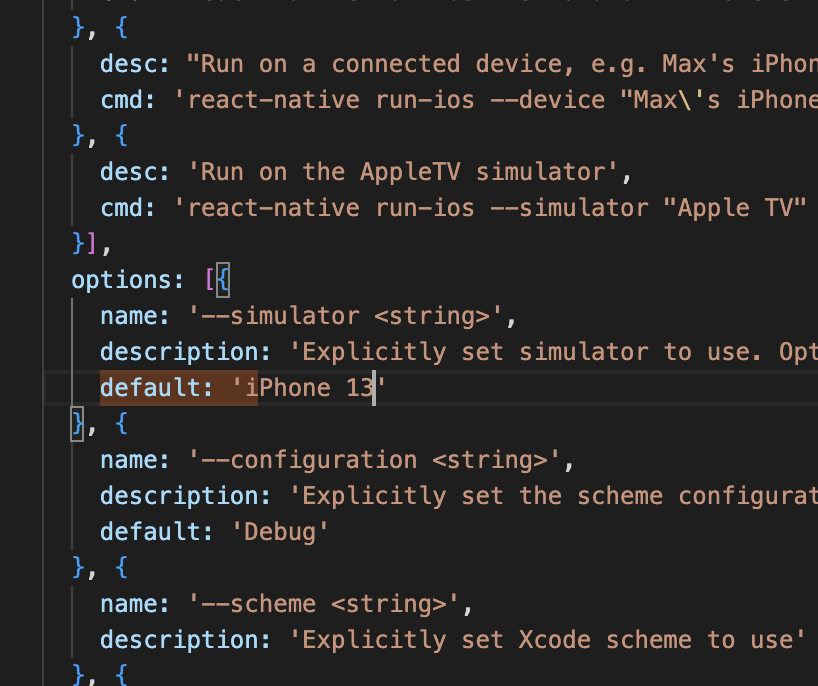
node_modules/@react-native-community/cli-platform-ios/build/commands/runIOS/index.jsthe default is iPhone 13. You can set any emulator here