electron-builder: installSiderbar won't work
-
Version: 19.45.4
-
Target: nsis
The build config is :
 "nsis": {
      "oneClick": false,
      "installerLanguages": "zh_CN",
      "language": "2052",
      "allowToChangeInstallationDirectory": true,
      "installerSidebar": "installerSidebar.bmp",
      "multiLanguageInstaller": true
    },
I dig into the source code to make sure the installerSidebar would be right set
 asyncTaskManager.add((0, (_bluebirdLst || _load_bluebirdLst()).coroutine)(function* () {
                const bitmap = (yield packager.getResource(options.installerSidebar, "installerSidebar.bmp")) || "${NSISDIR}\\Contrib\\Graphics\\Wizard\\nsis3-metro.bmp";
                console.log('bitmap#####', bitmap)
                defines.MUI_WELCOMEFINISHPAGE_BITMAP = bitmap;
                defines.MUI_UNWELCOMEFINISHPAGE_BITMAP = (yield packager.getResource(options.uninstallerSidebar, "uninstallerSidebar.bmp")) || bitmap;
            }));
and the log is
shangpo.zw@MININT-HFTKDRR MINGW64 /d/boat-ide (master)
$ yarn release-win
yarn run v1.3.2
$ cross-env NPM_CONFIG_ELECTRON_MIRROR=https://npm.taobao.org/mirrors/electron/ electron-builder --win
electron-builder 19.45.4
No native production dependencies
Packaging for win32 x64 using electron 1.7.9 to release\win-unpacked
Building nsis installer (x64)
bitmap##### D:\boat-ide\build_resources\installerSidebar.bmp
options.multiLanguageInstaller true
options.multiLanguageInstaller true
options.multiLanguageInstaller true
Done in 107.80s.
It show that the picture’s location is right
the picture is: https://img.alicdn.com/tfs/TB1MXAYem_I8KJjy0FoXXaFnVXa-164-314.bmp

But the result is that the installerSidebar won’t work
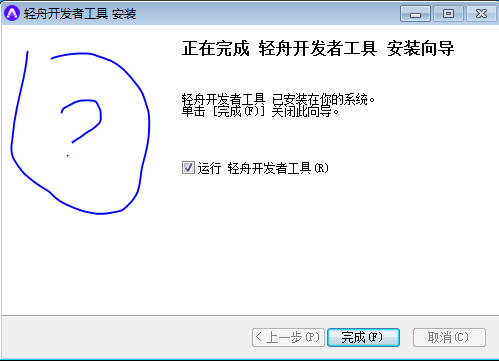
Maybe I make a wrong config ?
About this issue
- Original URL
- State: closed
- Created 7 years ago
- Comments: 22 (1 by maintainers)
@damianobarbati Thank you. After save bitmap to 24 bit the picture are shown correctly 😉
@damianobarbati Here is my confiig.
I used MS paint to convert the image into a 24-bit .bmp
As for 09/29/2020
electron-builderdoes not seem to throw any error. Met the same issue and saving the sidebar image to 24bit bpm worked like a charm.Yes, it shows up!!! So… what is the exact filetype/size/color/shape/width/height/depth/encoding to have this working?
Hi, I solved it by using a 24-bit bitmap image. 32-bit works fine too. The dimensions does not matter.