code-server: Jupyter Notebooks not working
OS/Web Information
- Web Browser: Firefox 89.0.2 (64-bit)
- Local OS: macOS 10.14.6 (Mojave)
- Remote OS: Debian buster
- Remote Architecture: 64-bit
code-server --version: 3.11.0 4e8cd09ef0412dfc7b148b7639a692e20e4fd6dd
Steps to Reproduce
- Create a
.ipynbfile
Expected
Jupyter extension should load and display the Jupyter notebook.
Actual

Logs
Log (Remote Extension Host)
[2021-07-15 07:06:36.925] [exthost] [error] Activating extension ms-toolsai.jupyter failed due to an error:
[2021-07-15 07:06:36.925] [exthost] [error] Error: Cannot find module '/home/jovyan/.local/share/code-server/extensions/ms-toolsai.jupyter-2021.6.99/out/client/extension'
Require stack:
- /opt/code-server/lib/vscode/out/vs/loader.js
- /opt/code-server/lib/vscode/out/bootstrap-amd.js
- /opt/code-server/lib/vscode/out/bootstrap-fork.js
	at Function.Module._resolveFilename (internal/modules/cjs/loader.js:902:15)
	at Function.Module._load (internal/modules/cjs/loader.js:746:27)
	at Function.n._load (/opt/code-server/lib/vscode/out/vs/workbench/services/extensions/node/extensionHostProcess.js:103:27915)
	at Function.E._load (/opt/code-server/lib/vscode/out/vs/workbench/services/extensions/node/extensionHostProcess.js:103:24661)
	at Function.c._load (/opt/code-server/lib/vscode/out/vs/workbench/services/extensions/node/extensionHostProcess.js:93:59193)
	at Module.require (internal/modules/cjs/loader.js:974:19)
	at require (internal/modules/cjs/helpers.js:92:18)
	at Function.t [as __$__nodeRequire] (/opt/code-server/lib/vscode/out/vs/loader.js:5:101)
	at f._loadCommonJSModule (/opt/code-server/lib/vscode/out/vs/workbench/services/extensions/node/extensionHostProcess.js:103:26067)
	at f._doActivateExtension (/opt/code-server/lib/vscode/out/vs/workbench/services/extensions/node/extensionHostProcess.js:89:12599)
	at f._activateExtension (/opt/code-server/lib/vscode/out/vs/workbench/services/extensions/node/extensionHostProcess.js:89:11658)
	at Object.actualActivateExtension (/opt/code-server/lib/vscode/out/vs/workbench/services/extensions/node/extensionHostProcess.js:89:9243)
	at l._activateExtension (/opt/code-server/lib/vscode/out/vs/workbench/services/extensions/node/extensionHostProcess.js:84:85443)
	at /opt/code-server/lib/vscode/out/vs/workbench/services/extensions/node/extensionHostProcess.js:84:85125
	at Array.map (<anonymous>)
	at l._activateExtensions (/opt/code-server/lib/vscode/out/vs/workbench/services/extensions/node/extensionHostProcess.js:84:85113)
	at l.activateByEvent (/opt/code-server/lib/vscode/out/vs/workbench/services/extensions/node/extensionHostProcess.js:84:82447)
	at f._activateByEvent (/opt/code-server/lib/vscode/out/vs/workbench/services/extensions/node/extensionHostProcess.js:89:10142)
	at /opt/code-server/lib/vscode/out/vs/workbench/services/extensions/node/extensionHostProcess.js:89:20014
	at processTicksAndRejections (internal/process/task_queues.js:95:5)
Screenshot
See above.
Notes
This issue can be reproduced in VS Code: No
@jsjoeio This is the bug report you asked for in issue https://github.com/cdr/code-server/issues/3776.
About this issue
- Original URL
- State: closed
- Created 3 years ago
- Reactions: 4
- Comments: 74 (61 by maintainers)
I found this thread after hours of searching on the Internet for the enable-proposed-api problem. And it took another hour to read and understand.
Here is what worked for me finally (@jsjoeio’s solution https://github.com/coder/code-server/issues/3782#issuecomment-996202105) :
~/.local/share/code-server/extensions/ms-toolsai.jupyter-<version>/package.jsonRestart
code-server(without any --enabled-proposed-api arguments)So far I figured out at least two issues that are rather strange:
https://user-images.githubusercontent.com/32478819/146665568-7ea1ed7e-8608-41fe-b6f2-7b7d89c9cc47.mp4
"Failed to set 'pythonPath'. Error: Unable to write to Folder Settings because no resource is provided."https://user-images.githubusercontent.com/32478819/146665708-4a95dbc2-c678-4dd6-bbcc-42aacdafc505.mp4
Okay seems like I figured out in which situation it works and in which not:
If I start code-server using
code-server .(notice the dot for the current directory) and visit it using the browser afterwards:Maybe that helps?
Ahhhh fu … I only checked the timestamps and not the commits. Okay nvm. Than I’ll wait until the next dev. build.
Planning to look into this after we wrap up 3.11!
That seemed to do it! Thank you again for making this very easy to fix. We couldn’t have done it this fast without both of you
https://user-images.githubusercontent.com/3806031/148261234-ba91f181-5f18-4d7e-a693-ec03e7dfc73b.mov
Using the new version 4.0.0 I get quite strange errors, telling me that I must enable a proposed api:
I’m not sure if this is related, but in 3.11 I get an error when calling “Jupyter: Create New Blank Notebook”:
Interesting, I can run
yarn packand the same issue occurs so I can figure out the issue without having to publish.Thank you for reporting!
I verified the ipynb extension is missing the dist directory after installing (
yarn global add code-serverin my case).It exists in the standalone release though so I guess it is unlikely to be a build issue.
I downloaded the npm package artifact from CI but it looks fine so not a packaging issue either.
Which I guess means something went wrong when we ran
yarn publish. I think we will need to try re-publishing, maybe as 4.1.0-1 although I am nervous the same thing will happen.@benz0li @fritterhoff wow - thank you both for digging in!
@code-asher should we revert https://github.com/coder/vscode/commit/d50b73c41535a688e4bace787a1f5d829d26af40 then?
Yep. Getting the same error.
Yes, adding the param
?folder=works fine. Afterwards the new version 4.0.0 works great in my case! Great tool for plenty use cases!Those also work (from my tests) with 4.0.0
@jsjoeio could it even be that the issue is caused by the extension? As the log says:
Its package.json#enabledApiProposals-property declares: [] but NOT notebookEditor.So looking into the extensions vsix (version ms-toolsai.jupyter-2021.11.1001552333) and the package.json proofs that there is no
enabledApiProposalsproperty at all.Hi ndgayan , thank you very much, it worked perfectly on my iMac. To recap: I installed code-server using brew but it had issues with jupyter notebooks. So, as suggested by @ndgayan , I installed code-server as a standalone with: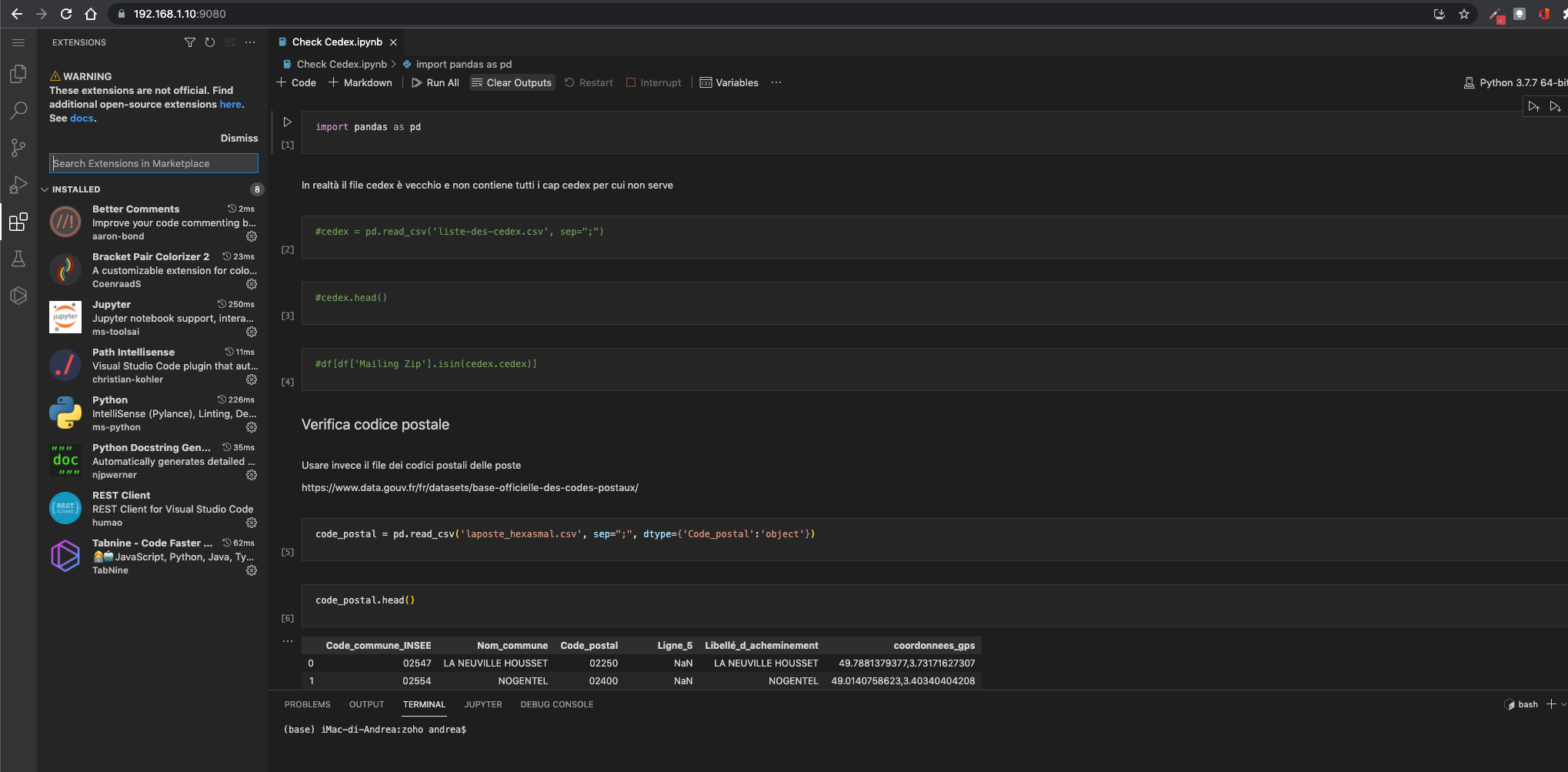
curl -fsSL https://code-server.dev/install.sh | sh -s -- --method=standalonemodified my plist to point to the new version~/.local/lib/code-server-3.12.0/code-serverand everything worked perfectly (no need to reinstall any extension, I already downloaded them from open-vsx, or modify the config files) It’s a good workaround waiting for 3.12.1PS I also updated the symbolic link created by brew in /usr/local/bin to point to the new code-server
Yeah, we’re in the process of updating VS Code so it should be compatible in the next release 🤞 (sorry for the issues!)
I can confirm, the same symptom is occurring running 3.12.0. I am running with node v14.18.0 on ppc64le.
FYI It worked fine with code-server 3.10.2 387b12ef4ca404ffd39d84834e1f0776e9e3c005, Python 2021.5.926500501 and Jupyter 2021.6.832593372.
e.g.
code-server --extensions-dir $CODE_BUILTIN_EXTENSIONS_DIR --install-extension ms-toolsai.jupyterwithCODE_BUILTIN_EXTENSIONS_DIR=/opt/code-server/vendor/modules/code-oss-dev/extensions;PATH=/opt/code-server/bin:$PATH.@fritterhoff you rock! I’m running it locally with this revert to ensure it works as expected too!
@jsjoeio Atm I’m building a fork of your vscode without that patch and all remaining. So prop. I can tell you in ± 30mins if it works.
So, it seems like either https://github.com/coder/vscode/commit/53bc7512d7af7105fc5908e07eed9f9a891e94d6 or https://github.com/coder/vscode/commit/d50b73c41535a688e4bace787a1f5d829d26af40 causes the issues.
As https://github.com/coder/vscode/commit/53bc7512d7af7105fc5908e07eed9f9a891e94d6 “only” adds a missing file I’m pretty sure, that https://github.com/coder/vscode/commit/d50b73c41535a688e4bace787a1f5d829d26af40 (https://github.com/coder/vscode/pull/23) causes the issues. Well now it’s up to you @code-asher @jsjoeio to dig into that problems and maybe to revert https://github.com/coder/vscode/pull/23?
Thank you for testing it and nice find! If it works with
?folderI think I might know where the problem is. I will take a look soon.I will submit a PR into
coder/vscodeshortly@jsjoeio Nonetheless, the issue rather lies with code-server than the extension(s).
Usually, older versions of the extension(s) work with newer versions of code-server.
@jsjoeio I’ve rolled back.
FYI Jupyter v2021.11.1001552333 ist the version deployed at https://vscode-r.jupyter.b-data.ch.
P.S.: This deployment uses https://github.com/coder/code-server/releases/tag/v4.0.0.
Ok… strange I thought that worked yesterday. Does not work for me. Sorry.
Thats strange… I’ll give it another try
It does not.
@fritterhoff I have whitelisted you at https://vscode-r.jupyter.b-data.ch, too.
Going to rollback in 90 mins. Rolled back.
@jsjoeio I may force install Jupyter v2021.8.12 and Python v2021.10.1365161279 for code-server v4.0.0 at https://vscode-r.jupyter.b-data.ch if you wish.
I don’t need the latest versions of these extension. I’m happy to pin older versions of these extension, if they work.
Going to build images with pinned versions now… done.
Yeah atm we also run the “old” jupyter extension, but the new brings some great features we would love to use.
The Jupyter v2021.8.12 and Python v2021.10.1365161279 extension worked well with code-server v3.12.0 (aka VS Code v1.60.0). You may check At https://demo.jupyter.b-data.ch; login with GitHub account.
At https://vscode-r.jupyter.b-data.ch the
docker buildinstalls Python v2021.10.1365161279 and Jupyter v2021.11.1001552333 from OpenVSX, which are the latest available versions compatible with code-server v4.0.0 (aka VS Code v1.63.0).Here are notes as part of my second time investigating this.
Notes
Test with 2022.1.1001585725 (no modifications
Expected: it installs Actual: it fails due to mismatch like @fritterhoff pointed out.
You can see the latest version of VS code required here.
We can also inspect the source code ourselves by changing the downloaded
.vsixfile to a.zipand then unpacking.Opening that folder (called
extension) in code-server to inspect the files, we see this.One theory to test is to change this version to match the one in code-server:
1.63.0and then zip, change to.vsixand try installing…This is weird 🤔 I’m trying to package it up using
vscelocally. When I runnpm installI get a weird dependency error.Seems like I might have to clone and build from source since the packaged version obviously doesn’t have build scripts.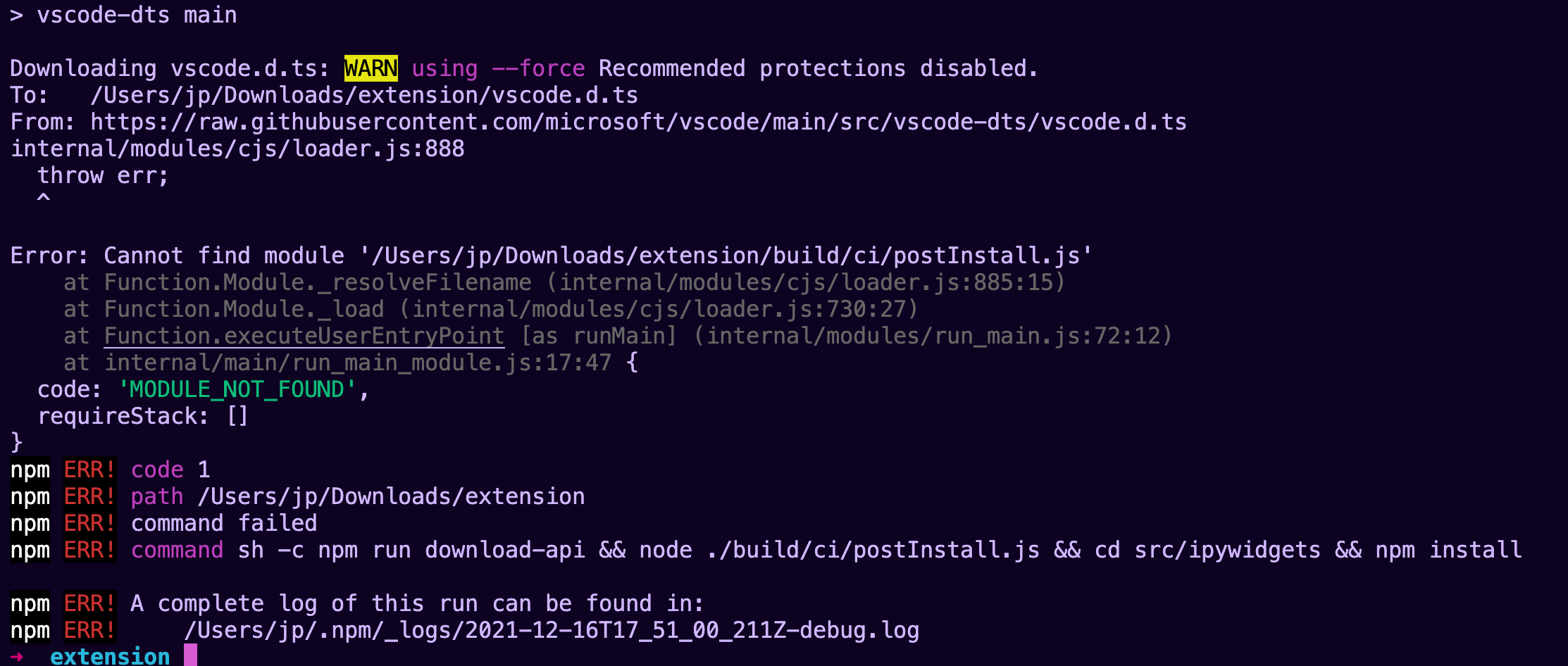
Argh…as I’m going down this path, it feels super hacky. I’m going to stop here and explore other options. See this open issue though: https://github.com/microsoft/vscode-jupyter/issues/8548
Reproduces in local VS Code
I manually downloaded the extension here and I’m getting a similar error about incompatibility so that does make me a little happy.
This makes me think we need to find a version that is compatible with 1.63.0
Trying to use older versions
I keep getting the same error. The extension is trying to use proposed APIs but doesn’t declare it in it’s package.json
https://open-vsx.org/extension/ms-toolsai/jupyter/2021.11.1001480568
enableProposedApi vs. enabledApiProposals
Hmm…this might be something. I took a look at the
package.jsonof an older extension (2021.11.1001480568) and I don’t even see theenabledApiProposalsproperty that the error message is referring to. Instead, I seeenableProposedApi: true. I wonder if that could be related at all?Trying an older extension with --enable-proposed-api flag
Tried this as well. No luck.
Related to https://github.com/coder/code-server/issues/4480. See also https://github.com/coder/vscode/commit/a9ea411918c8db3a02820c43ee290b6e2569f418:
❓
Digging a little bit further in this approach leads me to an other point
By default this is done:
So from my point of view we never should run into: https://github.com/coder/vscode/blob/main/src/vs/workbench/services/extensions/common/abstractExtensionService.ts#L1215
Using the latest version (2022.1.1001585725) provides:
Shouldn’t that be
./code-server-4.0.0-macos-amd64/bin/code-server --enable-proposed-api "ms-toolsai.jupyter"?Ah nvm … skipped the interesting line. Sorry.
I’m testing this out with the v4.0.0 pre-release. I’ll update this comment with my notes.
Notes
The file loads but the Jupyter extension is complaining.
I tried running this:
But that didn’t work. Gonna try running with
notebookEditorinstead.There may be an issue with those flags not being passed to VS Code.
Seems like they need to be in quotes for the flags to be picked up. Still doesn’t work sadly 😦 I think there are some thing missing for Jupyter to work so we’ll need to investigate more.
Video
https://user-images.githubusercontent.com/3806031/146266625-e2e8342d-4ff4-42bd-9013-7b6068fc30ed.mov
Hmm…it seems like my proposed api flags are not being read with:
That might be the first place to look. cc @code-asher
Stack trace:
Next Steps
@code-asher pointed out a few good things to look at.
This worked
https://github.com/cdr/code-server/issues/3874#issuecomment-923383398
Yes, it worked for 3.9.3 but doing the same on 3.12.0 does not work : Unfortunately there is no brew formula for version 3.9.3. I hope you will be able to fix 3.12 soon.
Thanks.
Unfortunately there is no brew formula for version 3.9.3. I hope you will be able to fix 3.12 soon.
Thanks.
Hi @jsjoeio , thank you very much for your kind reply. I did like this:
SERVICE_URL=https://open-vsx.org/vscode/gallery ITEM_URL=https://open-vsx.org/vscode/item code-server --install-extension ms-python.pythonAm I doing wrong? But the error is still there (I cleaned the extension dir before installing).Same issue for me with my installation on my iMac with Os X 10.14 using Homebrew (the latest version of code-server is 3.12.0); jupyter files won’t open:
code-server: v3.12.0 VS Code: v1.60.0 Commit: 4cd55f94c0a72f05c18cea070e10b969996614d2 Date: 2021-09-15T19:34:37Z (1 mo ago) Browser: Mozilla/5.0 (X11; CrOS x86_64 14150.64.0) AppleWebKit/537.36 (KHTML, like Gecko) Chrome/94.0.4606.104 Safari/537.36Python extension installed (v2021.10.1365161279 from open-vsx) and Jupyter too (v2021.8.12; actually I tried to install a more recent version using open-vsx, the installer said that version 2021.10.100 was succesfully installed code-server shows me the other version). They are no python or jupyter duplicated versions in the extension directory.
I can select the python interpreter, also for jupyter server, but when I try to open a .ipynb file I get the following error:
The same issue if I run from the iMac where code-server is installed or remotely using my Chromebook. In local Vscode on my iMac jupyter files open without any issue selecting the same python interpreter.
PS (off-topic) adding the suggested lines in prdouct.json to use open-vsx does not seem to work for me even after a server restart:
"extensionsGallery": { "serviceUrl": "https://open-vsx.org/vscode/gallery", "itemUrl": "https://open-vsx.org/vscode/item" }