code-server: Jupyter notebook not shown on screen
OS/Web Information
- Web Browser: Firefox 93.0
- Local OS: Ubuntu 21.04
- Remote OS: same (running locally)
- Remote Architecture: Installed anaconda (conda version 4.10.3)
code-server --version: 3.12.0
Steps to Reproduce
- Open an existing notebook
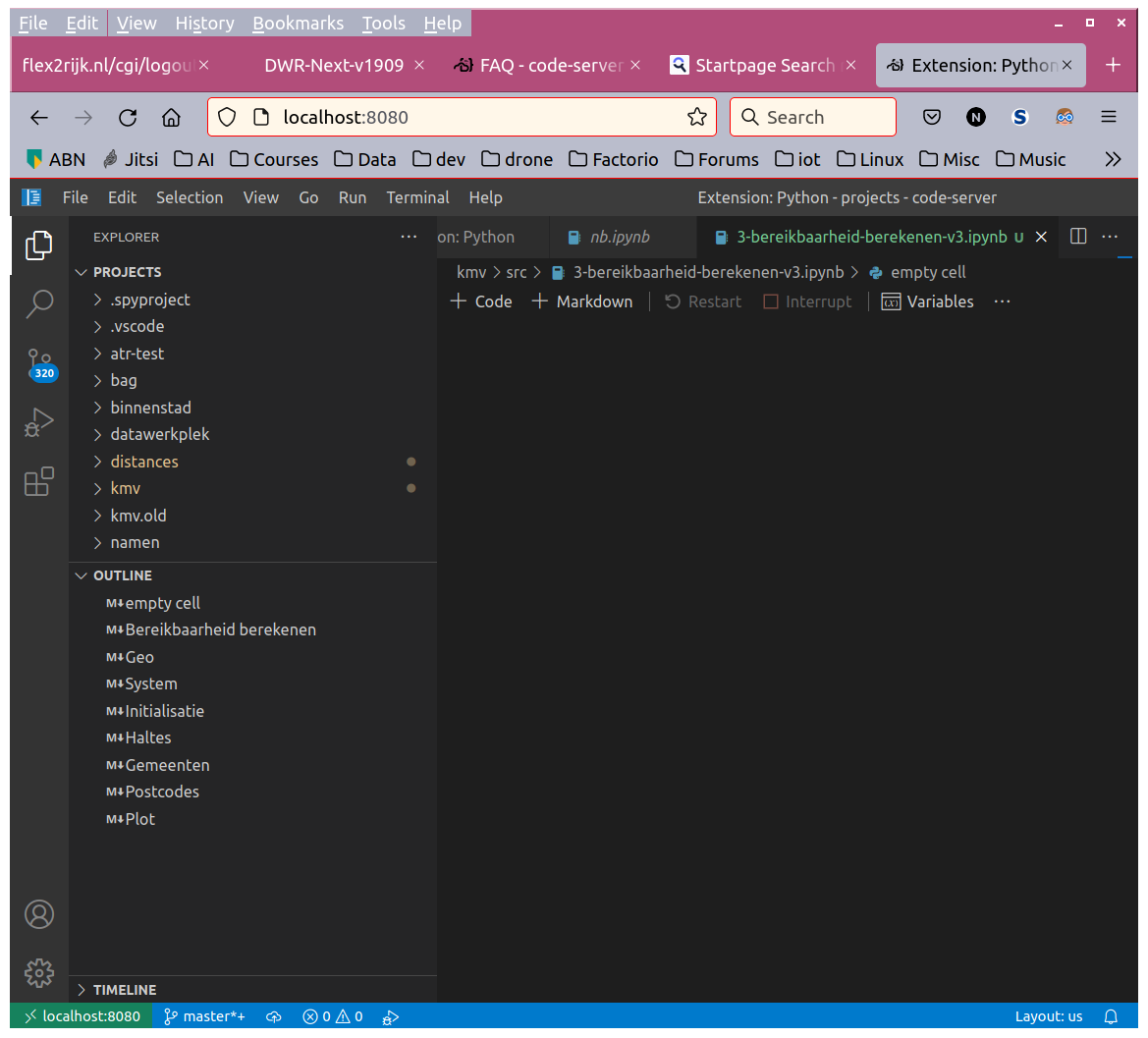
- The file kind of opens, meaning the contents are not shown, the wait indicator is running but the outline can be shown. It can be run as well but does not recognize the installed python interpreter (ms-python) or jupyter notebook (ms-toolsai). It asks again and again to install a python interpreter.
- New markdowns can be added, show up in the outline (without text) but not on the screen.
- The same happens when creating a new notebook
- Notebooks can be normally created, opened and run in local vscode (1.61.1)
- code-server has been removed and installed again to see if anything differed. That was not the case.
Python code runs as expected.
Expected
When opening an existing notebook, it shows the notebook on the screen that can be run using F5. Also it should be aware of already existing installed python environments.
I would like to see a jupyter notebook and be able to run the cells like in the local version.
Actual
Nothing.
Logs
Log files are added. There is no log activity to be seen on the screen (code-server.log) when I try to open and run a jupyter notebook.
Screenshot
Has been added. The editor shows a blank screen but the outline shows that a lot is present. The sidebar is identical as that of local vscode.
Notes
This issue can be reproduced in VS Code: No
About this issue
- Original URL
- State: open
- Created 3 years ago
- Reactions: 2
- Comments: 34 (16 by maintainers)
I have the same issue
@benz0li this process of adding IP of each new remote machine can be bit cumbersome. Even in the chrome solution of adding IP to this box
chrome://flags/#unsafely-treat-insecure-origin-as-securein this link seems to fix the issue and maybe simpler, so would skip this way by mcert then. But thank you for your insights and for being patient and also helping me. there are lot of remote machines with different IP in my university so I feel chrome way is easier.You might need to download an older version of the extension.
An example of switching to OpenVSX can be found here: https://github.com/cdr/code-server/blob/v3.12.0/docs/FAQ.md#how-do-i-use-my-own-extensions-marketplace
The next release of code-server will likely use OpenVSX by default.
Seems likely related to our recent extension issues in our marketplace in which case it would be fixed by our switch to Open VSX https://github.com/cdr/code-server/pull/4319.
Workarounds are to install the .vsix or switch to Open VSX early.
I might have known it was because there was no SSL certificate. I really appreciate you taking the time to answer my questions. wish you a happy life.
@rohit901 If you run this on your actual computer (i.e.
localhost) you couldand access either via http://127.0.0.1:11000 or http://localhost:11000
Then, Jupyter Notebooks will work.
You may also
docker run --rm -p 8888:8888 -e GEN_CERT=yes -v jupyter-user-jovyan:/home/jovyan [image]with any of the followingimages:registry.gitlab.b-data.ch/jupyterlab/r/r-verregistry.gitlab.b-data.ch/jupyterlab/r/tidyverseregistry.gitlab.b-data.ch/jupyterlab/r/verseregistry.gitlab.b-data.ch/jupyterlab/r/geospatialregistry.gitlab.b-data.ch/jupyterlab/julia/verSee https://github.com/coder/code-server/issues/4689#issuecomment-1006472915
and https://github.com/coder/code-server/issues/4689#issuecomment-1007599115
plus
I am not sure, we will need to look into this once we finish the work on 4.0.1.
I’m having the same issue. Could you elaborate a bit more on the workaround. I’ve tried to install the .vsix but they are incompatible requiring vscode 1.61.