atldotnet: OutOfMemoryException
The problem
Writing chapter data to my .m4a/.m4b file triggers an OutOfMemory exception in
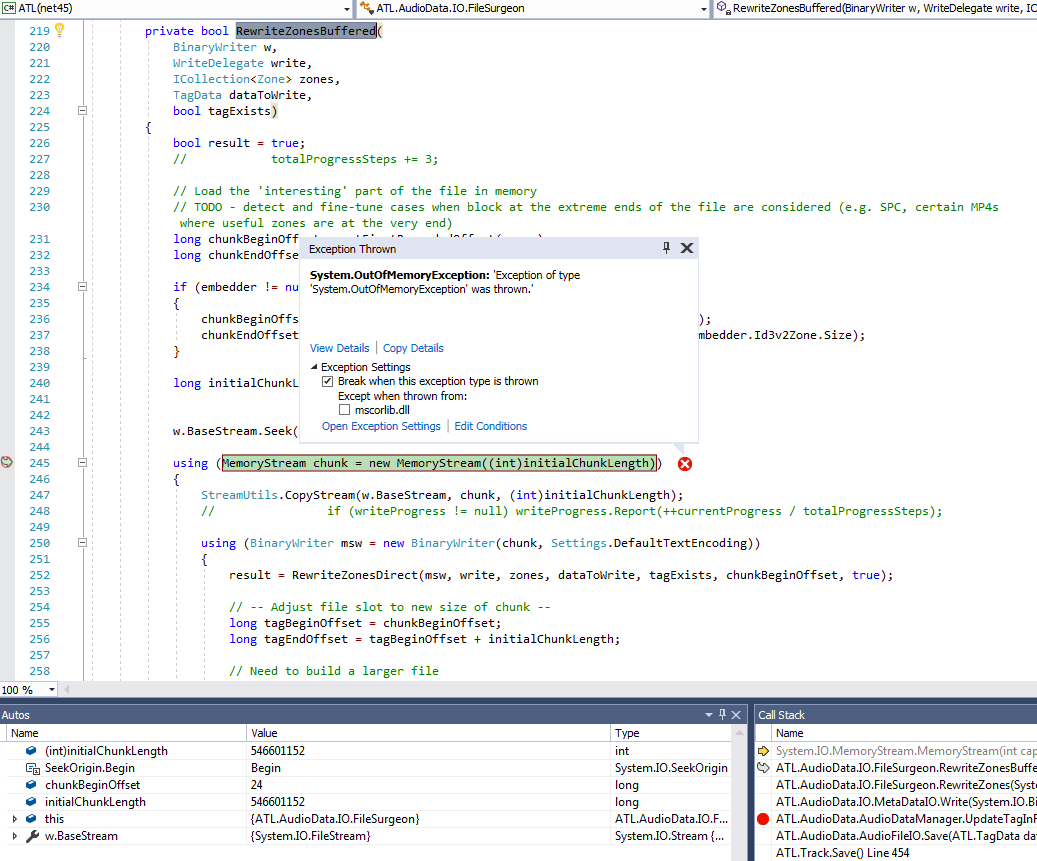
ATL.AudioData.IO.FileSurgeon.RewriteZonesBuffered (), line 245
Environment
- ATL version 3.11 (local clone)
- OS/version Win7, .Net 4.7.1
Details
I was just about to publish the next version of AAX Audio Converter with ATL.net now in charge of all chapter meta data. I was running my final tests, only to find out that no chapters were present for a monolithic book of 521 MB (546.601.176 bytes).
I tracked it down for this to happen only in the release build, not in the debug build. For some initial debugging I built ATL.net myself again, based on your latest release.
While this memory allocation at line 245 goes through in debug mode without protest, it fires the exception in release mode. Don’t ask me why. The exception is caught by ATL.net internally and not forwarded to the caller, hence I couldn’t see any reason at first.
What confuses me is that the amount of memory asked for is almost the entire file, 546.601.152 bytes. And this is a rather short book.
Code To Reproduce Issue [ Good To Have ]
Will probably happen with any larger file.
About this issue
- Original URL
- State: closed
- Created 4 years ago
- Comments: 22 (12 by maintainers)
Commits related to this issue
- Optimize memory usage when processing MP4 files [#71] — committed to Zeugma440/atldotnet by Zeugma440 4 years ago
- Temporarily revert to old FileSurgeon + add Settings.ForceDiskIO [#71] — committed to Zeugma440/atldotnet by Zeugma440 4 years ago
- Optimization of RAM usage when writing (WIP, still some issues to fix) [#71] — committed to Zeugma440/atldotnet by Zeugma440 4 years ago
Not a misunderstanding really, I just wanted confirmation. I noticed that the buffer setting gets used in the
StreamUtils.CopyStreammethod.Yes, that’s fine with me.
I plan to release AAX Audio Converter 1.15 next weekend now and am quite happy with the current direct disk mode for that version. Please do not feel under any pressure. There will also be a version 1.16 and I still want to completely replace TagLibSharp for the remaining meta data.
In my professional work, I create unit tests all over the place for all our fundamental libraries. Otherwise, we wouldn’t be able to maintain those.
But I always regarded AAX Audio Converter as a leisure project, a pastime. So, not all the professional conventions will apply. And unit tests for this application aren’t simple. While there is a clear project separation between the GUI and the executing lib, unit testing would still need a mock-up for the GUI. And asserts aren’t easy either, as they most often will require audio file analysis. Then there is some other software I am doing as a hobby, (closed source, payware, written in C++, in a totally different sector) which requires attention, too, as it has been neglected for too long.
On the other hand, I didn’t expect over 30,000 downloads until now. We’ll see…
v3.12 has been uploaded to NuGet. You can now use
Settings.ForceDiskIOFFmpeg, Something like this:
FFmpeg -hide_banner -i infile.m4b -map_chapters -1 -vn -c:a copy outfile.m4b