wallabag: Wallabagger for Firefox not working with self-hosted instance (Docker)
Issue details
I just deployed a Wallabag instance to my server using the official docker-compose. I also use Nginx as a reverse proxy.
Docker compose and Nginx configs here.
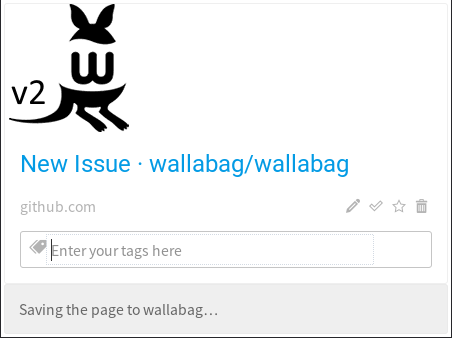
The web UI and the Android client are working fine but the Wallabagger for Firefox extension does not work. I configured it properly (and successfully) and when I try to bag a page I get the “Saving the page to wallabag…” message forever. The Wallabag icon turns yellow upon clicking and then red. See screenshot bellow.
Looking at the docker-compose logs (when running up without the `-d’ option) shows me this error when I try to save a page with Wallabagger:
db_1        | 2018-09-18 12:17:26 58 [Warning] Aborted connection 58 to db: 'wallabag' user: 'wallabag' host: '172.23.0.3' (Got an error reading communication packets)
wallabag_1  | 2018/09/18 12:17:26 [error] 245#245: *164 recv() failed (104: Connection reset by peer) while reading response header from upstream, client: 172.23.0.1, server: _, request: "POST /api/entries.json HTTP/1.0", upstream: "fastcgi://127.0.0.1:9000", host: "127.0.0.1:3004"
wallabag_1  | 172.23.0.1 - - [18/Sep/2018:12:17:26 +0000] "POST /api/entries.json HTTP/1.0" 502 166 "-" "Mozilla/5.0 (X11; Ubuntu; Linux x86_64; rv:62.0) Gecko/20100101 Firefox/62.0"
Environment
- Version: 2.3.3
- Install method: Docker (docker-compose)
- Last wallabag version that did not exhibit the issue (if applicable): -
- PHP version: 7.2.10 (Docker version, should be irrelevant)
- OS: Debian 8
- Type of hosting: dedicated
- Storage system: MariaDB
Steps to reproduce/test case
- Deploy Wallbag with docker-compose and a Nginx reverse proxy as mentioned above
- Configure the Wallabagger extension for Firefox
- Try to save a page with it
Screenshot
About this issue
- Original URL
- State: closed
- Created 6 years ago
- Comments: 26 (9 by maintainers)
Same problem with 2.3.5 on Ubuntu 18.04, apache2 2.4.29 and php-fpm 7.2.10. I suppose that there is a problem with the firefox extension. I started a a tcpdump on my machine an saw no connection to my server while invoking the plugin.
Is there a debug view in firefox which helps me to inspect what the wallabag extension is doing?
I’m using the “plain git install” (no container), so I guess the issue might be more appropriate here, right? 😉
Thanks for your continued efforts, wallabag is very useful to me.
I just did, sadly the issue remains.