vuetify-loader: Sourcemap points to missing source files
@KaelWD I am using Nuxt 3 and integrating vuetify 3.
Everything works smoothly but when I add sass variables customization, I get a WARNING Sourcemap for “plugin-vuetify:styles/main.sass” points to missing source files and that keeps repeating for each component in the library (eg Sourcemap for “plugin-vuetify:components/VBtnToggle/VBtnToggle.sass” points to missing source files ). I am using the vite-plugin-vuetify to add vuetify using a nuxt.hooks.hook in an async way in modules. (I need to do this because vuetify must be loaded after vue is loaded). Note I use the same configuration with just vue and vite and it works without warning (to be honest in this case i can load vue in the plugins).
So in nuxt.config.ts I do have the following:
modules: [
    async (options, nuxt) => {
      nuxt.hooks.hook('vite:extendConfig', (config) =>
        config.plugins.push(
          vuetify({
            autoImport: true,
            styles: { configFile: 'assets/styles/config.scss' },
          })
        )
      )
    },
  ],
The file config.scss just overwrite few sass variables. Everything works great, the variables are overwritten, the style gets applied and the components are working properly; I only get this annoying warning in the terminal, and because the warning is for every component, I do have my terminal flooded with them.
How I can prevent the warning to show up?
About this issue
- Original URL
- State: open
- Created a year ago
- Reactions: 53
- Comments: 97 (6 by maintainers)
The error still exists with
"nuxt": "^3.2.0"and"vuetify": "^3.1.4". Has there been any progress on this issue?Vuetify: 3.3.6 Nuxt: 3.6.1
Problem still there
I had similar issues as @oemer-aran and I never really understood why the accepted solution was to leverage the whole nuxt-vuetify-module.
So, by copy & pasting the stylesPlugin.ts from this repo and making a few minor changes (which is exactly what the community module does) I discovered that you can make it work with nuxt + ssr.
public package here
working demo here
Hope it helps!
Nuxt got updated… still no changes 😦
I noticed that the component for which the sourcemap is missing are always the same, independently from which component I am using in the app. The list is the following:
@Dinuz
Unsure if I get you right but deactivating the sourcemaps cannot be the solution. Only a workaround. I often use them to find the variables vuetify uses so I can change them without having to look trough their sass. There must be a bug inside the function which creates the base64 path to the sourcefiles. Maybe also the ‘\0’ thing.
Yep you are right. I didn’t read your post thoroughly enough and thought you import the whole main.scss from vuetify. I will edit my post.
Ah ok. Thought it might be due to the excessive warnings and what else happens.
Another thing I encountered yesterday (maybe offtopic)
Not sure if this is caused by the vuetify-loader. Could be problem (or wanted) by vuetify itself. Vuetify imports ALL (component) sass files and three times. Even if I don’t use them. Look here:
A quick googling revealed nothing. Maybe this is something new with latest nuxt or vuetify?
The warning is still there. Vuetify 3 / Nuxt 3
Hello everyone, everything good? Open this Pull Request, to fix this bug, please would like more people to test the implementation.
In my tests, treeshaking worked and stopped breaking application loading.
Thank you very much in advance.
Issue resolved by append
components,directivesfor vuetify instance => ‘/plugins/vuetify.ts’Any update ?
Vuetify: 3.3.0 Nuxt: 3.5.0
Problem still there…
You can add
RenderResponsetype fromnitropackto avoid usingany.I have same problem too. Do you have any solution?
In this way, you’ll lose the Treeshaking feature
Vuetify: 3.3.0 Nuxt: 3.5.1
nuxt.config.ts
Source map warning still exist! SASS variables loading Instructions by official documentation causes this issue.
This statement sounds peculiar to me. I am of the opinion that if the community had to choose between Nuxt or Vuetify, they would opt for Nuxt without a second thought. It’s noteworthy that nearly all developers in the community are closely monitoring NuxtUI developments and are contemplating a potential move to that framework (some have already moved to other frameworks like Quasar).
Vue is exceptional, but I’m uncertain why the maintainers of its major projects seem to be neglecting themselves.
same here. is there any workaround?
https://stackblitz.com/edit/nuxt-starter-nbwlts?file=package.json
Vuetify:
3.2.5Nuxt:3.5.0the problem still EXIST!
@ricardoaat same problem here , did you find any solution ? i’m currently working with nuxt 3.7 and vuetify 3.3 using vite-plugin-vuetify as well
There’s two things going on here, not sure if they’re related.
\0(https://github.com/nuxt/nuxt/issues/14124)/@id/__x00__plugin-vuetify:styles/main.sassinto/_nuxt/plugin-vuetify:styles/main.sassand then loading bothI’ve tried a bunch of stuff and can’t get rid of either of these, I suspect it’s a bug in nuxt itself because just vite works fine.
Hey @Dinuz Does this workaround works for nuxt 3.7 (previously it was working)? I’m now getting logs like
[nuxt] Could not resolve id plugin-vuetify:styles/main.sassin terminal when I run nuxt 3.7 + vuetify.Is anyone getting this with nuxt 3.7?
Take a look at the new vuetify module for nuxt https://vuetify-nuxt-module.netlify.app/ – I don’t believe the issue is present there.
@KaelWD @BayBreezy I rearranged my solution, note the warning are still present, but now I am fully able to customize vuetify settings, define custom variables, and use the sass variables everywhere without need to import them in each component file.
The warning are related to the way in which the vite-plugin-vuetify encode the url and it conflict with the way in which nuxt does (there is a weird character that get encoded at the beginning of the url, so it becomes unreachable). To fix this, the encoding must be fixed on the vuetify side.
I removed completely the async hook in the modules, and I defined directly an hook in the hooks. I also added the preprocessor options to my vite config and there I define my global sass variables. It’s important highlight the fact that hooks and vite config are both necessary, the hook allow for vuetify to be customized, the vite config to use the sass variables everywhere globally.
Another important thing is that we must utilize the keyword forward and not use in the settings file for vuetify otherwise the sass variables are not gonna be accessible.
My config is the following:
(1) settings.scss
NOTE: I am using a folder (eg vuetify-settings) with a bunch of scss partial files inside, and an _index.scss file where I load all with the @forward keyword. This allow me to just import the files as I am doing in the settings file. Note also that I use the keyword @forward for everything that I want to use outside that specific file (global variables in my case).
(2) nuxt.config.ts
(3) server/plugins/vuetify.fix.ts
That’s it! Everything works smoothly and perfectly, only thing that still need attention is that last point and the warnings.
i try install vuetify-nuxt-module and make me the same error in console with a space in nuxt folder…
ERROR (node:33760) [DEP0170] DeprecationWarning: The URL virtual:nuxt:C:/Users/test/ .nuxt/paths.mjs is invalid. Future versions of Node.js will throw an error. (Use node --trace-deprecation … to show where the warning was created)
I switched to
vuetify-nuxt-modulewith the instructions taken from https://vuetify-nuxt-module.netlify.app/guide/server-side-rendering.html#vuetify-sass-variables and it works without any error - Problem solved 😃So, I have locally tested the related PR and it’s working!
Both errors (source maps and nuxt 3.7 errors) are gone, so that’s amazing @linspw.
But… the problem that remains (which is quite bad) is that the SASS variable customization feature will increase nuxt cold start up to ~10/15 seconds and I am using a basic repo with just one v-btn! So, I do not know how this is gonna scale for complex-production-grade apps.
I keep going back and forth between this issue and the nuxt related one and I still do not know if this is a vuetify-loader issue or nuxt issue. Or something related with sass files…
So any help from the maintainers will be much appreciated.
@jd-solanki
Yeah! Getting that brand new error on nuxt 3.7.x
On latest versions…
You get:
Reproduction repo
The thing is that the vuetify-loader still “works”, i.e., loads both components (on demand / treeshaked) and custom sass variables. But the styles loading is by no means DX friendly (cold start dramatically increasing, terrible style shift on every page reload).
@KaelWD any plans on checking out these new issues? I will try to check out @linspw PR that seems to address all these problems!
Thanks in advanced!
Since this is already a long and confusing thread, Can anyone confirm if there is any solution at all for Nuxt 3 (SSR) and Vuetify 3 working together where SASS variables could be used and overridden without issue?
@KaelWD , hello! Can you please gice any advice on what to expect (and when) with this issue? I am in the process of code refactoring and unfortunately leaning towards moving to another CSS framework that has normal integration with Nuxt+Vite (as you can understand, after using Vite, I will never use Webpack in my projects again 😃 )
For me, the SASS variable didn’t even work before Vuetify v3.1.2 It worked after v3.1.2 The sourcemap warning is gone now for me, using Vuetiy v3.1.5 and vite-plugin-vuetify v1.0.2 Note: using Nuxt v3
Hello @KaelWD , here is the reproduction: https://stackblitz.com/edit/nuxt-starter-ttbwg5?file=nuxt.config.ts Nuxt updated to v3.1.1 and updated rollup and vite… I think that has something to do with this warning that we are now getting. Maybe something needs to be updated in this package as well? I honestly don’t know. That a look and let me know what you think please?
Just bumped into the same issue, although I disabled Vuetify’s color packs and utilities, but Tailwinds styles always has lower priority than Vuetify components styles due to style tags’ loading order, no matter set

injectPositionor imported manually in app.vue (Vuetify component styles are loaded after app mounted, there’s no way to hook or change the order).But the Selector strategy config did the trick perfectly, thanks @stephenjason89 🎉
One thing to remind is that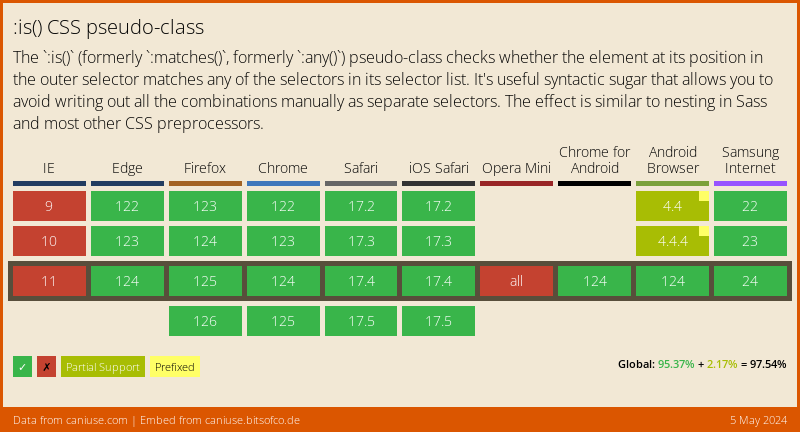
:is()selector may not compatible with some old browsers.vuetify-nuxt-moduleseems to produce other issues in my advanced setup… I don’t like how it does not support the default configuration options from vuetify. I have to adapt my working vuetify config so it works with this module. The good old problem of abstracting too much.Is there no better way to use SCSS variables and still have a good style loading with vuetify + nuxt? It really is the biggest paint point for me with vuetify.
Can’t imagine of any. They are just source files. But I can’t currently check the docs for any hints.
Edit (To be more concrete about downsides): Having no sourcemaps only affect the browsers devtools or more specific the developer using the sourcemaps (imo). They are usually disabled in production environment anyway. With sourcemaps enabled, the browser tells you where the styling come from. They are nothing more (afaik) than a roadmap. If I want to know where the yellow background of a button is set, I can pick the button with the devtool and the browser tells me the exact position (file and line number) where the styling come from. Without sourcemaps, the browser doesn’t know and I have to guess.
Before disabling sourcemaps you should think about how many custom styling you wrote or about to write. If you use an utility CSS Framework like vuetify itself or tailwind, you should write just a minimum of (scoped) scss. The most is covered with utility classes. So there is no real advantag in having sourcemaps. I can see no sense in knowing the file where vuetify/tailwind put the styling for an element. The buildingprocess of the app or the functionalities of nuxt or whatever libraries used there, shouldn’t be affected by the sourcemaps. I am 99% sure of it.
Please correct me if I am wrong.
Sourcemaps enabled:
Sourcemaps disabled:
I can also confirm this issue when running
npm run dev.I already had
in place before, so that’s present, but not fixing the issue.
I’m using this with nuxt3: https://next.vuetifyjs.com/en/features/treeshaking/#treeshaking
This is from my nuxt.config.ts:
Trying
as temporary workaround in tsconfig.json didn’t help either.
I’m having the same issue, my settings are like @BayBreezy showed. The project works fine, but I can’t remove the warnings
Same. Only with custom scss variables (nuxt and vite plugin)
@stephenjason89 No prob. Vuetify uses the important thing on most utility classes so yeah, that makes sense
@BayBreezy thank you for the link, however prefix didn’t do the trick for me. To increase the specificity I found that setting
important: '#__nuxt'in your tailwind config fixes it.I hope it helps anyone having the same issue.
@stephenjason89 You have to use a prefix with your tailwind classes. See more about setting it up in your TW config here: https://tailwindcss.com/docs/configuration#prefix
Anyone here integrated vuetify with tailwind? My vuetify tailwind config uses @paro-paro package.
In my project, Vuetify is incorporated, and I use vite-plugin-vuetify for treeshaking purposes.
I’ve turned off Vuetify’s CSS helpers and implemented Tailwind CSS.
Tailwind CSS functions perfectly except when used within a Vuetify component.
For instance, a Vuetify component like VCard is styled with
padding:0,Then, trying to apply a Tailwind class such as
p-10fails, as it gets overridden bypadding:0.Given that vite-plugin-vuetify creates separate CSS files for each Vuetify component, like ,
,
Specifying ‘injectPosition’ as ‘last’ doesn’t solve this issue.
Upon inspecting the DOM, I noticed that the Tailwind class is indeed applied but is negated by the existing
padding:0. Manually removingpadding:0enables the Tailwindp-10class to function as intended.I also have some weird issues with the community module, but I think the best course of action is to contribute to the community module. Especially since John mentioned in VueConf2023 that they are not planning on officially supporting Nuxt at the moment. Either that or parting from Vuetify… I’ve considered it with all these weird SSR errors
Hello Everyone, after taking lots of my hair off i finally went to this conversation and i can confirm that the plugin nuxt-vuetify-plugin https://vuetify-nuxt-module.netlify.app/guide/server-side-rendering.html#vuetify-sass-variable
work perfectly as long as you add the piece of code from @Talla2XLC in your nuxt.config.ts. I just tested it right now and i’m able to fully use Vuetify and change base SCSS color
Thanks everyone
Confirm,
vuetify-nuxt-moduleworks great. As I understand this issue rootcause was in experimental feature inlineSSRStyles which Nuxt uses as a defaultThank you @mostafaznv, I will give it a try.
@ricardoaat just switch to this package. it works perfectly and it instantly gets updates and bugfixes.
The only weakness of this package is how it treats sass variables (it’s somehow hacky)
Hi!
I’ve tried the latest version 3.3.23 with the following configuration inside nuxt.config.ts modules:
It works, and takes a bit longer to compile despite my settings.scss only has one font change. Still getting the warnings:
Vuetify: 3.3.15 Nuxt: 3.7.1
Problem still there, getting errors and warnings when using:
Importing the settings here works when using
@use 'vuetify' withinstead of vuetify/settings, but it increases the app start up to 20 seconds.I same problem in nuxt 3 project
@Talla2XLC thanks for the feedback, but I don’t think it belongs here and the thread is already long enough. Could you fill an issue in the project instead, please (and eventually edit your comment with the screenshot to link it?)
Thank you 😃
@marr , Just tried this module - it’s looks like there is no treeshaking functionality implemented for Vuetify components. Client load all Vuetify components including JS and styles even if I don’t use them in my project: https://github.com/vuetifyjs/vuetify-loader/assets/50024798/03fae70a-e684-454b-8b3b-b3c6b1e4d18e
@rudolfbyker , Unfortunately it will take too much time to get into this( It’s quite big framework with huge vuetifyCreating logic, that’s why I was hoping for the developer’s help. Temporary can be done by disabled style loading during components autoImport and then manually load all V-Elements styles sass flies using your custom variables but this is ugly approach
@Talla2XLC Would you care to make a PR against this repo or against Vuetify to fix it? It sounds like you know how.
The most absurd thing here is that the problem is quite insignificant. It consists in redefining some SASS variables in Vuetify and it is obvious that the ability to set custom variables should be at the Vuetify creation stage. But no, you have to use adapters like [vuetify-loader] for Vite server with all the resulting compilation problems…
@cyan-berg , Chic approach) But it is more logical for a developer to choose a stack of frameworks that are compatible with each other. Btw, no complaints about Nuxt, it is more fundamental than a CSS framework which can be replaced without significant problems
@KaelWD ,
Do I understand correctly that you are not going to do anything to solve this issue? Neither to contact the Nuxt team, nor to edit your code for correct compilation
I have no idea what that means.
Nuxt does, it works fine with just vite.
I already said idk how to fix it: https://github.com/vuetifyjs/vuetify-loader/issues/290#issuecomment-1441362118
scss or sass whatever it is, is shit, it’s just there for job security or something. It literally doesn’t save anyone time.
setting styles: true just uses the precompiled css and personality I think its the move app loads faster and is less confusing. this is my config, https://github.com/BrianPurgert/Personal-Website/blob/main/nuxt.config.ts
I’m looking through the Vite issues to find it XD @tabuz
@QozbroQqn I think the sourcemap solution it’s the key, I looked into it and in theory it doesn’t affect the results and removes the warnings. So thank you for pointing that out.
Your solution for what regard not including vuetify into the vite preprocessor works, as long as you don’t want to access the vuetify sass variables in components, if you want to do that you must include it as I did.
The increase in warmup time is normal and usual with vuetify, it happens also if you try to customize it in a plane vue application. I think it is also mentioned somewhere in the documentation.
Are there any downsides to disabling the sourcemap from the nuxt.config file? I am not sure how this sourcemap thing works.
For the devs: You probably know this already: the problem with the malformed url come from the ‘\0’ in the stylesPlugin.js. If you remove them, the 404 go away.
But that doesn’t fix the sourcemap warnings. To fix (hide) them you could add: sourcemap
(Your SCSS is also affected)
So my (nuxt 3.2.2) nuxt.config.ts (minimalistic) looks like this:
The difference to @Dinuz config is: I dont put the vuetify.scss in the vite preprocessorOptions because this would nuxt tell to load them in every component. This is only necessary, if you want use sass vars, mixins or functions inside vue.
My vuetify.scss contains just:
One thing still not clear to me: Customizing vuetify leads to an (in my case 15s) increased vite client warming up. Can somebody evaluate if this is normal?
I’m having a similar issue when configuring custom scss variables
I noticed this too… the
%EF%BF%BDis causing the issue with Nuxt 3. I am not sure how to go about replacing it in nuxt tho… I think that maybe if we created a hook, we could replace it before it gets processed? Just like the Nitro hook that I created to replace it before it hits the browser(The response hook - i think).I might have to ask Daniel which hook we can tap into to get this done… The documentation around the hooks are not so great at the moment 😦