vuetify: [Bug Report] VInput: outlined fieldset legend clipped when dynamically shown
Versions and Environment
Vuetify: 2.0.0-beta.1 Vue: 2.6.10 Browsers: Chrome 74.0.3729.131 OS: Linux x86_64
Steps to reproduce
-
Create an outlined
VTextField,VTextareaorVSelectwith a default value so that the fieldset legend is initially set/shown at the top. -
Place the previously created element in a wrapper with
display: none. -
Dynamically (through JavaScript) change the wrapper style to
display: block.
Expected Behavior
The fieldset legend will have a width in pixels corresponding to the fieldset legend text width. This makes the outlined border not “strike” the fieldset legend text.
Actual Behavior
The fieldset legend will have a width of 6px regardless after the wrapper style is dynamically changed, thus making it appear “clipped” with the outlined border.
Reproduction Link
About this issue
- Original URL
- State: closed
- Created 5 years ago
- Comments: 24 (7 by maintainers)
My workaround was inspired by this similar Material-UI issue, where one suggestion was to make the label border white.
Using this Stackoverflow answer as guidance, I have this scoped styling:
Beyond the suggestion that @jacekkarczmarczyk provided, you could also use a dynamic key to force re-rendering of the inputs. This will also retain the state of the inner items.
https://codepen.io/johnjleider/pen/rExOod
Otherwise, there is not much we can do.
If you have any additional questions, please reach out to us in our Discord community.
@danielchodusov looks like you just need some padding or margin between your tabs items and content. (not a text-field issue)
This is because of how we calculate the dimensions of the label - offsetWidth is 0 when it’s hidden. Probably could be done by creating a visible copy of the label, but that could be inefficient with a large amount of inputs, I’d say this is
won't fixand advise to usev-ifinstead of hiding the fields with csshi @jacekkarczmarczyk , this seems like a major issue affecting many people. Even with the v-app, it still does the same. I found a temp fix.
Add this to your styles css in the component.
.v-label.theme–light.error–text { left: 0 !important; } .v-label.v-label–active.theme–light { left: -27px !important; }
This issue affects outlined inputs in expansion panels & steppers For instance, this,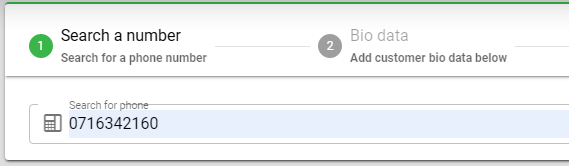
Changes to this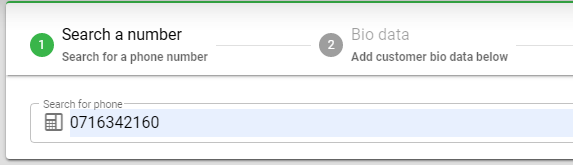
Note that there are some undesired results that seam related to this issue when introducing the
prepend-inner-iconattribute too: https://codepen.io/spencercap/pen/vYYbbqg