vue-router: useRouter() return undefined

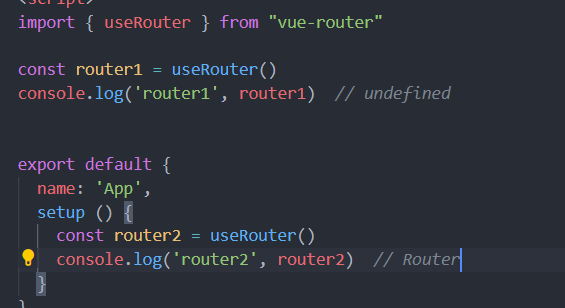
when i use useRouter break away vue hooks , it return undefined, but in the vue hooks, it return Router. so i dont know this reason, Please answer me how to use useRouter is normal js, because i want to use it in vuex image
About this issue

  • Original URL
  • State: closed
  • Created 4 years ago
  • Reactions: 2
  • Comments: 16

Most upvoted comments

useRouter must be called inside of setup() (documentation link)

But you can use composition api for extract logic of routing

<script>
import { useRouter } from "vue-router"

const useRouterCustom = () => {
  const router = useRouter();

  const goToRoot = () => {
    router.push('/')
  }
  return {
    goToRoot
  }
}

export default {
  name: 'App',
  setup() {
    const { goToRoot } = useRouterCustom();
  }
  
}
</script>

I hope it helps, good luck!

you can import you created router to use in any files,

For example:

//  src/router/index.ts 
exprot const router = createRouter({
...
})


//  orther files 
import { router } from '@/router/index'

or use window.location.href

useRouter() was returning undefined for me in my own composable, though. I’ll have to double-check the stack again to make sure it’s originating from a <script setup>.

If I only able to use it in setup script, how do I redirect route in axios interceptor file then?

Welp, this is what comes up on Google when you search the issue.

@chris-zhu Did you figure this out?

Hello, thank you for taking time filling this issue!

However, we kindly ask you to use our Issue Helper when creating new issues, in order to ensure every issue provides the necessary information for us to investigate. This explains why your issue has been automatically closed by me (your robot friend!).

I hope to see your helper-created issue very soon!

just got hit by this issue, sometimes useRouter() returned undefined.

Another option is to use a dynamic import:

// api.js
const req = async ({ method = 'POST', uri, payload }) => {
  const token = useUserStore().store.token
  const { router } = await import('./router') // export const router in a file called router.js near api.js
  const url = `${import.meta.env.VITE_API_URL}${uri}`
  const headers = {
    'Content-Type': 'application/json',
    Accept: 'application/json'
  }
  if (token) headers['Authorization'] = `Bearer ${token}`
  try {
    const result = await fetch(url, {
      body: JSON.stringify(payload),
      headers,
      method
    })
    if(result.status < 400)
      return result.json()
    else {
      throw result
    }
  } catch (e) {
    if(e.status === 401) {
      router.push('/auth')
    }
    throw new Error(`${e.status} - ${await e.text()}`)
  }
}

This is not the first time I have faced this problem, I think I have finally grown up to have the ability to solve it. The correct solution is to cache the call results during setup.

<template>
  <div @click="clickHandle">
  </div>
</template>
<script setup lang="ts">
import { useRouter } from 'vue-router';
let useRouterResult = useRouter();
let clickHandle = ()=>useRouterResult.go(-1)
</script>

You can try using the following code for inspiration

<script setup lang="ts">
import { useRouter } from 'vue-router';
console.log(useRouter(), 1);
setTimeout(() => console.log(useRouter(), 2), 3000);
let useRouterResult = useRouter();
setTimeout(() => console.log(useRouterResult, 3), 5000);
</script>

This behavior, which can only be called during setup initialization, is like a joke that will severely hit beginners. To be honest I think it’s best for the document to provide a detailed explanation of this situation, rather than being confusing https://router.vuejs.org/api/#useRoute:~:text=RouteLocationNormalizedLoaded-,useRouter,Router,-FREE WEEKEND

Examples of mistakes that many people make

<template>
  <div @click="clickHandle">
  </div>
</template>
<script setup lang="ts">
import { useRouter } from 'vue-router';
let clickHandle = ()=>useRouter().go(-1)
</script>

useRouter() was returning undefined for me in my own composable, though. I’ll have to double-check the stack again to make sure it’s originating from a <script setup>.

Sorry. Do you have any solutions on that?

Add useRouter change onMounted to async add await router.isReady() before setting parameters


<script lang="ts" setup>
import {onMounted, ref, Ref} from 'vue'
import {useRoute, useRouter} from 'vue-router'

const route = useRoute()
const router = useRouter()
let companyId: Ref<string | string[]> = ref([])
onMounted(async () => {
    console.log('Before Router Preparation', route.name);
    await router.isReady();
    console.log('After Router Preparation', route.name);
    companyId.value = route.params.id
})
</script>

What if I have a composable that needs to reference another composable? E.g. my composable needs to use useRouter to grab the route? I suppose I have to use dependency injection?

<script setup lang="ts">
import { useRouter } from 'vue-router';
import { useLogin } from '../composables/login';

const router = useRouter();
const { attemptLogin } = useLogin(router);