vue-cli: Typescript: IDE reports TS2307: Cannot find module error for Vue components imports
Version
3.0.0-beta.9
Reproduction link
Steps to reproduce
- Install Vue with vue-cli,
- Choose Typescript support
- Open any file that imports *.vue files
What is expected?
No errors are reported
What is actually happening?
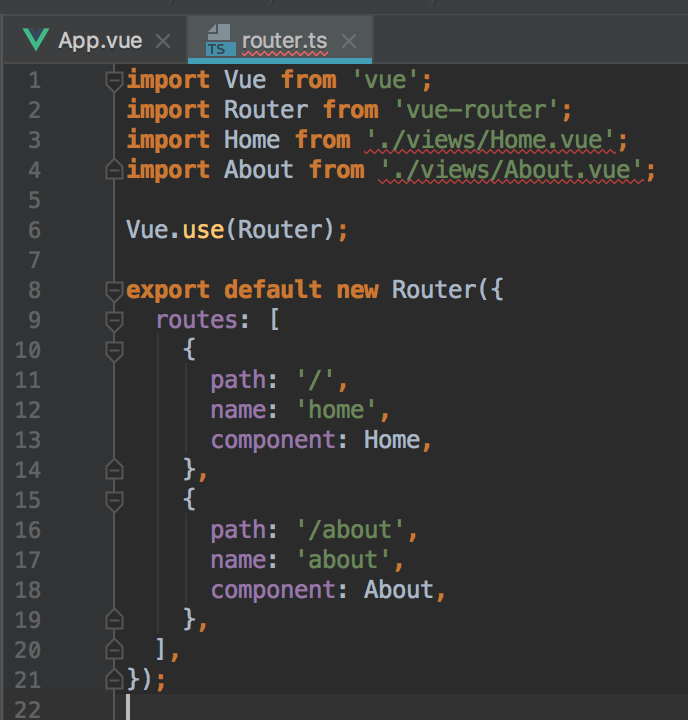
IDE reports TS2307: Cannot find module error for Vue components imports. Imports are higlighted in red.
I’ve already reported this error here: https://github.com/vuejs/vue-class-component/issues/219 because I thought that it is a vue-class-component issue, but it’s not. It’s a configuration issue.
Putting the following vue-shim.d.ts declaration file under my ./src directory solves the problem:
declare module "*.vue" {
    import Vue from "vue";
    export default Vue;
}
About this issue
- Original URL
- State: closed
- Created 6 years ago
- Reactions: 50
- Comments: 41 (2 by maintainers)
Commits related to this issue
- main.tsで`import App from '@/App.vue`がエラーになるのを修正 https://github.com/vuejs/vue-cli/issues/1198#issuecomment-1139752067 — committed to xmitoux/nai-utils by xmitoux 5 months ago
Creating file
vue-shim.d.tsinsrcsolved the problem in my caseSorry to resurrect, but this still pops up.
I’ve actually put a // @ts-ignore on it, and it’s compiling fine…
This is happening when the
.vuefile extension is emitted from the import statement (i.e.import MyComponent from '@/components/MyComponent'instead ofimport MyComponent from '@/components/MyComponent.vue'). Haven’t figured out how to make it work without the file extension.ts-loader has special handling for Vue file which doesn’t affect IDE.
The workaround is to split
declare moduleanddeclare globalinto two separate files.The first
declare moduleis called ambient module, which is used to describe modules written in JavaScript. The seconddeclare globalis called (external) module, which is a TypeScript specific module system designed before ES-module. Global types likeArrayandJSX.Elementresides in this module type.And finally it seems that TS cannot mix up two modules, sadly. The compiler thinks one file has one single module type. So the error occurs.
Even though I don’t know the reason, but this error may be caused by the new version of
shims.d.ts. The new version is below:However, just change it to the old version (like beta-6.0)
You can resolve the modules
Still an issue it seems!
I added the following into
index.d.tsin project root, works for now.I also have this issue. Using Vue 2.6.10.
Bonus: Make sure you include the
*.d.tsfiles in your tsconfig.jsonI solved this issue by adding additional declarations in shim-vue.d.ts file (all my vue files are into spa/page and spa/components directories expect for App.vue):
This is because TypeScript does not resolve webpack aliases automatically.
For TS to resolve aliases, they should be added in tsconfig.json under compilerOptions.paths:
{ "compilerOptions": { "paths": { "@/*": [ "./*" ] } } }credit: https://stackoverflow.com/questions/54839057/vscode-showing-cannot-find-module-ts-error-for-vue-import-while-compiling-doe
I restarted webstorem and this problem was solved. But I don’t know why
declare module “*.vue” { import type { DefineComponent } from ‘vue’ const component: DefineComponent<{}, {}, any> export default component }
@medeman I am not using cli. Adding shim-vue.d.ts to the project & .vue extension to path of importing file not solved this problem for me =( and setup vue-ts-plugin is not helped too =( I am not limited to VS Code, but checking this error on console with tsc & eslint commands.
I also encountered the same problem, have you solved it?
I was having this issue only in WebStorm and not in VSCode. It was not happening with the
buildnorservecommands either. I will leave my “solution” here in case anyone is in my boat and finds this thread, but this does not need to be addressed.Note: I did not implement any of the above-mentioned declaration stubs. Doing so actually broke the
servecommand. With my version of vue-cli, it appears as though similar stubs are already declared in the 2 above-mentioned declaration files.vue-cli v3.4.1 WebStorm 2019.2.3
This is weird because the build actually works fine, it’s only the IDEs complaining.
/cc @ktsn @HerringtonDarkholme any idea why importing Vue at the root level in
shims.d.tsbreaks the*.vueimports?In webstorm,the following worked for me. Uncheck the vuejs and vite plugins temporarily and then re-enable them. Restart the IDE afterwards.
It helped me that I created another additional file with a different name: 'vue-shims.d.ts ’ and also wrote in it:
Is there a reason not to use this in the index.d.ts instead?
IIRC, Vue Single-File-Components export
Vue.Componentobjects, not specificallyVueConstructor(the type of Vue fromimport Vue from 'vue').ReturnType<typeof defineComponent>resolves toany.(see https://github.com/vuejs/core/blob/v3.3.9/packages/runtime-core/src/apiDefineComponent.ts)
For me installing TypeScript Vue Plugin (Volar) for vscode fixed to resolve .vue files for ts.
For me this was the real issue.
Every time I create a Vue-ts project I use this types helper. I hope this type config helps c:
@Danielg212 thank u. resolve in my
webstormWhen I have a
shim fileand still report an error in myvite projecttsconfig.jsonresolve