turbo: Prune command crashing on Windows & M1/M2
What version of Turborepo are you using?
1.1.2 & latest
What package manager are you using / does the bug impact?
Yarn v1
What operating system are you using?
Windows
Describe the Bug
I have a turborepo project, with sub-projects inside the packages folder. In the main root folder I have turbo.json file configured with pipelines to build each sub-project and their dependencies. Quick note, the project has been set-up from scratch following the https://turborepo.org/docs/getting-started
The problem is that the docker containers get build and work flawlessly on a Linux machine, but when trying to do that on either Windows (WSL2 on both 10 and 11) or Mac M1/M2 it fails.
Something I tried to do was to manually fix the problems by adding all the required files in to each package at cost of turning each one of them into the root project and it still failed. So the steps I did are the following:
- Normal build process (based on the one working on Linux):
=> ERROR [pruner 3/3] RUN turbo prune --scope=@mycoolproject/pack6 --docker                                0.6s
------
 > [pruner 3/3] RUN turbo prune --scope=@mycoolproject/pack6 --docker:
#9 0.620  ERROR  could not construct graph: Could not find turbo.json. Follow directions at https://turborepo.org/docs/getting-started to create one
------
executor failed running [/bin/sh -c turbo prune --scope=${SCOPE} --docker]: exit code: 1
- After manually putting turbo.json from monorepo’s root to sub-package:
=> ERROR [pruner 3/3] RUN turbo prune --scope=@mycoolproject/pack6 --docker                                0.7s
------
 > [pruner 3/3] RUN turbo prune --scope=@mycoolproject/pack6 --docker:
#9 0.459 2022/07/19 15:35:08 [WARNING] Did not find "packageManager" in your package.json. Please run "npx @turbo/codemod add-package-manager"
#9 0.600 2022/07/19 15:35:09 [WARNING] Did not find "packageManager" in your package.json. Please set the "packageManager" field to your package.json
#9 0.714 2022/07/19 15:35:09 [WARNING] Did not find "packageManager" in your package.json. Please run "npx @turbo/codemod add-package-manager"
#9 0.714 2022/07/19 15:35:09 [WARNING] Did not find "packageManager" in your package.json. Please run "npx @turbo/codemod add-package-manager"
#9 0.714  ERROR  could not construct graph: could not determine package manager. Please set the "packageManager" property in your root package.json (https://nodejs.org/api/packages.html#packagemanager) or run `npx @turbo/codemod add-package-manager` in the root of your monorepo.
------
executor failed running [/bin/sh -c turbo prune --scope=${SCOPE} --docker]: exit code: 1
- After adding the “packageManager” option into the package.json:
=> ERROR [pruner 3/3] RUN turbo prune --scope=@mycoolproject/pack6 --docker                                0.6s
------
 > [pruner 3/3] RUN turbo prune --scope=@mycoolproject/pack6 --docker:
#9 0.584  ERROR  could not construct graph: yarn.lock: failed to hash lockfile: open yarn.lock: no such file or directory
------
executor failed running [/bin/sh -c turbo prune --scope=${SCOPE} --docker]: exit code: 1
- After adding the yarn.lock file from monorepo’s root to sub-package:
 => ERROR [pruner 3/3] RUN turbo prune --scope=@mycoolproject/pack6 --docker                                0.8s
------
 > [pruner 3/3] RUN turbo prune --scope=@mycoolproject/pack6 --docker:
#9 0.676  ERROR  could not construct graph: could not detect workspaces: package.json: no workspaces found. Turborepo requires Yarn workspaces to be defined in the root package.json
------
executor failed running [/bin/sh -c turbo prune --scope=${SCOPE} --docker]: exit code: 1
- After adding the workspaces from monorepo root’s package.json:
=> ERROR [pruner 3/3] RUN turbo prune --scope=@mycoolproject/pack6 --docker                                1.4s
------
 > [pruner 3/3] RUN turbo prune --scope=@mycoolproject/pack6 --docker:
#9 1.152 panic: runtime error: invalid memory address or nil pointer dereference
#9 1.152 [signal SIGSEGV: segmentation violation code=0x1 addr=0x0 pc=0x7d4121]
#9 1.152
#9 1.152 goroutine 1 [running]:
#9 1.152 turbo/internal/prune.(*PruneCommand).Run(0xc000059850, {0xc00001e0a0, 0x2, 0x2})
#9 1.152        turbo/internal/prune/prune.go:110 +0x3a1
#9 1.153 github.com/mitchellh/cli.(*CLI).Run(0xc00012b900)
#9 1.153        github.com/mitchellh/cli@v1.1.2/cli.go:262 +0x5f8
#9 1.153 main.main.func7({0x0, 0x8d6360}, {0xc00001e090, 0x819510, 0x3}, {0x0, 0xc00000e020}, {0x0, 0x0}, 0xc00012b900, ...)
#9 1.153        turbo/cmd/turbo/main.go:154 +0x385
#9 1.153 main.main()
#9 1.153        turbo/cmd/turbo/main.go:159 +0x9e9
------
executor failed running [/bin/sh -c turbo prune --scope=${SCOPE} --docker]: exit code: 2
If you manage to successfully build 'em all then most of the containers crash because they won’t find the turbo module even if it gets globally installed during container’s initial build phase, and they’ll report the following message:
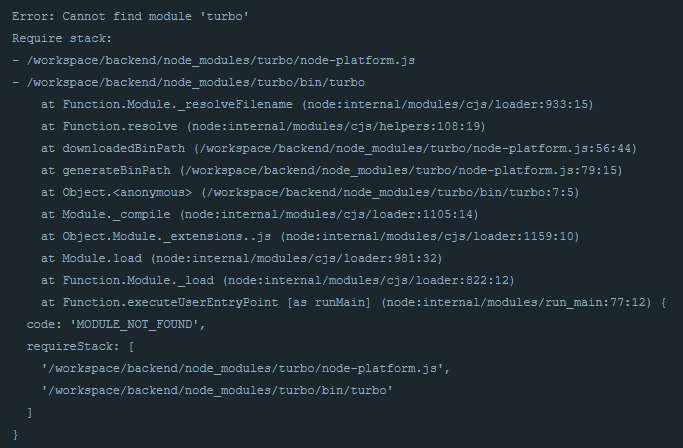
Furthermore, the build on a Linux machine works with both v1.1.2 which is the one we currently use to run it and the latest one.
Expected Behavior
A full-fledged running build is expected to be made with each docker container to be running flawlessly (which happens on a Linux machine).
To Reproduce
One of the Docker files the project is using to build the packages:

About this issue
- Original URL
- State: closed
- Created 2 years ago
- Reactions: 15
- Comments: 16 (3 by maintainers)
Any update on this one?
@DanielRaj1610 am running into the same issue as you on my CI build but am not sure what the fix is. did you manage to fix it? Also my prune command is similar to the vercel example here with the
--dockerflag.@DmitriyStadnik there is no Dockerfile on my main repo root dir, each Dockerfile is in its respective project root under the
appsdirectory. Perhaps what did you mean?Closing this issue as it has become a dumping ground for various Docker related issues and a lot has changed since it was opened.
If you encounter an issue similar to ones described in this issue with
1.12.3or higher, then please open a new issue. If you can provide a reproduction, then it will greatly help our ability to help as these issues are usually configuration related.For anyone who faces the same problem: your Dockerfile should not be located in the root of your project 😃
Facing a similar issue while running prune command
RUN turbo prune --scope=dashboard