next.js: with-turbopack occasionally throws "Error during SSR rendering - timed out waiting for the Node.js process to connect" when navigating pages
Verify canary release
- I verified that the issue exists in the latest Next.js canary release
Provide environment information
Using Windows 10 with WSL2:
    Operating System:
      Platform: linux
      Arch: x64
      Version: #1 SMP Fri Apr 2 22:23:49 UTC 2021
    Binaries:
      Node: 16.17.1
      npm: 8.15.0
      Yarn: N/A
      pnpm: 7.14.0
    Relevant packages:
      next: 13.0.0
      eslint-config-next: 13.0.0
      react: 18.2.0
      react-dom: 18.2.0
Which example does this report relate to?
with-turbopack
What browser are you using? (if relevant)
Firefox 107.0b4
How are you deploying your application? (if relevant)
No response
Describe the Bug
The new with-turbopack example occasionally throws during dev:
error - [rendering] [root of the dev server]/[CURRENT ROUTE TRYING TO RENDER]
  Error during SSR Rendering
  timed out waiting for the Node.js process to connect
Most of the time the page does end up rendering successfully and an event - updated in _xxx_ms gets logged, but on some occasions it throws the above error in the console while still rendering the page. I can still navigate to other pages, but the console stops logging events. This can happen on all pages when I navigate to them.
Sometimes the error blocks the entire page from rendering by throwing an error in the browser, although this only occurred twice:

I cannot figure out a pattern that causes this error, the pages load fine most of the time but occasionally throw this error unexpectedly.
Expected Behavior
On navigating, a page should render without errors, echoing an event to the console with the amount of time it took to update.
To Reproduce
- Create a new project using the example.
pnpm create next-app --ts --example with-turbopack
- Run the dev command (
--turbois included in thedevscript by default in this example.)
pnpm run dev
- Go to http://localhost:3000 in the browser and click the links in the sidebar to navigate to different pages. 3.a. Pay attention to the console as the error might be thrown even though the page rendered.
- After some successful navigation events this error might be thrown (multiple times if you continue navigating):
 4.a On some occasions the error can be thrown in the browser as well, preventing the page from rendering.
About this issue
- Original URL
- State: closed
- Created 2 years ago
- Reactions: 19
- Comments: 38 (3 by maintainers)
16.18.0 worked for windows! Does not work with M1 MAC
I used Node 16 and it worked!
npm install -g nnSwitching from node14 to node16 fixed this for me.
using nvm
nvm use 16I experienced the same error when trying to add a ‘react-hook-form’. It seems to have an issue with the addition of <input {…register(‘name’, {required:true})} … />
Versions:
After disabling turbo and running the project it showed where the error was so it was easier to debug. Then, reactivated --turbo and everything is running fine. It seems to have issues giving clear descriptions of the errors it’s experiencing. My situation just needed “use client” at the top of the file.
I was receiving this timeout warning when I was running app with
next dev --turbo. I also tried it without--turboflag and I received different error in console, which was a lot more specific.With

--turbo: nothing in console just500Without
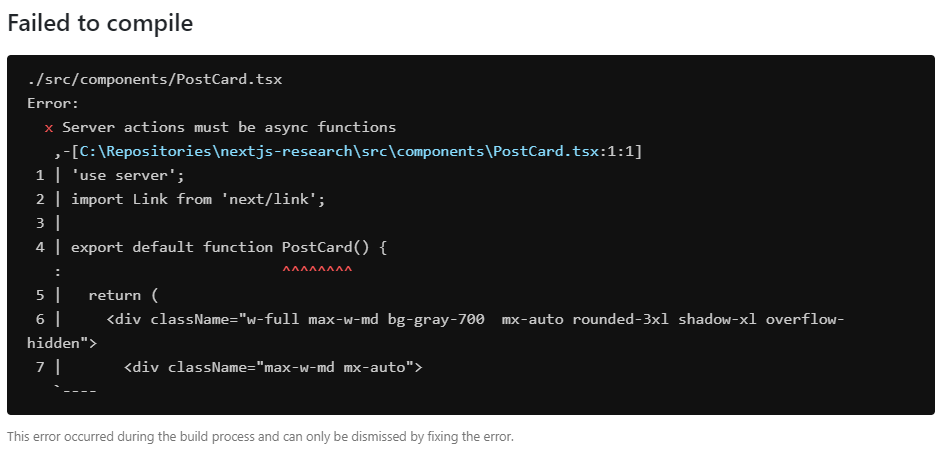
--turbo:As you can see without using turbo the errors are descriptive and points to where the error is. Looks like turbo somehow is missing what caused the error and just throws error. If you have problem with app while using turbo try also running your app without it to see if it also produces any errors.
M1 Macbook Air same issue
same error for me on node
16.13.0and18.12.0on M2 chip. Nextjs version:13.0.2, Nextjs13.0.0works fine.The same issue. v14, v16, v16.18.0 - are not working.
Turbopack failed to compileerror - [rendering] [root of the dev server]/ Error during SSR Rendering timed out waiting for the Node.js process to connectPS: SoC M1