hyper: Setting bell to false doesn't prevent sounds on Window 10
- OS version and name: Windows 10 Pro
- Hyper.app version: 1.2.1 or 1.3.1
- Link of a Gist with the contents of your .hyper.js: Basically the default but with
bell: false. - The issue is reproducible in vanilla Hyper.app:
Is Vanilla.
Issue
Setting the bell attribute to false in my .hyper.js does not prevent the terminal from producing sounds whenever I tab-complete or do other actions.
About this issue
- Original URL
- State: closed
- Created 7 years ago
- Reactions: 55
- Comments: 41
Apparently zsh needs this
unsetopt beep(though I’ve not tested it, I’m using bash on windows, and theset bell-style noneworked for me). (source)What I finally found that worked for me is creating
~/.inputrcin WSL bash and settingset bell-style none.On a OS X I cheated. I just went to
System Preferences -> Notifications -> Hyper -> Play sound for notificationsand disabled the checkbox.
I’m on Windows 10 as well, using the Linux subsystem with Ubuntu, and I’ve found that the issue is with bash itself, not Hyper. As @pheuter said, you just have to do
vi ~/.inputrcand typeset bell-style noneand save, then reload Hyper. For the notification sounds, I just went into the “Notifications & actions settings” and turned off the sounds for Hyper.I’m using Zsh via Bash on Windows (WSL) - the solution by @remy fixed the beeps on the shell, but for vim I also had to add
set visualbellto ~/.vimrc.This. Is. Driving. Me. Insane. 🙉 Have always had this problem though. Windows 10 user.
same on macOS 10.12.3
Same on macOs 10.12.3
Found a hacky solution for the moment. Set the bellSoundUrl parameter to a directory and it will play no sound
Just turning off notifications for Hyper (in Window’s “Notifications & actions” settings) stops the bell (and the notification).
I gotta say as feedback this is an awesome terminal for windows, combined with bash for windows 10 it really provides that awesome terminal experience for windows that I get from linux and osx, absolute god send and believe me I spent countless hours fudging with the other emulators to get a good experience, the best I found being cmdr other than this but it and the others all have show stopping issues. I found this terminal purely by chance reading an issue about powerline fonts, its a shame I didn’t come across it earlier, I guess it doesn’t get a lot of press as yet but it should!
On Windows 10, I went to Notifications and actions settings, and then just turned off notifications from Hyper and it worked.
I’ve also got a hacky solution (if you want to turn it off) for Windows. Just mute it in the Volume Mixer. Hyper was showing up as ‘Console Window Host’ there.
On Windows 10 the bell is the “Critical Stop” sound, so change that and you’ll change the bell.
If you’re thinking about setting it to silent, I’ve got bad news for you. At least on my machine doing that instead caused a booop sound to be played, and I couldn’t find a way to silence that.
My solution: Set Critical Stop to a softer sound. I settled on ding.wav, which is in the list of default Windows sounds (as has been since Windows 95, I think).
Another solution: Try setting Critical Stop to a silent wav file.
It’s a sad work-around, but I hope it brings relief to some of you.
@pheuter are you using
bashorzsh? Cause I’m usingzsh, and that does not seems to fix for me.All I did was mute bash app on windows volume mixer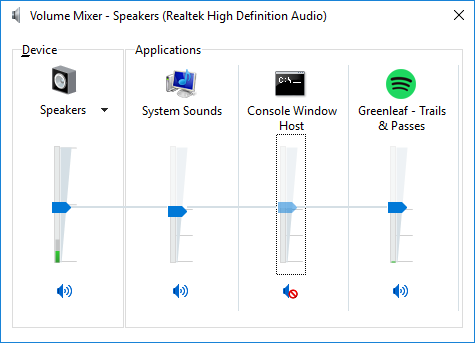
I had this problem with powershell. I use psreadline and was able to disable the bell with
Set-PSReadlineOption -BellStyle NoneI’m sure this was also happening using windows 10’s built in terminal app, but switching to hyper made me notice it again.
I use Hyper on Windows with WSL. The workaround with
~/.inputrcstated by @pheuter worked in that case, but when I ssh to a remote host, it still bells.Turning the sound notification off for this app did not help in that case.
The two other workarounds works. Either use a softer or even a silent wav in the Critical Stop sound setting, or in my case, muting the Hyper Console Window Host application in the Volume Mixer.
just wanted to say thanks @jasperandrew this worked 💯
@remy Your solution did it for me with zsh / oh-my-zsh. I just added
unsetopt beepto my.zshrc. Thanks a lot!!