ngx-bootstrap: [Datepicker]Can't bind to 'bsValue' since it isn't a known property of 'input'.
when i use datepicker, i have this error import { BrowserModule } from ‘@angular/platform-browser’; import { NgModule } from ‘@angular/core’;
import { AppComponent } from ‘./app.component’; import {NavbarComponent} from ‘./navbar/navbar.component’; import {DatepickerModule} from “ngx-bootstrap”; import {FormsModule} from “@angular/forms”;
@NgModule({ declarations: [ AppComponent, NavbarComponent ], imports: [ BrowserModule, DatepickerModule.forRoot(), FormsModule ], providers: [], bootstrap: [AppComponent] }) export class AppModule { }
<input type=“text” value=“{{ bsValue | date:‘yMd’}}” bsDatepicker `[(bsValue)]=“bsValue”>]
public bsValue: any ;
About this issue
- Original URL
- State: closed
- Created 7 years ago
- Reactions: 2
- Comments: 18 (5 by maintainers)
I have this on .angular-cli.json
I will add this to FAQ one day 90% issue like this:
@Hesesses @BluesPeter thannnks so much 💃 the path “…/node_modules/ngx-bootstrap/datepicker/bs-datepicker.css” worked for me
when i include BsDatepickerModule, the datepicker shows,but it has none css,like this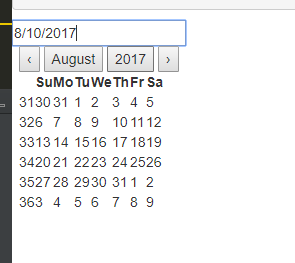 how can i include the bs-datepicker.css
Pay attention to docs, you need to import BsDatepickerModule.forRoot()
@BluesPeter how did you include the bs-datepicker.css ?? I’m having the same problem
http://valor-software.com/ngx-bootstrap/#/datepicker#examples
BsDatepickerModule is activily developed but you can use it already?